

Journey introduction
A Journey helps you automate follow-up for contacts who meet conditions that you configure. When a contact enters a Journey, the steps in your flow determine what happens next.What you can automate
Use a Journey to organize a follow-up flow that can:- Send a template message.
- Wait before the next action.
- Check whether a contact has read or replied to a template message.
- Add tags to contacts who reach a step.
- Route contacts to different follow-up paths based on the rules in your flow.
How a Journey works
- A Trigger starts the Journey when a contact matches the entry conditions.
- The steps you configure determine the follow-up actions and timing.
- You can add a Goal to track completion and an Exit rule to remove contacts from remaining follow-up when they meet your exit conditions.
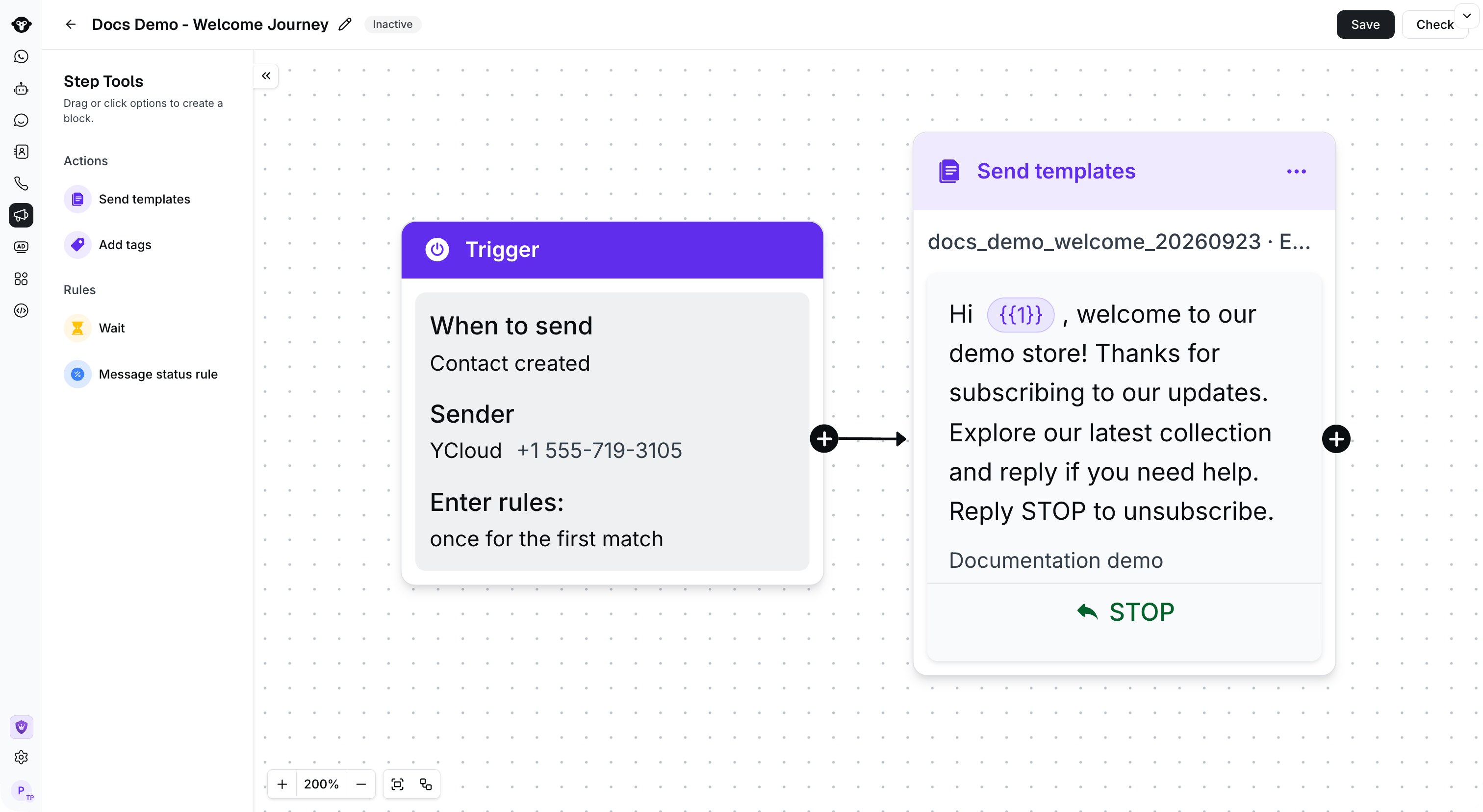
A Journey connects its Trigger to follow-up steps. This demo remains inactive.
Before you start
Before you build a Journey, decide:- Which contacts should enter the flow.
- Which Sender and template message you plan to use.
- What follow-up should happen after a message is sent.
- What should count as completion or when a contact should leave the flow.
Track completion and stop follow-up
Use a Goal to track completion. Use an Exit rule to remove contacts from remaining follow-up when they meet the exit conditions that you configure.
Configure a Goal to track completion and an Exit rule to stop follow-up. This example is an unsaved configuration.