Use CTWA Analysis to review Click to WhatsApp ad performance, conversations, and reported results. Start in YCloud, then check the corresponding advertising platform when you need platform-level data.
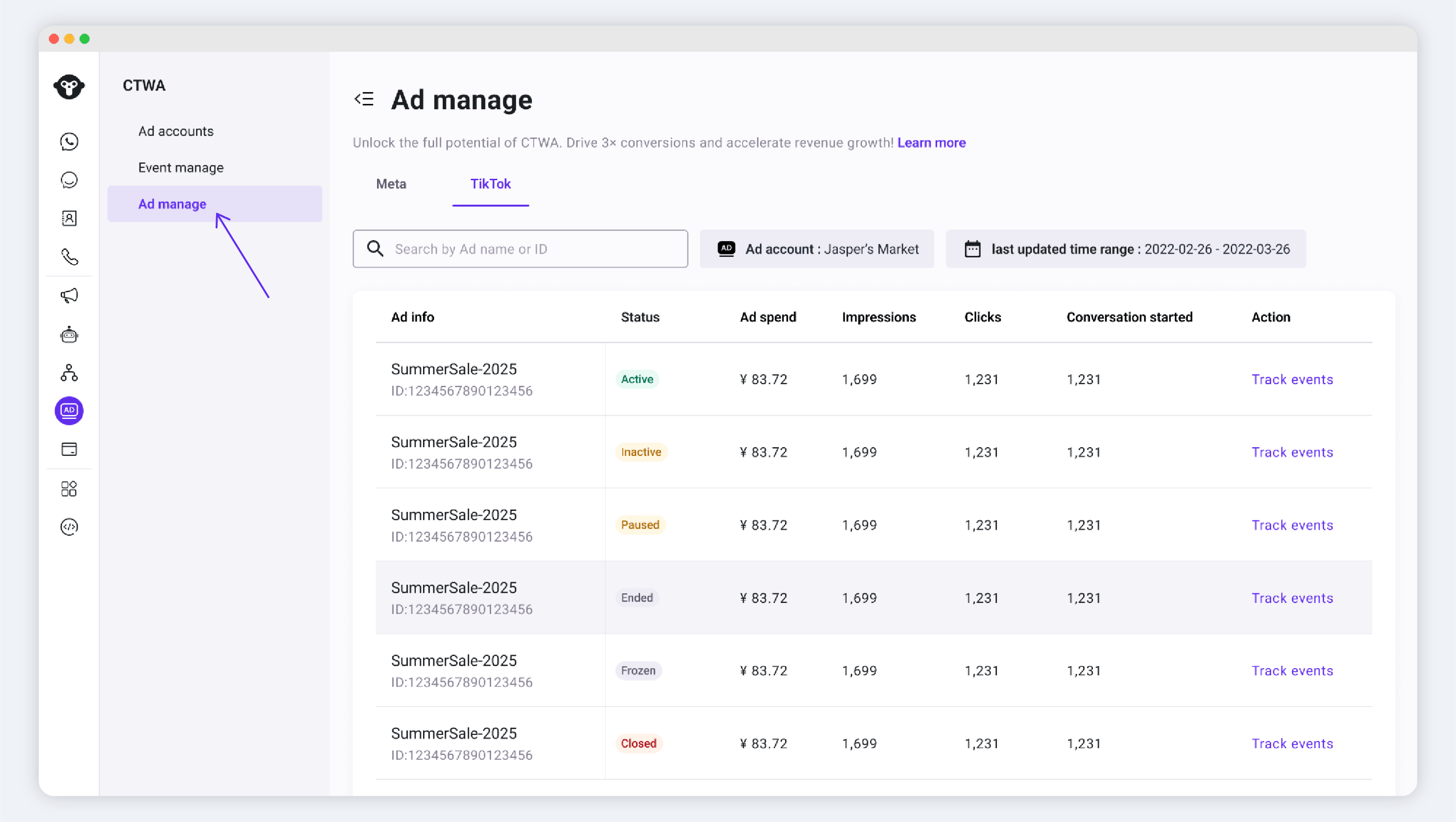
In YCloud, go to CTWA > Ad Manage and select the connected ad account that you want to review. You can view one ad account at a time.A customer must click the ad and send a WhatsApp message before the resulting conversation can appear in YCloud.
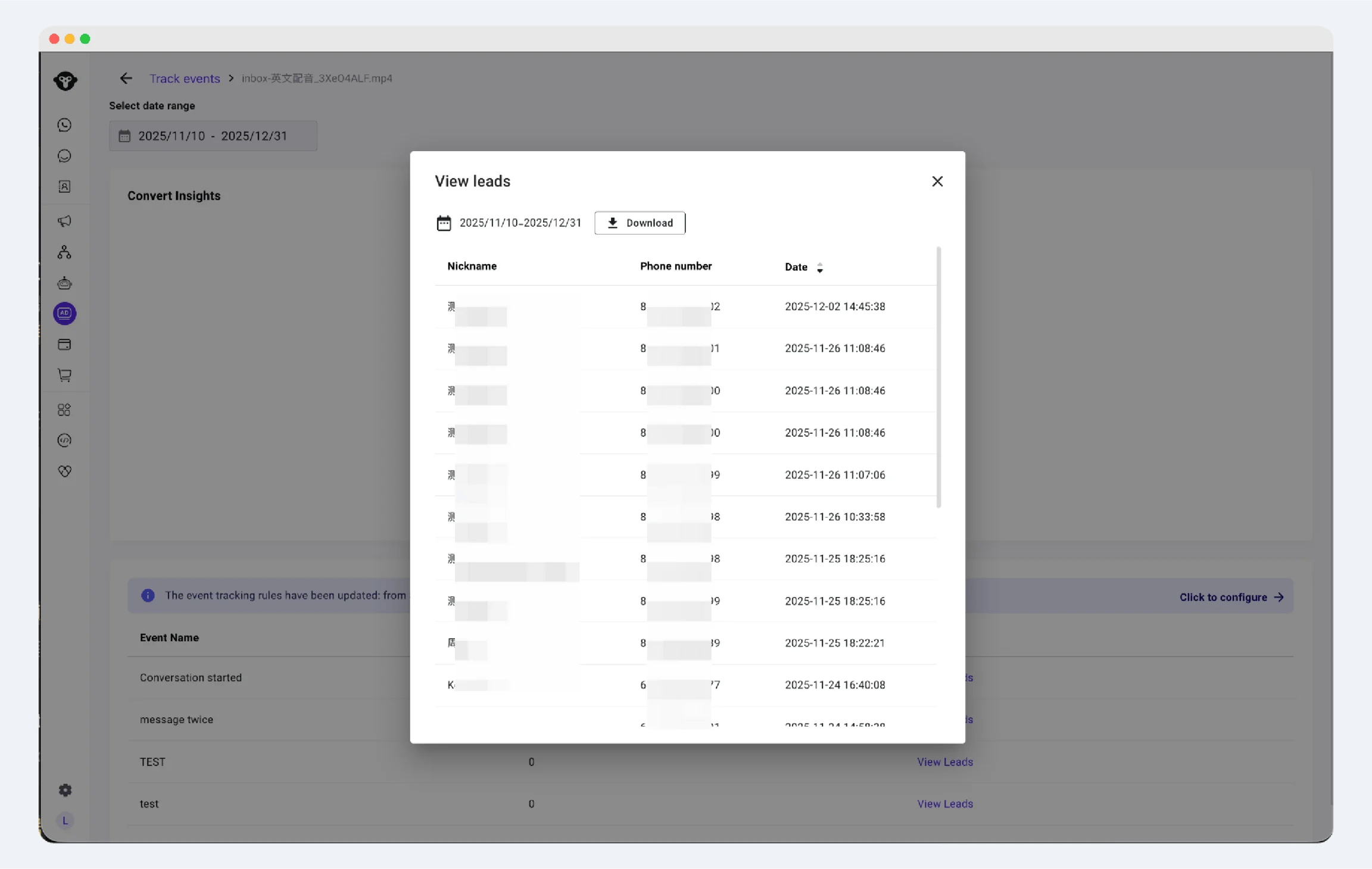
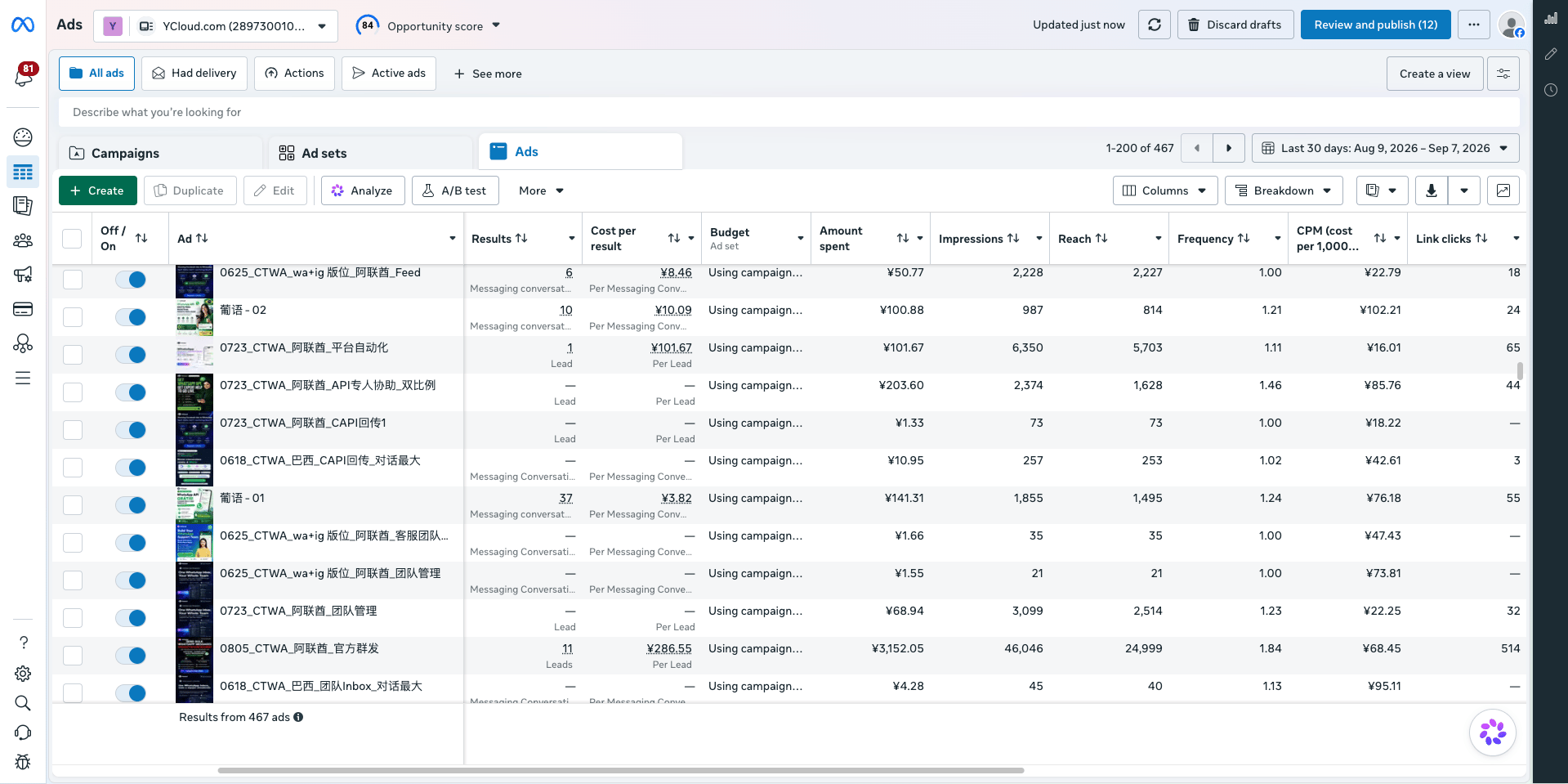
For a Meta ad account, review data such as spend, impressions, clicks, and conversations started. Select an ad to open View Leads or Track Events for the event details associated with that ad.If available for the selected event, use View Leads to review and export the recorded lead details.To report qualified Lead or Purchase results to Meta, see Report CTWA Ad Results to Meta.
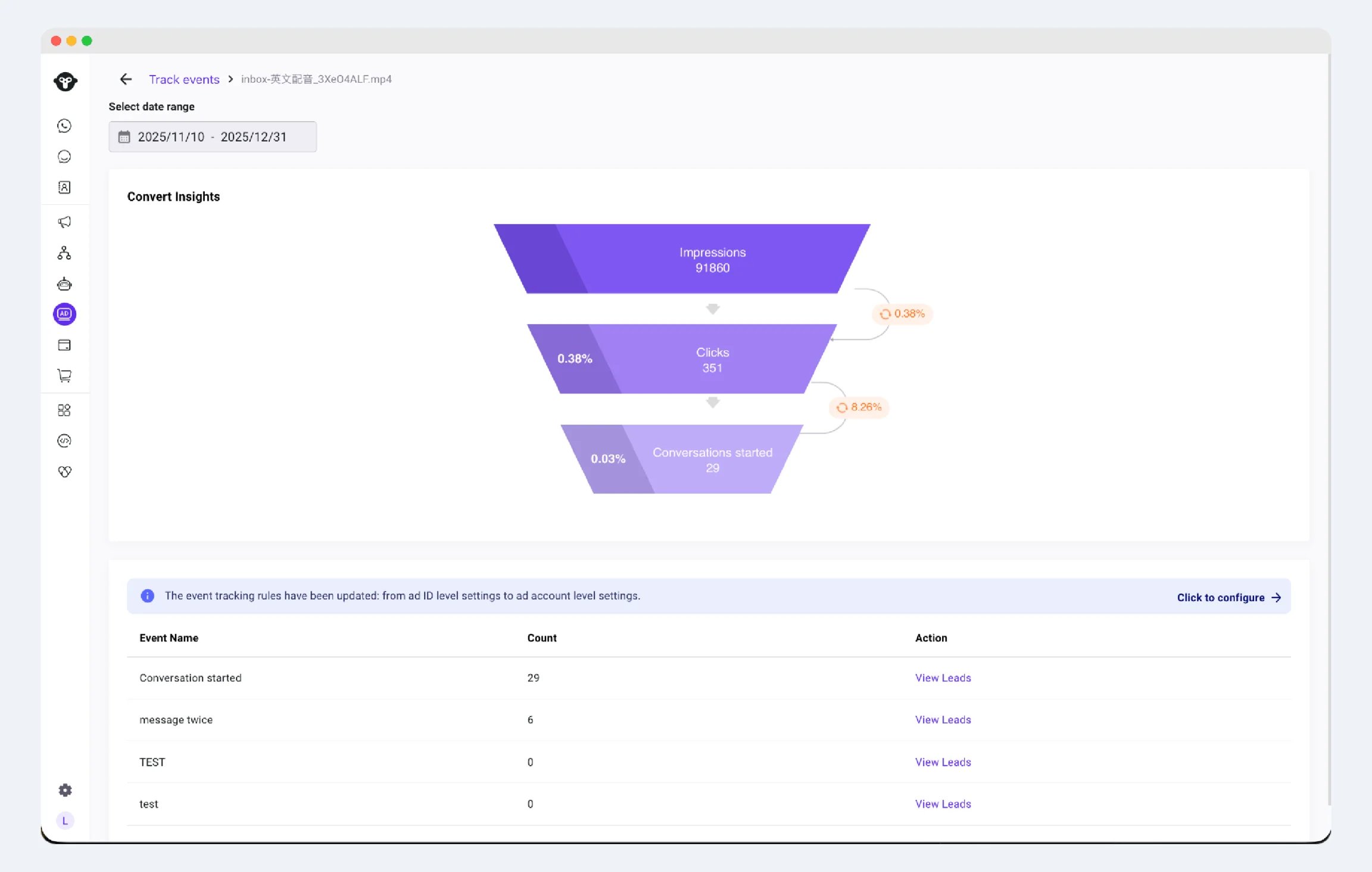
For a TikTok ad account, select the account in CTWA > Ad Manage to review its data in YCloud. Open Track Events or View Leads for an ad when you need more detailed event records or lead data.
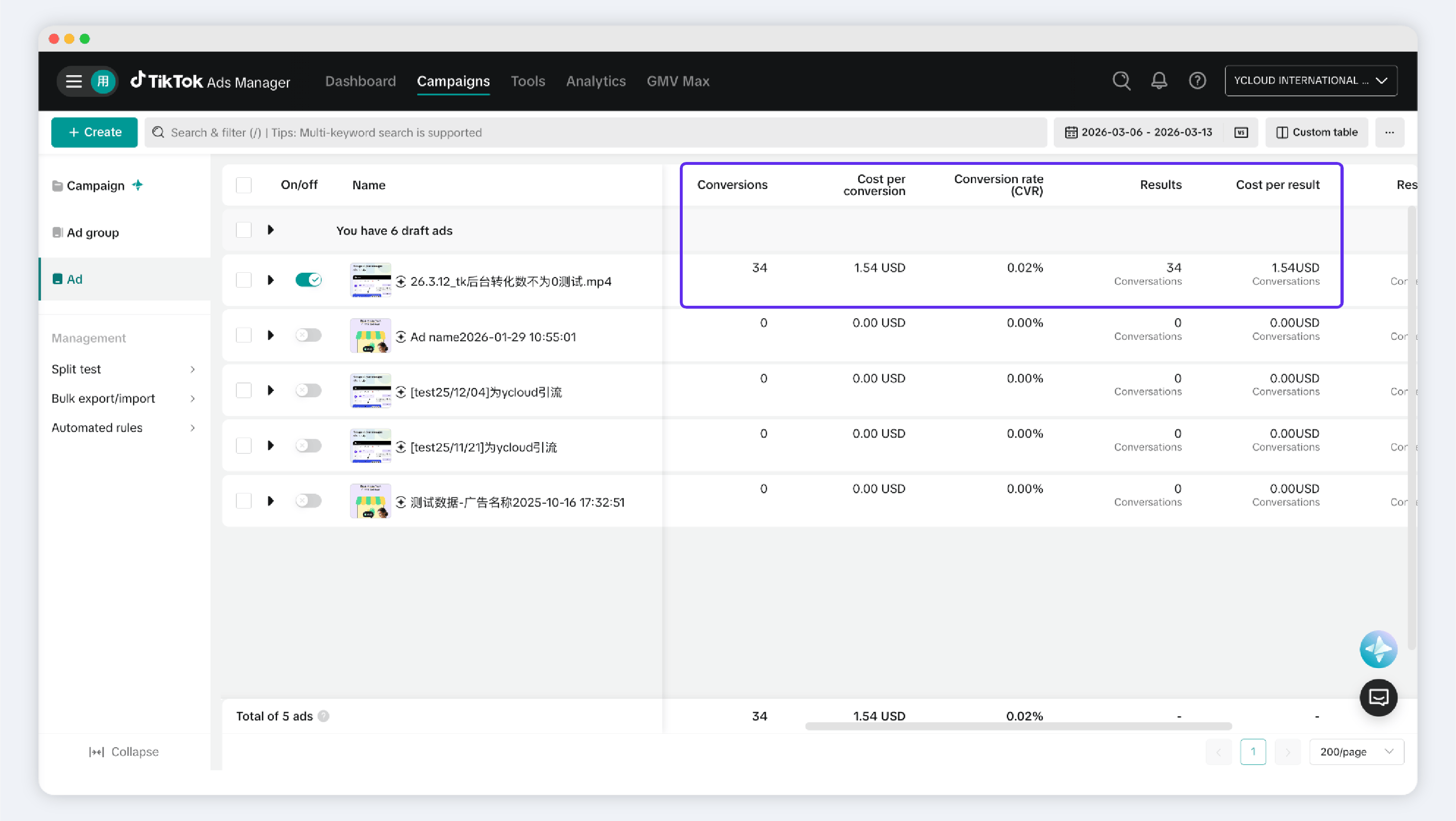
In TikTok Ads Manager, open the relevant campaign, ad group, or ad to review platform-level delivery data, such as spend, impressions, clicks, and conversations.
TikTok messaging ad performance in TikTok Ads Manager
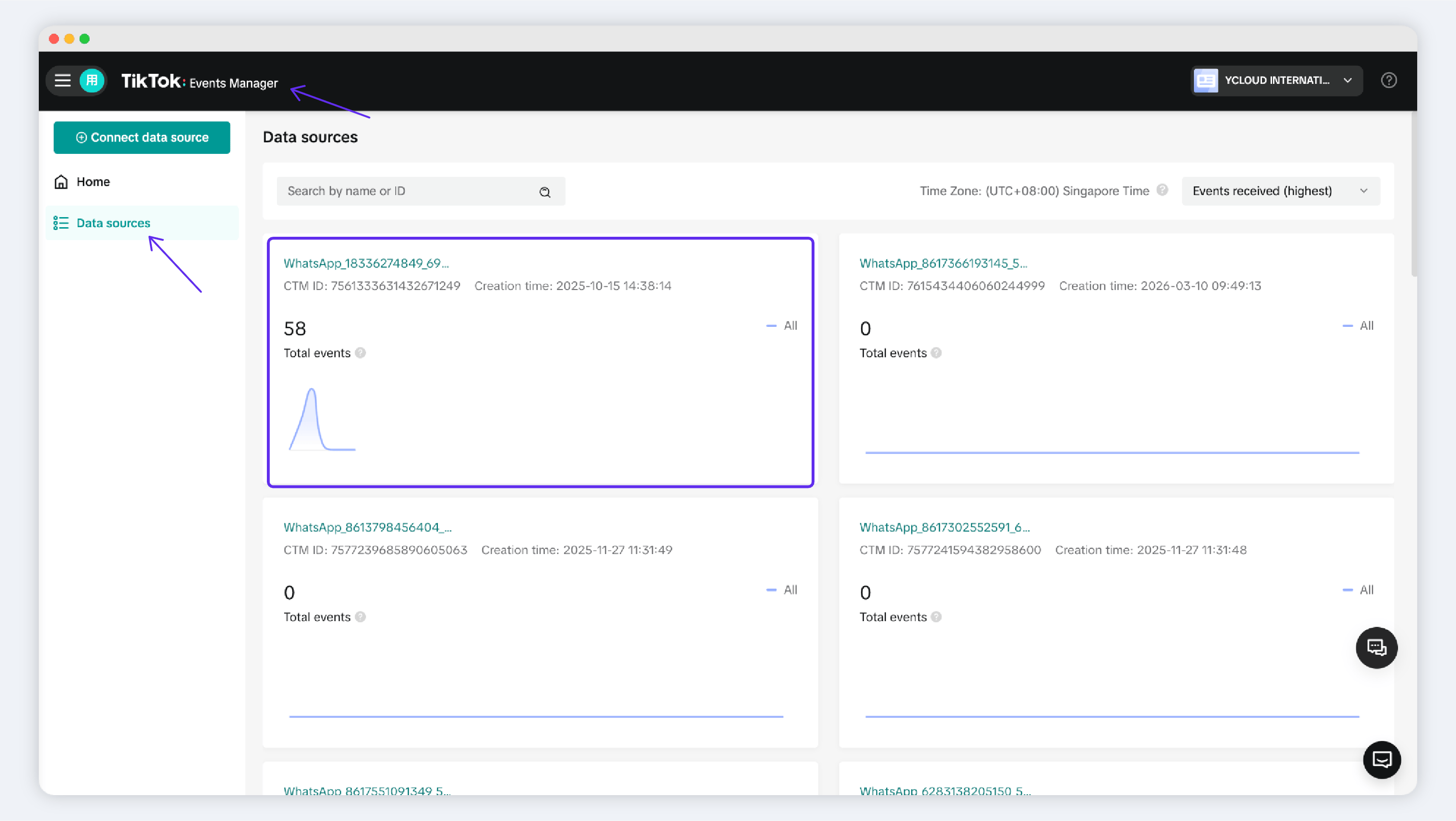
To review events reported by YCloud, open TikTok Events Manager and select the messaging event source for the relevant WhatsApp Business number. These data sources may be named WhatsApp + [Phone Number].
TikTok messaging event data source in Events Manager
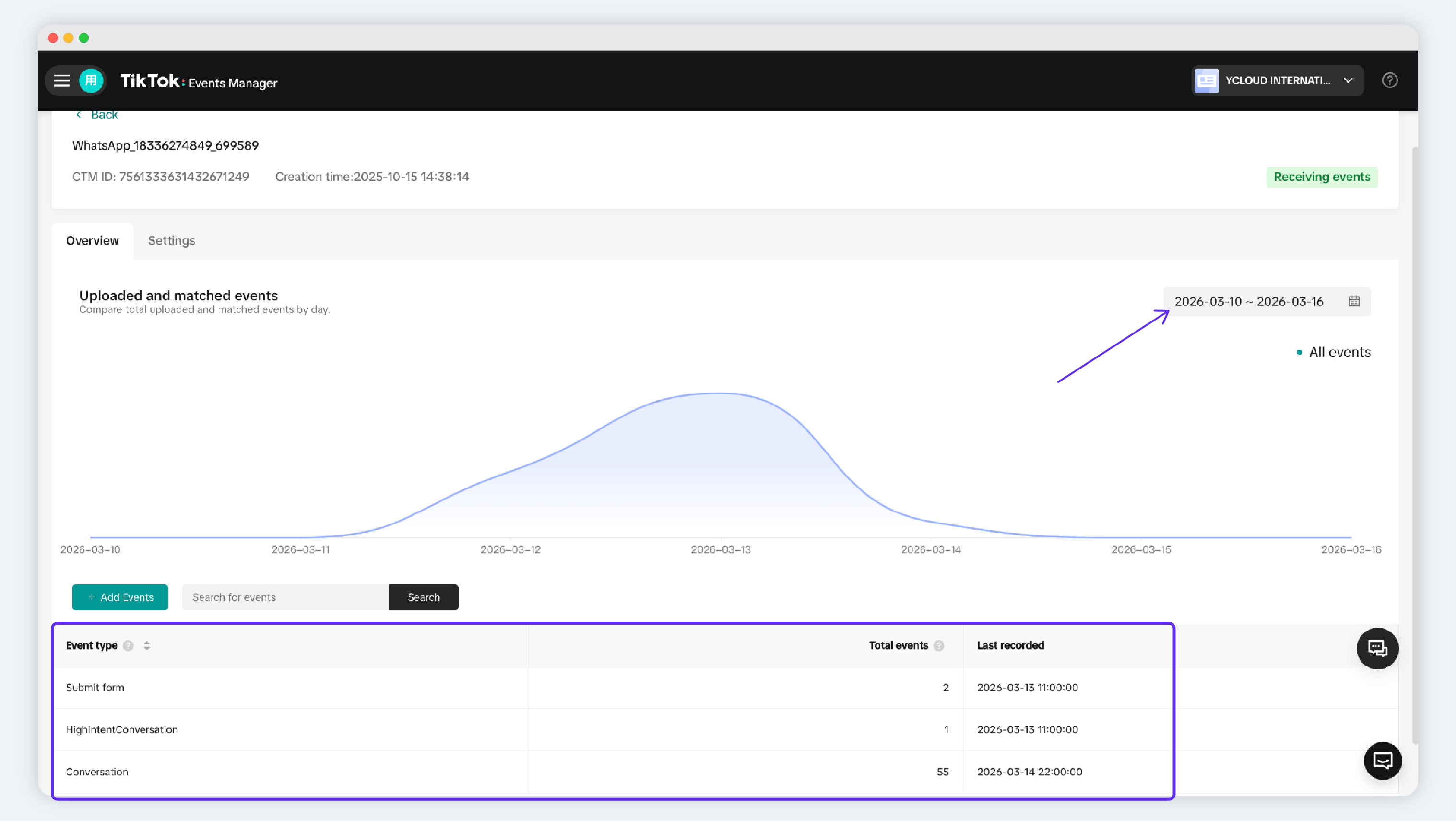
Open the event source to view its reported event history.
Why does the Conversations metric in Meta Ads Manager show more conversations than YCloud?
The Conversations metric in the ad list in Meta Ads Manager and the conversation data in CTWA > Ad Manage use different attribution scopes.In CTWA > Ad Manage, YCloud displays and counts WhatsApp conversations that Meta identifies as coming from a specific ad. This happens when a customer clicks the ad, enters WhatsApp, and starts a conversation, and Meta sends YCloud the matching ad information.Meta Ads Manager can also count conversations under Meta’s own attribution rules. For example, a customer may view your ad without clicking it, then later start a conversation from your business profile or another entry point. Meta may attribute that conversation to your ad. However, if the data Meta sends to YCloud does not include the matching ad information, YCloud cannot associate the conversation with that ad, so it is not included in YCloud’s ad data.
How do I view the Lead and Purchase signals that I report to Meta?
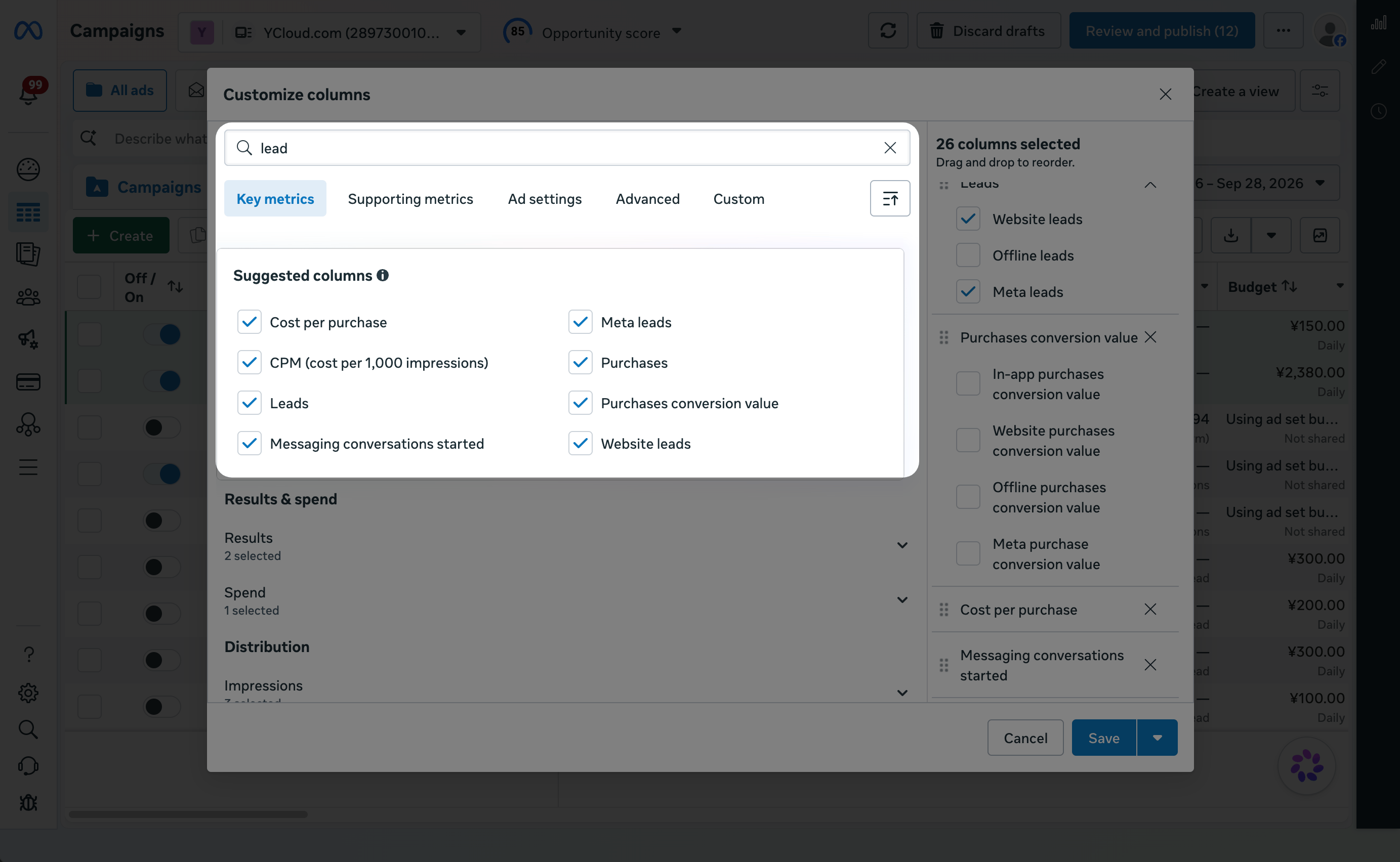
You can add the reported signals as columns in Meta Ads Manager:
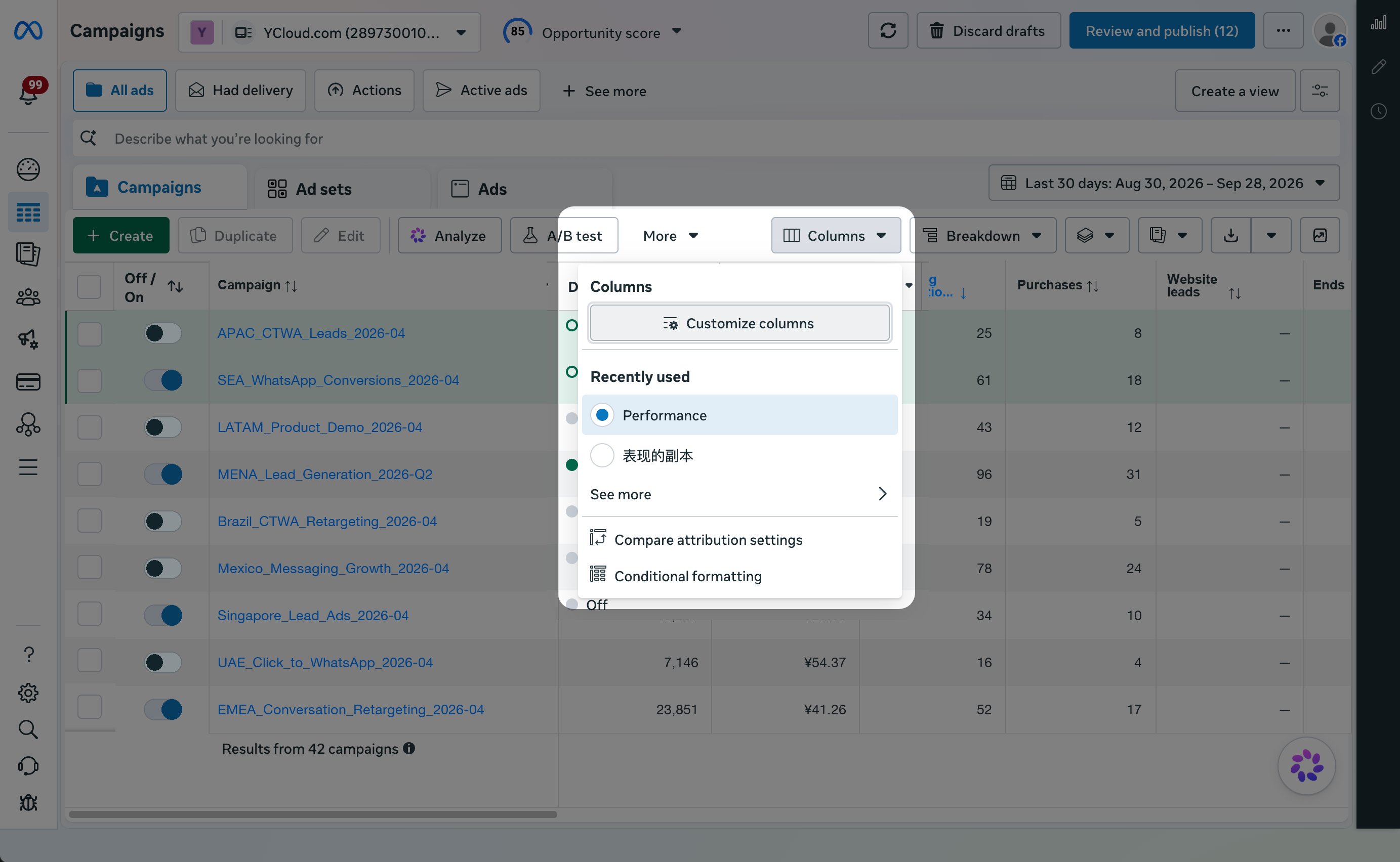
In the ad table, open the Columns: Performance dropdown.
Open Customize columns from the Columns menu in Meta Ads Manager.
Select Customize columns.
Search for and select Leads and Purchases.
Select Save.
Save the selected Lead and Purchase columns.
The ad table now displays your reported Lead and Purchase results. To use the same column setup later, select Save as preset before you select Save.
{"docsConfig":{"theme":"mint","$schema":"https://mintlify.com/docs.json","name":"YCloud Docs","description":"YCloud product documentation, API reference, and webhook payload documentation.","colors":{"primary":"#602DED","light":"#FD4C7D","dark":"#1a1e22"},"logo":{"light":"https://mintcdn.com/lchnan/AXn0jsI-c5aPnOMW/logo/light.png?fit=max\u0026auto=format\u0026n=AXn0jsI-c5aPnOMW\u0026q=85\u0026s=0865e4207d765d07a769c29bc819adbe","dark":"https://mintcdn.com/lchnan/AXn0jsI-c5aPnOMW/logo/dark.png?fit=max\u0026auto=format\u0026n=AXn0jsI-c5aPnOMW\u0026q=85\u0026s=1bafffbe886c0ac13b0409dc90d446f8","href":"https://www.ycloud.com"},"favicon":"https://mintcdn.com/lchnan/AXn0jsI-c5aPnOMW/favicon.png?fit=max\u0026auto=format\u0026n=AXn0jsI-c5aPnOMW\u0026q=85\u0026s=1eed9e0b562f4b06368d2b8185b801b4","api":{"openapi":["openapi/endpoints/ycloud-api-v2.yaml","openapi/webhooks/testing-webhooks.yaml"],"params":{"expanded":"closed"},"playground":{"display":"interactive"},"examples":{"defaults":"required","prefill":true,"autogenerate":false},"url":"full"},"background":{"color":{"light":"#ffffff"}},"navbar":{"links":[{"href":"https://www.ycloud.com/customer-support","label":"Support"},{"href":"https://www.ycloud.com/pricing","label":"Pricing"}],"primary":{"type":"button","label":"Dashboard","href":"https://www.ycloud.com/console"}},"seo":{"indexing":"all"},"fonts":{"heading":{"family":"Inter","weight":650},"body":{"family":"Inter","weight":450}},"icons":{"library":"fontawesome"},"styling":{"codeblocks":{"theme":{"light":"github-light","dark":"github-dark"}},"latex":true},"errors":{"404":{"redirect":true}},"contextual":{"options":["copy","view","chatgpt","claude","perplexity","mcp","cursor","vscode"],"display":"header"},"markdown":{"schema":true},"navigation":{"languages":[{"language":"en","default":true,"href":"en/documentation/overview"},{"language":"zh","href":"zh/documentation/overview"},{"language":"es","href":"es/documentation/overview"},{"language":"pt","href":"pt/documentation/overview"},{"language":"ru","href":"ru/documentation/overview"}]}},"deployment":{"deploymentMetadataValue":{"subdomain":"lchnan","hasAudioNarration":false,"actualSubdomain":"lchnan","customDomains":["docs.ycloud.com"],"gitSource":{"type":"github","owner":"ycloud-developers","repo":"ycloud_docs","deployBranch":"main","contentDirectory":"","isPrivate":true,"mountPath":"","label":""},"chroma":{"collectionId":"38a7c79a-935e-44ce-8ac4-771d9347bc89","liveDeploymentHistoryId":"6ae201baf9cefd8f8d7a475b","schemaVersion":"v3","latestBuiltDeploymentHistoryId":"6ae201baf9cefd8f8d7a475b"},"feedback":{"thumbs":true,"agentFeedback":true},"entitlements":{"AI_CHAT":{"status":"DISABLED"}},"buildId":"6ae201baf9cefd8f8d7a475b","clientVersion":"0.0.4006","searchFilterCounts":[{"language":"en","tag":"Documentation","count":242},{"language":"es","tag":"Documentación","count":241},{"language":"pt","tag":"Documentação","count":241},{"language":"ru","tag":"Документация","count":241},{"language":"zh","tag":"产品文档","count":241},{"language":"default","tag":"API Reference","count":165},{"language":"default","tag":"Endpoints","count":165},{"language":"en","tag":"API Reference","count":68},{"language":"es","tag":"Referencia de la API","count":68},{"language":"pt","tag":"Referência da API","count":68},{"language":"ru","tag":"Справочник API","count":68},{"language":"zh","tag":"API 参考","count":68},{"language":"en","tag":"Guides","count":63},{"language":"es","tag":"Guías","count":63},{"language":"pt","tag":"Guias","count":63},{"language":"ru","tag":"Руководства","count":63},{"language":"zh","tag":"指南","count":63},{"language":"default","tag":"Meta Business Agent","count":63},{"language":"en","tag":"Channels","count":60},{"language":"es","tag":"Gestión de cuentas de WhatsApp","count":54},{"language":"pt","tag":"Gerenciamento de contas do WhatsApp","count":54},{"language":"ru","tag":"Управление аккаунтами WhatsApp","count":54},{"language":"zh","tag":"WhatsApp 账号管理","count":54},{"language":"en","tag":"Integrations","count":44},{"language":"es","tag":"Integraciones","count":44},{"language":"pt","tag":"Integrações","count":44},{"language":"ru","tag":"Интеграции","count":44},{"language":"zh","tag":"集成","count":44},{"language":"default","tag":"Configure","count":43},{"language":"en","tag":"WhatsApp Business Platform","count":40},{"language":"es","tag":"WhatsApp Business Platform","count":40},{"language":"pt","tag":"WhatsApp Business Platform","count":40},{"language":"ru","tag":"Платформа WhatsApp Business","count":40},{"language":"zh","tag":"WhatsApp 商业平台","count":40},{"language":"es","tag":"Canales","count":32},{"language":"pt","tag":"Canais","count":32},{"language":"ru","tag":"Каналы","count":32},{"language":"zh","tag":"渠道","count":32},{"language":"en","tag":"Examples","count":28},{"language":"en","tag":"WhatsApp Accounts Management","count":28},{"language":"es","tag":"Ejemplos","count":28},{"language":"pt","tag":"Exemplos","count":28},{"language":"ru","tag":"Примеры","count":28},{"language":"zh","tag":"示例","count":28},{"language":"en","tag":"Webhook examples","count":25},{"language":"en","tag":"Agents","count":25},{"language":"es","tag":"Ejemplos de Webhook","count":25},{"language":"es","tag":"Agentes","count":25},{"language":"pt","tag":"Exemplos de Webhook","count":25},{"language":"pt","tag":"Agentes","count":25},{"language":"ru","tag":"Примеры Webhook","count":25},{"language":"ru","tag":"Агенты","count":25},{"language":"zh","tag":"Webhook 示例","count":25},{"language":"zh","tag":"智能体","count":25},{"language":"default","tag":"WhatsApp Phone Numbers","count":15},{"language":"default","tag":"WhatsApp Groups","count":12},{"language":"default","tag":"Contacts","count":10},{"language":"default","tag":"Operate","count":10},{"language":"default","tag":"Connectors","count":10},{"language":"default","tag":"Onboard","count":9}],"searchSettings":{"isFiltersEnabled":true}},"assistantConfig":{"enableAskAiButton":false,"enableStarterQuestions":false,"enableContextualStarterQuestions":false,"enableAskAiSearchBar":true},"basePath":"","hasChatPermissions":false,"hasWebMcpPermissions":false,"toggles":[],"privacy":{"consentBanner":{"enabled":true}},"googleFontsInlined":false},"customCss":[],"page":{"pagePath":"en/documentation/ctwa-click-to-whatsapp-ad/ctwa-analysis","slug":"/en/documentation/ctwa-click-to-whatsapp-ad/ctwa-analysis","pageMetadata":{"title":"CTWA Analysis","description":"CTWA Analytics is a compilation of CTWA ad metrics, displaying the performance of advertisers' marketing efforts through various charts and tables.","href":"/en/documentation/ctwa-click-to-whatsapp-ad/ctwa-analysis"},"description":{"compiledSource":"\"use strict\";\nconst {jsx: _jsx} = arguments[0];\nconst {useMDXComponents: _provideComponents} = arguments[0];\nfunction _createMdxContent(props) {\n const _components = {\n p: \"p\",\n ..._provideComponents(),\n ...props.components\n };\n return _jsx(_components.p, {\n children: \"CTWA Analytics is a compilation of CTWA ad metrics, displaying the performance of advertisers’ marketing efforts through various charts and tables.\"\n });\n}\nfunction MDXContent(props = {}) {\n const {wrapper: MDXLayout} = {\n ..._provideComponents(),\n ...props.components\n };\n return MDXLayout ? _jsx(MDXLayout, {\n ...props,\n children: _jsx(_createMdxContent, {\n ...props\n })\n }) : _createMdxContent(props);\n}\nreturn {\n default: MDXContent\n};\n","frontmatter":{},"scope":{}},"pageType":"default","mdx":{"mdxSource":{"compiledSource":"\"use strict\";const{Fragment:_Fragment,jsx:_jsx,jsxs:_jsxs}=arguments[0];const{useMDXComponents:_provideComponents}=arguments[0];function _createMdxContent(props){const _components={a:`a`,code:`code`,li:`li`,ol:`ol`,p:`p`,strong:`strong`,..._provideComponents(),...props.components},{Accordion,Frame,Heading,OptimizedImage}=_components;if(!Accordion)_missingMdxReference(`Accordion`,true);if(!Frame)_missingMdxReference(`Frame`,true);if(!Heading)_missingMdxReference(`Heading`,true);if(!OptimizedImage)_missingMdxReference(`OptimizedImage`,true);return _jsxs(_Fragment,{children:[_jsx(Heading,{level:`1`,id:`ctwa-analysis`,children:`CTWA Analysis`}),`\n`,_jsx(_components.p,{children:`Use CTWA Analysis to review Click to WhatsApp ad performance, conversations, and reported results. Start in YCloud, then check the corresponding advertising platform when you need platform-level data.`}),`\n`,_jsx(Heading,{level:`2`,id:`view-ctwa-data-in-ycloud`,children:`View CTWA data in YCloud`}),`\n`,_jsxs(_components.p,{children:[`In YCloud, go to `,_jsx(_components.strong,{children:`CTWA`}),` > `,_jsx(_components.strong,{children:`Ad Manage`}),` and select the connected ad account that you want to review. You can view one ad account at a time.`]}),`\n`,_jsx(_components.p,{children:`A customer must click the ad and send a WhatsApp message before the resulting conversation can appear in YCloud.`}),`\n`,_jsx(Heading,{level:`3`,id:`meta-ads`,children:`Meta ads`}),`\n`,_jsxs(_components.p,{children:[`For a Meta ad account, review data such as spend, impressions, clicks, and conversations started. Select an ad to open `,_jsx(_components.strong,{children:`View Leads`}),` or `,_jsx(_components.strong,{children:`Track Events`}),` for the event details associated with that ad.`]}),`\n`,_jsxs(_components.p,{children:[`If available for the selected event, use `,_jsx(_components.strong,{children:`View Leads`}),` to review and export the recorded lead details.`]}),`\n`,_jsxs(_components.p,{children:[`To report qualified Lead or Purchase results to Meta, see `,_jsx(_components.a,{href:`/en/documentation/ctwa-click-to-whatsapp-ad/meta-ctwa-ads/report-ctwa-ad-results-to-meta`,children:`Report CTWA Ad Results to Meta`}),`.`]}),`\n`,_jsx(Heading,{level:`3`,id:`tiktok-ads`,children:`TikTok ads`}),`\n`,_jsxs(_components.p,{children:[`For a TikTok ad account, select the account in `,_jsx(_components.strong,{children:`CTWA`}),` > `,_jsx(_components.strong,{children:`Ad Manage`}),` to review its data in YCloud. Open `,_jsx(_components.strong,{children:`Track Events`}),` or `,_jsx(_components.strong,{children:`View Leads`}),` for an ad when you need more detailed event records or lead data.`]}),`\n`,_jsx(Frame,{caption:`TikTok ad data in YCloud CTWA Ad Manage`,children:_jsx(OptimizedImage,{src:`https://mintcdn.com/lchnan/zF5bhBnzwSZkZsSr/product-assets/remote-d31eb43b48-ctwa-ad-manage-tiktokad-t1.png?fit=max\u0026auto=format\u0026n=zF5bhBnzwSZkZsSr\u0026q=85\u0026s=1ddc712e8e43b452733902c4aa476cd6`,alt:`YCloud CTWA Ad Manage page showing TikTok ad data`,\"data-og-width\":`3039`,width:`3039`,\"data-og-height\":`1715`,height:`1715`,\"data-path\":`product-assets/remote-d31eb43b48-ctwa-ad-manage-tiktokad-t1.png`,\"data-optimize\":`true`,\"data-opv\":`3`,srcset:`https://mintcdn.com/lchnan/zF5bhBnzwSZkZsSr/product-assets/remote-d31eb43b48-ctwa-ad-manage-tiktokad-t1.png?w=280\u0026fit=max\u0026auto=format\u0026n=zF5bhBnzwSZkZsSr\u0026q=85\u0026s=07cbaef934e9706a78449dc79c2af723 280w, https://mintcdn.com/lchnan/zF5bhBnzwSZkZsSr/product-assets/remote-d31eb43b48-ctwa-ad-manage-tiktokad-t1.png?w=560\u0026fit=max\u0026auto=format\u0026n=zF5bhBnzwSZkZsSr\u0026q=85\u0026s=dc5461c9230e0ff7551c6c4dc44fd64a 560w, https://mintcdn.com/lchnan/zF5bhBnzwSZkZsSr/product-assets/remote-d31eb43b48-ctwa-ad-manage-tiktokad-t1.png?w=840\u0026fit=max\u0026auto=format\u0026n=zF5bhBnzwSZkZsSr\u0026q=85\u0026s=904c80ea09172c9c6c53b58761a87c86 840w, https://mintcdn.com/lchnan/zF5bhBnzwSZkZsSr/product-assets/remote-d31eb43b48-ctwa-ad-manage-tiktokad-t1.png?w=1100\u0026fit=max\u0026auto=format\u0026n=zF5bhBnzwSZkZsSr\u0026q=85\u0026s=7c5fb723c9f5c9007edbc5ebcd458157 1100w, https://mintcdn.com/lchnan/zF5bhBnzwSZkZsSr/product-assets/remote-d31eb43b48-ctwa-ad-manage-tiktokad-t1.png?w=1650\u0026fit=max\u0026auto=format\u0026n=zF5bhBnzwSZkZsSr\u0026q=85\u0026s=2e0e0d53290d01ba249554c1716b1692 1650w, https://mintcdn.com/lchnan/zF5bhBnzwSZkZsSr/product-assets/remote-d31eb43b48-ctwa-ad-manage-tiktokad-t1.png?w=2500\u0026fit=max\u0026auto=format\u0026n=zF5bhBnzwSZkZsSr\u0026q=85\u0026s=da65c0508879e9ad453c54278964d7fc 2500w`})}),`\n`,_jsx(Frame,{caption:`Open tracking event details for a TikTok ad`,children:_jsx(OptimizedImage,{src:`https://mintcdn.com/lchnan/WD-ixrYVrqB7b7aQ/product-assets/4d2bf8e8e4-image-31.webp?fit=max\u0026auto=format\u0026n=WD-ixrYVrqB7b7aQ\u0026q=85\u0026s=815cbf5908877b6b3b170ab6a62cdec2`,alt:`YCloud TikTok tracking event details with conversion metrics and View Leads`,\"data-og-width\":`2304`,width:`2304`,\"data-og-height\":`1464`,height:`1464`,\"data-path\":`product-assets/4d2bf8e8e4-image-31.webp`,\"data-optimize\":`true`,\"data-opv\":`3`,srcset:`https://mintcdn.com/lchnan/WD-ixrYVrqB7b7aQ/product-assets/4d2bf8e8e4-image-31.webp?w=280\u0026fit=max\u0026auto=format\u0026n=WD-ixrYVrqB7b7aQ\u0026q=85\u0026s=e47111805514b4d68823418ae528cd98 280w, https://mintcdn.com/lchnan/WD-ixrYVrqB7b7aQ/product-assets/4d2bf8e8e4-image-31.webp?w=560\u0026fit=max\u0026auto=format\u0026n=WD-ixrYVrqB7b7aQ\u0026q=85\u0026s=024448891169b1db8f2adcc791238493 560w, https://mintcdn.com/lchnan/WD-ixrYVrqB7b7aQ/product-assets/4d2bf8e8e4-image-31.webp?w=840\u0026fit=max\u0026auto=format\u0026n=WD-ixrYVrqB7b7aQ\u0026q=85\u0026s=fc57a497216b5f19b2f201b828857e49 840w, https://mintcdn.com/lchnan/WD-ixrYVrqB7b7aQ/product-assets/4d2bf8e8e4-image-31.webp?w=1100\u0026fit=max\u0026auto=format\u0026n=WD-ixrYVrqB7b7aQ\u0026q=85\u0026s=c1f7c1f68c47dd45916e2b95397ea8c5 1100w, https://mintcdn.com/lchnan/WD-ixrYVrqB7b7aQ/product-assets/4d2bf8e8e4-image-31.webp?w=1650\u0026fit=max\u0026auto=format\u0026n=WD-ixrYVrqB7b7aQ\u0026q=85\u0026s=4e13bf3ff030228e285c39814c9eaf2c 1650w, https://mintcdn.com/lchnan/WD-ixrYVrqB7b7aQ/product-assets/4d2bf8e8e4-image-31.webp?w=2500\u0026fit=max\u0026auto=format\u0026n=WD-ixrYVrqB7b7aQ\u0026q=85\u0026s=866dd900df49f335a4ff1d2b243c6f8c 2500w`})}),`\n`,_jsx(Frame,{caption:`Export lead details from a TikTok tracking event`,children:_jsx(OptimizedImage,{src:`https://mintcdn.com/lchnan/NjO13A6gLJKR9m7M/product-assets/80ee1979c2-image-834.webp?fit=max\u0026auto=format\u0026n=NjO13A6gLJKR9m7M\u0026q=85\u0026s=a24c7ad85823a97e30dc5c5bdc5c6037`,alt:`YCloud lead details page with the Download option`,\"data-og-width\":`2304`,width:`2304`,\"data-og-height\":`1460`,height:`1460`,\"data-path\":`product-assets/80ee1979c2-image-834.webp`,\"data-optimize\":`true`,\"data-opv\":`3`,srcset:`https://mintcdn.com/lchnan/NjO13A6gLJKR9m7M/product-assets/80ee1979c2-image-834.webp?w=280\u0026fit=max\u0026auto=format\u0026n=NjO13A6gLJKR9m7M\u0026q=85\u0026s=e0b6911d59e94ccf9d6eb89f7ed528bb 280w, https://mintcdn.com/lchnan/NjO13A6gLJKR9m7M/product-assets/80ee1979c2-image-834.webp?w=560\u0026fit=max\u0026auto=format\u0026n=NjO13A6gLJKR9m7M\u0026q=85\u0026s=0a811febfb1dda581c94a41032095b97 560w, https://mintcdn.com/lchnan/NjO13A6gLJKR9m7M/product-assets/80ee1979c2-image-834.webp?w=840\u0026fit=max\u0026auto=format\u0026n=NjO13A6gLJKR9m7M\u0026q=85\u0026s=609a883a4245ce2e36e5c05ae44fe0aa 840w, https://mintcdn.com/lchnan/NjO13A6gLJKR9m7M/product-assets/80ee1979c2-image-834.webp?w=1100\u0026fit=max\u0026auto=format\u0026n=NjO13A6gLJKR9m7M\u0026q=85\u0026s=4e939852aafed824e43c0e206ec61b20 1100w, https://mintcdn.com/lchnan/NjO13A6gLJKR9m7M/product-assets/80ee1979c2-image-834.webp?w=1650\u0026fit=max\u0026auto=format\u0026n=NjO13A6gLJKR9m7M\u0026q=85\u0026s=c4faf2a941531b5f3c90499d3be5ea13 1650w, https://mintcdn.com/lchnan/NjO13A6gLJKR9m7M/product-assets/80ee1979c2-image-834.webp?w=2500\u0026fit=max\u0026auto=format\u0026n=NjO13A6gLJKR9m7M\u0026q=85\u0026s=33568fad216156b49f789c525c652d79 2500w`})}),`\n`,_jsxs(_components.p,{children:[`To configure which results YCloud sends to TikTok, see `,_jsx(_components.a,{href:`/en/documentation/ctwa-click-to-whatsapp-ad/tiktok-messaging-ad/report-ad-results-to-tiktok`,children:`Set Up TikTok Conversion Reporting`}),`.`]}),`\n`,_jsx(Heading,{level:`2`,id:`view-data-in-meta-ads-manager`,children:`View data in Meta Ads Manager`}),`\n`,_jsx(_components.p,{children:`Open the relevant campaign, ad set, or ad in Meta Ads Manager to review platform-level delivery data, such as spend, impressions, clicks, and results.`}),`\n`,_jsx(Frame,{caption:`Meta Ads Manager delivery metrics`,children:_jsx(OptimizedImage,{src:`https://mintcdn.com/lchnan/Wnx28zLac7mo9Oi3/images/ctwa-sep9-image-12.png?fit=max\u0026auto=format\u0026n=Wnx28zLac7mo9Oi3\u0026q=85\u0026s=ae301db0b9b11caeb0a0749bd76eaeed`,alt:`Meta Ads Manager table showing Click to WhatsApp ad delivery metrics`,\"data-og-width\":`1919`,width:`1919`,\"data-og-height\":`959`,height:`959`,\"data-path\":`images/ctwa-sep9-image-12.png`,\"data-optimize\":`true`,\"data-opv\":`3`,srcset:`https://mintcdn.com/lchnan/Wnx28zLac7mo9Oi3/images/ctwa-sep9-image-12.png?w=280\u0026fit=max\u0026auto=format\u0026n=Wnx28zLac7mo9Oi3\u0026q=85\u0026s=7adabd8373ff58e969189bfc27fee496 280w, https://mintcdn.com/lchnan/Wnx28zLac7mo9Oi3/images/ctwa-sep9-image-12.png?w=560\u0026fit=max\u0026auto=format\u0026n=Wnx28zLac7mo9Oi3\u0026q=85\u0026s=fb785fb68c91b68842026b506edaf714 560w, https://mintcdn.com/lchnan/Wnx28zLac7mo9Oi3/images/ctwa-sep9-image-12.png?w=840\u0026fit=max\u0026auto=format\u0026n=Wnx28zLac7mo9Oi3\u0026q=85\u0026s=fc31f49a18ad9dec21b5d4f25737e600 840w, https://mintcdn.com/lchnan/Wnx28zLac7mo9Oi3/images/ctwa-sep9-image-12.png?w=1100\u0026fit=max\u0026auto=format\u0026n=Wnx28zLac7mo9Oi3\u0026q=85\u0026s=7a341558a00c9086c669d6cbad169b83 1100w, https://mintcdn.com/lchnan/Wnx28zLac7mo9Oi3/images/ctwa-sep9-image-12.png?w=1650\u0026fit=max\u0026auto=format\u0026n=Wnx28zLac7mo9Oi3\u0026q=85\u0026s=7c32bdc5c51326740319416a7804f11c 1650w, https://mintcdn.com/lchnan/Wnx28zLac7mo9Oi3/images/ctwa-sep9-image-12.png?w=2500\u0026fit=max\u0026auto=format\u0026n=Wnx28zLac7mo9Oi3\u0026q=85\u0026s=66e48b2887f366d29a96bea85507daac 2500w`})}),`\n`,_jsx(Heading,{level:`2`,id:`view-data-in-tiktok-ads-manager`,children:`View data in TikTok Ads Manager`}),`\n`,_jsx(_components.p,{children:`In TikTok Ads Manager, open the relevant campaign, ad group, or ad to review platform-level delivery data, such as spend, impressions, clicks, and conversations.`}),`\n`,_jsx(Frame,{caption:`TikTok messaging ad performance in TikTok Ads Manager`,children:_jsx(OptimizedImage,{src:`https://mintcdn.com/lchnan/Sw_U7mGNtitEcc60/product-assets/remote-e303103b39-tiktok-t1.png?fit=max\u0026auto=format\u0026n=Sw_U7mGNtitEcc60\u0026q=85\u0026s=1070e33b15186fa672e8559dd8aceb29`,alt:`TikTok Ads Manager showing messaging ad performance data`,\"data-og-width\":`3037`,width:`3037`,\"data-og-height\":`1713`,height:`1713`,\"data-path\":`product-assets/remote-e303103b39-tiktok-t1.png`,\"data-optimize\":`true`,\"data-opv\":`3`,srcset:`https://mintcdn.com/lchnan/Sw_U7mGNtitEcc60/product-assets/remote-e303103b39-tiktok-t1.png?w=280\u0026fit=max\u0026auto=format\u0026n=Sw_U7mGNtitEcc60\u0026q=85\u0026s=683b932c592a61ca821f8142b847defa 280w, https://mintcdn.com/lchnan/Sw_U7mGNtitEcc60/product-assets/remote-e303103b39-tiktok-t1.png?w=560\u0026fit=max\u0026auto=format\u0026n=Sw_U7mGNtitEcc60\u0026q=85\u0026s=6dd12f9feee6bf4eab33449324cad28d 560w, https://mintcdn.com/lchnan/Sw_U7mGNtitEcc60/product-assets/remote-e303103b39-tiktok-t1.png?w=840\u0026fit=max\u0026auto=format\u0026n=Sw_U7mGNtitEcc60\u0026q=85\u0026s=99e1543c4ffe1cca714f5823bfe72724 840w, https://mintcdn.com/lchnan/Sw_U7mGNtitEcc60/product-assets/remote-e303103b39-tiktok-t1.png?w=1100\u0026fit=max\u0026auto=format\u0026n=Sw_U7mGNtitEcc60\u0026q=85\u0026s=a6e9cc9789a2692686062c77cd857401 1100w, https://mintcdn.com/lchnan/Sw_U7mGNtitEcc60/product-assets/remote-e303103b39-tiktok-t1.png?w=1650\u0026fit=max\u0026auto=format\u0026n=Sw_U7mGNtitEcc60\u0026q=85\u0026s=461de3d6aefd21d885781744f3a303b1 1650w, https://mintcdn.com/lchnan/Sw_U7mGNtitEcc60/product-assets/remote-e303103b39-tiktok-t1.png?w=2500\u0026fit=max\u0026auto=format\u0026n=Sw_U7mGNtitEcc60\u0026q=85\u0026s=0dec1672ce27fb0e6bb81ece4c5ba90b 2500w`})}),`\n`,_jsxs(_components.p,{children:[`To review events reported by YCloud, open TikTok Events Manager and select the messaging event source for the relevant WhatsApp Business number. These data sources may be named `,_jsx(_components.code,{children:`WhatsApp + [Phone Number]`}),`.`]}),`\n`,_jsx(Frame,{caption:`TikTok messaging event data source in Events Manager`,children:_jsx(OptimizedImage,{src:`https://mintcdn.com/lchnan/zF5bhBnzwSZkZsSr/product-assets/remote-545af81cfd-tiktok-eventmanager-datasource-t1.png?fit=max\u0026auto=format\u0026n=zF5bhBnzwSZkZsSr\u0026q=85\u0026s=ccc0107833356aafaa1e6a3f0b9b1476`,alt:`TikTok Events Manager showing a WhatsApp messaging event data source`,\"data-og-width\":`3039`,width:`3039`,\"data-og-height\":`1713`,height:`1713`,\"data-path\":`product-assets/remote-545af81cfd-tiktok-eventmanager-datasource-t1.png`,\"data-optimize\":`true`,\"data-opv\":`3`,srcset:`https://mintcdn.com/lchnan/zF5bhBnzwSZkZsSr/product-assets/remote-545af81cfd-tiktok-eventmanager-datasource-t1.png?w=280\u0026fit=max\u0026auto=format\u0026n=zF5bhBnzwSZkZsSr\u0026q=85\u0026s=0e29d0ce75c7f0b1c9706d67906dcff1 280w, https://mintcdn.com/lchnan/zF5bhBnzwSZkZsSr/product-assets/remote-545af81cfd-tiktok-eventmanager-datasource-t1.png?w=560\u0026fit=max\u0026auto=format\u0026n=zF5bhBnzwSZkZsSr\u0026q=85\u0026s=90b4db52fdff0c29090b40961fb02446 560w, https://mintcdn.com/lchnan/zF5bhBnzwSZkZsSr/product-assets/remote-545af81cfd-tiktok-eventmanager-datasource-t1.png?w=840\u0026fit=max\u0026auto=format\u0026n=zF5bhBnzwSZkZsSr\u0026q=85\u0026s=390281ddacda403f354b46195d7b0f50 840w, https://mintcdn.com/lchnan/zF5bhBnzwSZkZsSr/product-assets/remote-545af81cfd-tiktok-eventmanager-datasource-t1.png?w=1100\u0026fit=max\u0026auto=format\u0026n=zF5bhBnzwSZkZsSr\u0026q=85\u0026s=90bdb0bdaa058ec3bd45c7dcf57c5c88 1100w, https://mintcdn.com/lchnan/zF5bhBnzwSZkZsSr/product-assets/remote-545af81cfd-tiktok-eventmanager-datasource-t1.png?w=1650\u0026fit=max\u0026auto=format\u0026n=zF5bhBnzwSZkZsSr\u0026q=85\u0026s=d35105f87db3667e382a25b964a875f2 1650w, https://mintcdn.com/lchnan/zF5bhBnzwSZkZsSr/product-assets/remote-545af81cfd-tiktok-eventmanager-datasource-t1.png?w=2500\u0026fit=max\u0026auto=format\u0026n=zF5bhBnzwSZkZsSr\u0026q=85\u0026s=417749fcba0b2ebb1f8c629faf1d9882 2500w`})}),`\n`,_jsx(_components.p,{children:`Open the event source to view its reported event history.`}),`\n`,_jsx(Frame,{caption:`Reported event history in TikTok Events Manager`,children:_jsx(OptimizedImage,{src:`https://mintcdn.com/lchnan/zF5bhBnzwSZkZsSr/product-assets/remote-2e3ba94faf-tiktok-eventmanager-t1.png?fit=max\u0026auto=format\u0026n=zF5bhBnzwSZkZsSr\u0026q=85\u0026s=e1e14bc229bf30c267427b8074a75852`,alt:`TikTok Events Manager showing reported messaging events`,\"data-og-width\":`3035`,width:`3035`,\"data-og-height\":`1711`,height:`1711`,\"data-path\":`product-assets/remote-2e3ba94faf-tiktok-eventmanager-t1.png`,\"data-optimize\":`true`,\"data-opv\":`3`,srcset:`https://mintcdn.com/lchnan/zF5bhBnzwSZkZsSr/product-assets/remote-2e3ba94faf-tiktok-eventmanager-t1.png?w=280\u0026fit=max\u0026auto=format\u0026n=zF5bhBnzwSZkZsSr\u0026q=85\u0026s=0098db7e14f4d151b72ff2208ece29e5 280w, https://mintcdn.com/lchnan/zF5bhBnzwSZkZsSr/product-assets/remote-2e3ba94faf-tiktok-eventmanager-t1.png?w=560\u0026fit=max\u0026auto=format\u0026n=zF5bhBnzwSZkZsSr\u0026q=85\u0026s=dfa1ea9dff22adf79cc16691901ce366 560w, https://mintcdn.com/lchnan/zF5bhBnzwSZkZsSr/product-assets/remote-2e3ba94faf-tiktok-eventmanager-t1.png?w=840\u0026fit=max\u0026auto=format\u0026n=zF5bhBnzwSZkZsSr\u0026q=85\u0026s=ca3d4de891bd6ca8bca1dc415d08976c 840w, https://mintcdn.com/lchnan/zF5bhBnzwSZkZsSr/product-assets/remote-2e3ba94faf-tiktok-eventmanager-t1.png?w=1100\u0026fit=max\u0026auto=format\u0026n=zF5bhBnzwSZkZsSr\u0026q=85\u0026s=f8fafd1772b1a3dc6c67c526e65609e4 1100w, https://mintcdn.com/lchnan/zF5bhBnzwSZkZsSr/product-assets/remote-2e3ba94faf-tiktok-eventmanager-t1.png?w=1650\u0026fit=max\u0026auto=format\u0026n=zF5bhBnzwSZkZsSr\u0026q=85\u0026s=8a99f775f2a4d27f3cd9f477579ec3b3 1650w, https://mintcdn.com/lchnan/zF5bhBnzwSZkZsSr/product-assets/remote-2e3ba94faf-tiktok-eventmanager-t1.png?w=2500\u0026fit=max\u0026auto=format\u0026n=zF5bhBnzwSZkZsSr\u0026q=85\u0026s=c33afcd0dc1fdc1303a03e7a6a826d11 2500w`})}),`\n`,_jsx(Heading,{level:`2`,id:`frequently-asked-questions`,children:`Frequently Asked Questions`}),`\n`,_jsxs(Accordion,{title:`Why does the Conversations metric in Meta Ads Manager show more conversations than YCloud?`,id:`why-does-the-conversations-metric-in-meta-ads-manager-show-more-conversations-than-ycloud`,children:[_jsxs(_components.p,{children:[`The `,_jsx(_components.strong,{children:`Conversations`}),` metric in the ad list in `,_jsx(_components.strong,{children:`Meta Ads Manager`}),` and the conversation data in `,_jsx(_components.strong,{children:`CTWA`}),` > `,_jsx(_components.strong,{children:`Ad Manage`}),` use different attribution scopes.`]}),_jsxs(_components.p,{children:[`In `,_jsx(_components.strong,{children:`CTWA`}),` > `,_jsx(_components.strong,{children:`Ad Manage`}),`, YCloud displays and counts WhatsApp conversations that Meta identifies as coming from a specific ad. This happens when a customer clicks the ad, enters WhatsApp, and starts a conversation, and Meta sends YCloud the matching ad information.`]}),_jsx(_components.p,{children:`Meta Ads Manager can also count conversations under Meta’s own attribution rules. For example, a customer may view your ad without clicking it, then later start a conversation from your business profile or another entry point. Meta may attribute that conversation to your ad. However, if the data Meta sends to YCloud does not include the matching ad information, YCloud cannot associate the conversation with that ad, so it is not included in YCloud’s ad data.`})]}),`\n`,_jsxs(Accordion,{title:`How do I view the Lead and Purchase signals that I report to Meta?`,id:`how-do-i-view-the-lead-and-purchase-signals-that-i-report-to-meta`,children:[_jsx(_components.p,{children:`You can add the reported signals as columns in Meta Ads Manager:`}),_jsxs(_components.ol,{children:[`\n`,_jsxs(_components.li,{children:[`In the ad table, open the `,_jsx(_components.strong,{children:`Columns: Performance`}),` dropdown.`]}),`\n`]}),_jsx(Frame,{caption:`Open Customize columns from the Columns menu in Meta Ads Manager.`,children:_jsx(OptimizedImage,{src:`https://mintcdn.com/lchnan/mNk_Zeh-zC49qsZ2/product-assets/english-help-2026-09-29/meta-ad-manager-customize-columns-menu.png?fit=max\u0026auto=format\u0026n=mNk_Zeh-zC49qsZ2\u0026q=85\u0026s=262258ebbdcb9cd2e518c1284fd5896d`,alt:`Meta Ads Manager Columns menu with Customize columns selected.`,\"data-og-width\":`2766`,width:`2766`,\"data-og-height\":`1704`,height:`1704`,\"data-path\":`product-assets/english-help-2026-09-29/meta-ad-manager-customize-columns-menu.png`,\"data-optimize\":`true`,\"data-opv\":`3`,srcset:`https://mintcdn.com/lchnan/mNk_Zeh-zC49qsZ2/product-assets/english-help-2026-09-29/meta-ad-manager-customize-columns-menu.png?w=280\u0026fit=max\u0026auto=format\u0026n=mNk_Zeh-zC49qsZ2\u0026q=85\u0026s=b7590c7759939062642b112a5358f6d1 280w, https://mintcdn.com/lchnan/mNk_Zeh-zC49qsZ2/product-assets/english-help-2026-09-29/meta-ad-manager-customize-columns-menu.png?w=560\u0026fit=max\u0026auto=format\u0026n=mNk_Zeh-zC49qsZ2\u0026q=85\u0026s=da9c49ecb3ea8952fae067e10dd123ea 560w, https://mintcdn.com/lchnan/mNk_Zeh-zC49qsZ2/product-assets/english-help-2026-09-29/meta-ad-manager-customize-columns-menu.png?w=840\u0026fit=max\u0026auto=format\u0026n=mNk_Zeh-zC49qsZ2\u0026q=85\u0026s=b99967bd5bfe8128ecbcc13ba3f22b10 840w, https://mintcdn.com/lchnan/mNk_Zeh-zC49qsZ2/product-assets/english-help-2026-09-29/meta-ad-manager-customize-columns-menu.png?w=1100\u0026fit=max\u0026auto=format\u0026n=mNk_Zeh-zC49qsZ2\u0026q=85\u0026s=b4c859d1d3cf3f5e8d6217996944c19e 1100w, https://mintcdn.com/lchnan/mNk_Zeh-zC49qsZ2/product-assets/english-help-2026-09-29/meta-ad-manager-customize-columns-menu.png?w=1650\u0026fit=max\u0026auto=format\u0026n=mNk_Zeh-zC49qsZ2\u0026q=85\u0026s=4e95e2d391a787757edbe796f8048cff 1650w, https://mintcdn.com/lchnan/mNk_Zeh-zC49qsZ2/product-assets/english-help-2026-09-29/meta-ad-manager-customize-columns-menu.png?w=2500\u0026fit=max\u0026auto=format\u0026n=mNk_Zeh-zC49qsZ2\u0026q=85\u0026s=525d0cae8822c9738ce2bc8cb7ecebe5 2500w`})}),_jsxs(_components.ol,{start:`2`,children:[`\n`,_jsxs(_components.li,{children:[`Select `,_jsx(_components.strong,{children:`Customize columns`}),`.`]}),`\n`,_jsxs(_components.li,{children:[`Search for and select `,_jsx(_components.strong,{children:`Leads`}),` and `,_jsx(_components.strong,{children:`Purchases`}),`.`]}),`\n`,_jsxs(_components.li,{children:[`Select `,_jsx(_components.strong,{children:`Save`}),`.`]}),`\n`]}),_jsx(Frame,{caption:`Save the selected Lead and Purchase columns.`,children:_jsx(OptimizedImage,{src:`https://mintcdn.com/lchnan/mNk_Zeh-zC49qsZ2/product-assets/english-help-2026-09-29/meta-ad-manager-customize-columns-lead-purchase.png?fit=max\u0026auto=format\u0026n=mNk_Zeh-zC49qsZ2\u0026q=85\u0026s=b7184dde76bd14b9766d8fbf64457b0b`,alt:`Meta Ads Manager Customize columns panel showing Leads and Purchases selected.`,\"data-og-width\":`2766`,width:`2766`,\"data-og-height\":`1704`,height:`1704`,\"data-path\":`product-assets/english-help-2026-09-29/meta-ad-manager-customize-columns-lead-purchase.png`,\"data-optimize\":`true`,\"data-opv\":`3`,srcset:`https://mintcdn.com/lchnan/mNk_Zeh-zC49qsZ2/product-assets/english-help-2026-09-29/meta-ad-manager-customize-columns-lead-purchase.png?w=280\u0026fit=max\u0026auto=format\u0026n=mNk_Zeh-zC49qsZ2\u0026q=85\u0026s=3f6556bd8d95b411ca5511da8a014b9b 280w, https://mintcdn.com/lchnan/mNk_Zeh-zC49qsZ2/product-assets/english-help-2026-09-29/meta-ad-manager-customize-columns-lead-purchase.png?w=560\u0026fit=max\u0026auto=format\u0026n=mNk_Zeh-zC49qsZ2\u0026q=85\u0026s=0c0ba687be62112a0c29bbfeb1590a4e 560w, https://mintcdn.com/lchnan/mNk_Zeh-zC49qsZ2/product-assets/english-help-2026-09-29/meta-ad-manager-customize-columns-lead-purchase.png?w=840\u0026fit=max\u0026auto=format\u0026n=mNk_Zeh-zC49qsZ2\u0026q=85\u0026s=b9c1c223079442e290cce46998813687 840w, https://mintcdn.com/lchnan/mNk_Zeh-zC49qsZ2/product-assets/english-help-2026-09-29/meta-ad-manager-customize-columns-lead-purchase.png?w=1100\u0026fit=max\u0026auto=format\u0026n=mNk_Zeh-zC49qsZ2\u0026q=85\u0026s=37682d98cf51df97e798e4659958c35e 1100w, https://mintcdn.com/lchnan/mNk_Zeh-zC49qsZ2/product-assets/english-help-2026-09-29/meta-ad-manager-customize-columns-lead-purchase.png?w=1650\u0026fit=max\u0026auto=format\u0026n=mNk_Zeh-zC49qsZ2\u0026q=85\u0026s=335f4812f59bc853709fa06b0b4e77d9 1650w, https://mintcdn.com/lchnan/mNk_Zeh-zC49qsZ2/product-assets/english-help-2026-09-29/meta-ad-manager-customize-columns-lead-purchase.png?w=2500\u0026fit=max\u0026auto=format\u0026n=mNk_Zeh-zC49qsZ2\u0026q=85\u0026s=365ce28a3219e5da5b17ed262389a613 2500w`})}),_jsxs(_components.p,{children:[`The ad table now displays your reported Lead and Purchase results. To use the same column setup later, select `,_jsx(_components.strong,{children:`Save as preset`}),` before you select `,_jsx(_components.strong,{children:`Save`}),`.`]})]})]})}function MDXContent(props={}){const{wrapper:MDXLayout}={..._provideComponents(),...props.components};return MDXLayout?_jsx(MDXLayout,{...props,children:_jsx(_createMdxContent,{...props})}):_createMdxContent(props)}return{default:MDXContent};function _missingMdxReference(id,component){throw new Error(`Expected `+(component?`component`:`object`)+\" `\"+id+\"` to be defined: you likely forgot to import, pass, or provide it.\")}","frontmatter":{},"scope":{"codeStyling":{"theme":{"light":"github-light","dark":"github-dark"}},"config":{},"pageMetadata":{"title":"CTWA Analysis","description":"CTWA Analytics is a compilation of CTWA ad metrics, displaying the performance of advertisers' marketing efforts through various charts and tables.","href":"/en/documentation/ctwa-click-to-whatsapp-ad/ctwa-analysis"}}},"mdxSourceWithNoJs":null},"mdxExtracts":{"tableOfContents":[{"title":"CTWA Analysis","slug":"ctwa-analysis","depth":1,"children":[]},{"title":"View CTWA data in YCloud","slug":"view-ctwa-data-in-ycloud","depth":2,"children":[{"title":"Meta ads","slug":"meta-ads","depth":3,"children":[]},{"title":"TikTok ads","slug":"tiktok-ads","depth":3,"children":[]}]},{"title":"View data in Meta Ads Manager","slug":"view-data-in-meta-ads-manager","depth":2,"children":[]},{"title":"View data in TikTok Ads Manager","slug":"view-data-in-tiktok-ads-manager","depth":2,"children":[]},{"title":"Frequently Asked Questions","slug":"frequently-asked-questions","depth":2,"children":[]}],"codeExamples":{}},"jsLinks":[],"subdomain":"lchnan","siteName":"YCloud Docs","title":"CTWA Analysis - YCloud Docs","navMaps":{"firstHrefInVersion":{},"firstHrefInLanguage":{"en":{"href":"/en/documentation/ctwa-click-to-whatsapp-ad/ctwa-analysis","matchLevel":0},"zh":{"href":"/zh/documentation/ctwa-click-to-whatsapp-ad/ctwa-analysis","matchLevel":1},"es":{"href":"/es/documentation/ctwa-click-to-whatsapp-ad/ctwa-analysis","matchLevel":1},"pt":{"href":"/pt/documentation/ctwa-click-to-whatsapp-ad/ctwa-analysis","matchLevel":1},"ru":{"href":"/ru/documentation/ctwa-click-to-whatsapp-ad/ctwa-analysis","matchLevel":1}}},"lastModified":"2026-09-29T10:09:45.085Z","originalFileLocation":"en/documentation/ctwa-click-to-whatsapp-ad/ctwa-analysis.mdx","locale":"en"},"headHtml":"\u003cscript data-mint-head>(function(){var d=document.documentElement,p=null;if(!p){try{p=localStorage.getItem(\"isDarkMode\")}catch(e){}if(p==='true')p='dark';else if(p==='false')p='light';if(p!=='light'\u0026\u0026p!=='dark'\u0026\u0026p!=='system')p=\"system\"}var r=p==='system'?(matchMedia(\"(prefers-color-scheme: dark)\").matches?'dark':'light'):p;d.classList.remove(r==='dark'?'light':'dark');d.classList.add(r);d.setAttribute(\"data-theme-preference\",p)})();\u003c/script>\u003cmeta data-mint-head name=\"description\" content=\"CTWA Analytics is a compilation of CTWA ad metrics, displaying the performance of advertisers\u0026#x27; marketing efforts through various charts and tables.\">\u003cmeta data-mint-head name=\"application-name\" content=\"YCloud Docs\">\u003cmeta data-mint-head name=\"generator\" content=\"Mintlify\">\u003clink data-mint-head rel=\"icon\" type=\"image/png\" sizes=\"192x192\" href=\"/mintlify-assets/_mintlify/favicons/lchnan/g_kuIVCsIE9hrH5P/_generated/favicon/android-chrome-192x192.png\" media=\"(prefers-color-scheme: light)\">\u003clink data-mint-head rel=\"apple-touch-icon\" type=\"image/png\" sizes=\"180x180\" href=\"/mintlify-assets/_mintlify/favicons/lchnan/g_kuIVCsIE9hrH5P/_generated/favicon/apple-touch-icon.png\">\u003clink data-mint-head rel=\"icon\" type=\"image/png\" sizes=\"16x16\" href=\"/mintlify-assets/_mintlify/favicons/lchnan/g_kuIVCsIE9hrH5P/_generated/favicon/favicon-16x16.png\" media=\"(prefers-color-scheme: light)\">\u003clink data-mint-head rel=\"icon\" type=\"image/png\" sizes=\"32x32\" href=\"/mintlify-assets/_mintlify/favicons/lchnan/g_kuIVCsIE9hrH5P/_generated/favicon/favicon-32x32.png\" media=\"(prefers-color-scheme: light)\">\u003clink data-mint-head rel=\"shortcut icon\" type=\"image/x-icon\" href=\"/mintlify-assets/_mintlify/favicons/lchnan/g_kuIVCsIE9hrH5P/_generated/favicon/favicon.ico\" media=\"(prefers-color-scheme: light)\">\u003clink data-mint-head rel=\"icon\" type=\"image/png\" sizes=\"192x192\" href=\"/mintlify-assets/_mintlify/favicons/lchnan/g_kuIVCsIE9hrH5P/_generated/favicon-dark/android-chrome-192x192.png\" media=\"(prefers-color-scheme: dark)\">\u003clink data-mint-head rel=\"icon\" type=\"image/png\" sizes=\"16x16\" href=\"/mintlify-assets/_mintlify/favicons/lchnan/g_kuIVCsIE9hrH5P/_generated/favicon-dark/favicon-16x16.png\" media=\"(prefers-color-scheme: dark)\">\u003clink data-mint-head rel=\"icon\" type=\"image/png\" sizes=\"32x32\" href=\"/mintlify-assets/_mintlify/favicons/lchnan/g_kuIVCsIE9hrH5P/_generated/favicon-dark/favicon-32x32.png\" media=\"(prefers-color-scheme: dark)\">\u003clink data-mint-head rel=\"shortcut icon\" type=\"image/x-icon\" href=\"/mintlify-assets/_mintlify/favicons/lchnan/g_kuIVCsIE9hrH5P/_generated/favicon-dark/favicon.ico\" media=\"(prefers-color-scheme: dark)\">\u003cmeta data-mint-head property=\"og:title\" content=\"CTWA Analysis - YCloud Docs\">\u003cmeta data-mint-head property=\"og:description\" content=\"CTWA Analytics is a compilation of CTWA ad metrics, displaying the performance of advertisers\u0026#x27; marketing efforts through various charts and tables.\">\u003cmeta data-mint-head property=\"og:site_name\" content=\"YCloud Docs\">\u003cmeta data-mint-head property=\"og:url\" content=\"https://docs.ycloud.com/en/documentation/ctwa-click-to-whatsapp-ad/ctwa-analysis\">\u003cmeta data-mint-head property=\"og:type\" content=\"website\">\u003cmeta data-mint-head property=\"og:image\" content=\"https://lchnan.mintlify.app/_mintlify/api/og/v2?division=CTWA+%28Click+to+WhatsApp+Ad%29\u0026amp;title=CTWA+Analysis\u0026amp;description=CTWA+Analytics+is+a+compilation+of+CTWA+ad+metrics%2C+displaying+the+performance+of+advertisers%27+marketing+efforts+through+various+charts+and+tables.\u0026amp;theme=7e639de6347778391fbe3ad7\u0026amp;signature=0acbf0b5bd8fd671917fa8d8f81611895b6dccf44a9edb3c7e448ba0b96fd08b\">\u003cmeta data-mint-head property=\"og:image:width\" content=\"1200\">\u003cmeta data-mint-head property=\"og:image:height\" content=\"630\">\u003cmeta data-mint-head name=\"twitter:card\" content=\"summary_large_image\">\u003cmeta data-mint-head name=\"twitter:title\" content=\"CTWA Analysis - YCloud Docs\">\u003cmeta data-mint-head name=\"twitter:description\" content=\"CTWA Analytics is a compilation of CTWA ad metrics, displaying the performance of advertisers\u0026#x27; marketing efforts through various charts and tables.\">\u003cmeta data-mint-head name=\"twitter:image\" content=\"https://lchnan.mintlify.app/_mintlify/api/og/v2?division=CTWA+%28Click+to+WhatsApp+Ad%29\u0026amp;title=CTWA+Analysis\u0026amp;description=CTWA+Analytics+is+a+compilation+of+CTWA+ad+metrics%2C+displaying+the+performance+of+advertisers%27+marketing+efforts+through+various+charts+and+tables.\u0026amp;theme=7e639de6347778391fbe3ad7\u0026amp;signature=0acbf0b5bd8fd671917fa8d8f81611895b6dccf44a9edb3c7e448ba0b96fd08b\">\u003cmeta data-mint-head name=\"twitter:image:width\" content=\"1200\">\u003cmeta data-mint-head name=\"twitter:image:height\" content=\"630\">\u003cmeta data-mint-head name=\"msapplication-config\" content=\"/mintlify-assets/_mintlify/favicons/lchnan/g_kuIVCsIE9hrH5P/_generated/favicon/browserconfig.xml\">\u003cmeta data-mint-head name=\"apple-mobile-web-app-title\" content=\"YCloud Docs\">\u003cmeta data-mint-head name=\"msapplication-TileColor\" content=\"#602DED\">\u003clink data-mint-head rel=\"canonical\" href=\"https://docs.ycloud.com/en/documentation/ctwa-click-to-whatsapp-ad/ctwa-analysis\">\u003clink data-mint-head rel=\"alternate\" type=\"application/xml\" href=\"/sitemap.xml\">\u003clink data-mint-head rel=\"alternate\" type=\"text/markdown\" href=\"/en/documentation/ctwa-click-to-whatsapp-ad/ctwa-analysis.md\">\u003clink data-mint-head rel=\"alternate\" hreflang=\"en\" href=\"https://docs.ycloud.com/en/documentation/ctwa-click-to-whatsapp-ad/ctwa-analysis\">\u003clink data-mint-head rel=\"alternate\" hreflang=\"zh\" href=\"https://docs.ycloud.com/zh/documentation/ctwa-click-to-whatsapp-ad/ctwa-analysis\">\u003clink data-mint-head rel=\"alternate\" hreflang=\"es\" href=\"https://docs.ycloud.com/es/documentation/ctwa-click-to-whatsapp-ad/ctwa-analysis\">\u003clink data-mint-head rel=\"alternate\" hreflang=\"pt\" href=\"https://docs.ycloud.com/pt/documentation/ctwa-click-to-whatsapp-ad/ctwa-analysis\">\u003clink data-mint-head rel=\"alternate\" hreflang=\"ru\" href=\"https://docs.ycloud.com/ru/documentation/ctwa-click-to-whatsapp-ad/ctwa-analysis\">\u003clink data-mint-head rel=\"alternate\" hreflang=\"x-default\" href=\"https://docs.ycloud.com/en/documentation/ctwa-click-to-whatsapp-ad/ctwa-analysis\">\u003cscript data-mint-head type=\"application/ld+json\">{\"@context\":\"https://schema.org\",\"@graph\":[{\"@type\":\"Organization\",\"@id\":\"https://docs.ycloud.com/#organization\",\"name\":\"YCloud Docs\",\"url\":\"https://docs.ycloud.com\",\"logo\":{\"@type\":\"ImageObject\",\"url\":\"https://mintcdn.com/lchnan/AXn0jsI-c5aPnOMW/logo/light.png?fit=max\u0026auto=format\u0026n=AXn0jsI-c5aPnOMW\u0026q=85\u0026s=0865e4207d765d07a769c29bc819adbe\"}},{\"@type\":\"WebSite\",\"@id\":\"https://docs.ycloud.com#website\",\"name\":\"YCloud Docs\",\"url\":\"https://docs.ycloud.com\",\"publisher\":{\"@id\":\"https://docs.ycloud.com/#organization\"}},{\"@type\":\"WebPage\",\"@id\":\"https://docs.ycloud.com/en/documentation/ctwa-click-to-whatsapp-ad/ctwa-analysis#webpage\",\"url\":\"https://docs.ycloud.com/en/documentation/ctwa-click-to-whatsapp-ad/ctwa-analysis\",\"name\":\"CTWA Analysis\",\"description\":\"CTWA Analytics is a compilation of CTWA ad metrics, displaying the performance of advertisers' marketing efforts through various charts and tables.\",\"dateModified\":\"2026-09-29T10:09:45.085Z\",\"isPartOf\":{\"@id\":\"https://docs.ycloud.com#website\"},\"breadcrumb\":{\"@id\":\"https://docs.ycloud.com/en/documentation/ctwa-click-to-whatsapp-ad/ctwa-analysis#breadcrumb\"}},{\"@type\":\"BreadcrumbList\",\"@id\":\"https://docs.ycloud.com/en/documentation/ctwa-click-to-whatsapp-ad/ctwa-analysis#breadcrumb\",\"itemListElement\":[{\"@type\":\"ListItem\",\"position\":1,\"name\":\"CTWA (Click to WhatsApp Ad)\",\"item\":\"https://docs.ycloud.com/en/documentation/ctwa-click-to-whatsapp-ad/ctwa-introduction\"},{\"@type\":\"ListItem\",\"position\":2,\"name\":\"CTWA Analysis\",\"item\":\"https://docs.ycloud.com/en/documentation/ctwa-click-to-whatsapp-ad/ctwa-analysis\"}]},{\"@type\":[\"Article\",\"TechArticle\"],\"@id\":\"https://docs.ycloud.com/en/documentation/ctwa-click-to-whatsapp-ad/ctwa-analysis#article\",\"headline\":\"CTWA Analysis\",\"name\":\"CTWA Analysis\",\"description\":\"CTWA Analytics is a compilation of CTWA ad metrics, displaying the performance of advertisers' marketing efforts through various charts and tables.\",\"url\":\"https://docs.ycloud.com/en/documentation/ctwa-click-to-whatsapp-ad/ctwa-analysis\",\"mainEntityOfPage\":{\"@id\":\"https://docs.ycloud.com/en/documentation/ctwa-click-to-whatsapp-ad/ctwa-analysis#webpage\"},\"dateModified\":\"2026-09-29T10:09:45.085Z\",\"publisher\":{\"@id\":\"https://docs.ycloud.com/#organization\"},\"isPartOf\":{\"@id\":\"https://docs.ycloud.com#website\"}}]}\u003c/script>\u003cscript data-mint-head type=\"application/ld+json\">{\"@context\":\"https://schema.org\",\"@type\":\"WebSite\",\"name\":\"YCloud Docs\",\"creator\":{\"@type\":\"Organization\",\"name\":\"Mintlify\",\"url\":\"https://mintlify.com\"}}\u003c/script>","siteName":"YCloud Docs","nav":{"global":null,"languages":[{"language":"en","default":true,"tabs":[{"tab":"Documentation","icon":"book-open","groups":[{"group":"Overview","pages":[{"title":"Welcome to YCloud Docs","href":"/en/documentation/overview"},{"group":"Update Log","pages":[{"title":"Update Log","href":"/en/documentation/overview/update-log/index"},{"title":"WhatsApp pricing update and Message limit changes on Oct.","href":"/en/documentation/overview/update-log/whatsapp-pricing-update-and-message-limit-changes-on-oct"}]}]},{"group":"Quick Start","pages":[{"title":"Connect WhatsApp to YCloud","href":"/en/documentation/quick-start/connect-whatsapp-to-ycloud"},{"title":"Send verification codes via WhatsApp","href":"/en/documentation/quick-start/send-verification-codes-via-whatsapp"},{"title":"Send utility messages via WhatsApp","href":"/en/documentation/quick-start/send-utility-messages-via-whatsapp"},{"title":"Acquire customers with Click-to-WhatsApp ads","href":"/en/documentation/quick-start/acquire-customers-with-click-to-whatsapp-ads"},{"title":"Run marketing campaigns via WhatsApp","href":"/en/documentation/quick-start/run-marketing-campaigns-via-whatsapp"},{"title":"Set up customer support via WhatsApp","href":"/en/documentation/quick-start/set-up-customer-support-via-whatsapp"}]},{"group":"WhatsApp Business Platform","pages":[{"title":"Overview","href":"/en/documentation/whatsapp-business-platform/overview"},{"group":"Accounts and business identity","pages":[{"title":"Account structure and WABAs","href":"/en/documentation/whatsapp-business-platform/accounts-and-business-identity/account-structure-and-wabas"},{"title":"Business phone numbers","href":"/en/documentation/whatsapp-business-platform/accounts-and-business-identity/business-phone-numbers"},{"title":"Business verification","href":"/en/documentation/whatsapp-business-platform/accounts-and-business-identity/business-verification"},{"title":"Official Business Accounts","href":"/en/documentation/whatsapp-business-platform/accounts-and-business-identity/official-business-accounts"},{"title":"WhatsApp Business App coexistence","href":"/en/documentation/whatsapp-business-platform/accounts-and-business-identity/whatsapp-business-app-coexistence"}]},{"group":"Messaging","pages":[{"title":"How messaging works","href":"/en/documentation/whatsapp-business-platform/messaging/how-messaging-works"},{"group":"Message templates","pages":[{"title":"Template overview","href":"/en/documentation/whatsapp-business-platform/messaging/message-templates/index"},{"title":"Marketing templates","href":"/en/documentation/whatsapp-business-platform/messaging/message-templates/marketing-templates"},{"title":"Utility templates","href":"/en/documentation/whatsapp-business-platform/messaging/message-templates/utility-templates"},{"title":"Authentication templates","href":"/en/documentation/whatsapp-business-platform/messaging/message-templates/authentication-message-templates/index"},{"title":"Template components and formats","href":"/en/documentation/whatsapp-business-platform/messaging/message-templates/template-components-and-formats"},{"title":"Template review and lifecycle","href":"/en/documentation/whatsapp-business-platform/messaging/message-templates/template-review-and-lifecycle"},{"group":"Authentication Message Templates","hidden":true,"pages":[{"title":"Copy-code authentication","href":"/en/documentation/whatsapp-business-platform/messaging/message-templates/authentication-message-templates/copy-code-authentication"},{"title":"One-tap authentication","href":"/en/documentation/whatsapp-business-platform/messaging/message-templates/authentication-message-templates/one-tap-authentication"},{"title":"Zero-tap authentication","href":"/en/documentation/whatsapp-business-platform/messaging/message-templates/authentication-message-templates/zero-tap-authentication"}]},{"title":"Catalog templates","hidden":true,"href":"/en/documentation/whatsapp-business-platform/messaging/message-templates/catalog-templates"},{"title":"Carousel templates","hidden":true,"href":"/en/documentation/whatsapp-business-platform/messaging/message-templates/carousel-templates"},{"title":"Coupon-code templates","hidden":true,"href":"/en/documentation/whatsapp-business-platform/messaging/message-templates/coupon-code-templates"},{"title":"Limited-time offer templates","hidden":true,"href":"/en/documentation/whatsapp-business-platform/messaging/message-templates/limited-time-offer-templates"},{"title":"Multi-product templates","hidden":true,"href":"/en/documentation/whatsapp-business-platform/messaging/message-templates/multi-product-templates"}]},{"title":"Service messages","href":"/en/documentation/whatsapp-business-platform/messaging/service-messages"},{"title":"Message delivery statuses","href":"/en/documentation/whatsapp-business-platform/messaging/message-delivery-statuses"}]},{"group":"Pricing, limits, and quality","pages":[{"title":"WhatsApp pricing","href":"/en/documentation/whatsapp-business-platform/pricing-limits-and-quality/whatsapp-pricing"},{"title":"Authentication-international rates","href":"/en/documentation/whatsapp-business-platform/pricing-limits-and-quality/authentication-international-rates"},{"title":"Max Price for WhatsApp marketing messages","href":"/en/documentation/whatsapp-business-platform/pricing-limits-and-quality/max-price-for-marketing-messages"},{"title":"Messaging limits and throughput","href":"/en/documentation/whatsapp-business-platform/pricing-limits-and-quality/messaging-limits-and-throughput"},{"title":"Quality and delivery controls","href":"/en/documentation/whatsapp-business-platform/pricing-limits-and-quality/quality-and-delivery-controls"}]},{"group":"Consent, policies, and account health","pages":[{"title":"Customer opt-in","href":"/en/documentation/whatsapp-business-platform/consent-policies-and-account-health/customer-opt-in"},{"title":"Customer opt-out","href":"/en/documentation/whatsapp-business-platform/consent-policies-and-account-health/customer-opt-out"},{"title":"Business and commerce policies","href":"/en/documentation/whatsapp-business-platform/consent-policies-and-account-health/business-and-commerce-policies"},{"title":"Account restrictions and appeals","href":"/en/documentation/whatsapp-business-platform/consent-policies-and-account-health/account-restrictions-and-appeals"}]},{"group":"More WhatsApp Features","pages":[{"title":"WhatsApp Flows","href":"/en/documentation/whatsapp-business-platform/more-whatsapp-features/whatsapp-flows/index"},{"title":"WhatsApp Calling","href":"/en/documentation/whatsapp-business-platform/more-whatsapp-features/whatsapp-calling"},{"title":"WhatsApp Groups","href":"/en/documentation/whatsapp-business-platform/more-whatsapp-features/whatsapp-groups"},{"title":"Catalogs and commerce","href":"/en/documentation/whatsapp-business-platform/more-whatsapp-features/catalogs-and-commerce"},{"title":"Click-to-WhatsApp ads","href":"/en/documentation/whatsapp-business-platform/more-whatsapp-features/click-to-whatsapp-ads"}]},{"group":"WhatsApp Flows","hidden":true,"pages":[{"title":"Create a WhatsApp Flow","href":"/en/documentation/whatsapp-business-platform/more-whatsapp-features/whatsapp-flows/create-a-whatsapp-flow"},{"title":"Send a WhatsApp Flow","href":"/en/documentation/whatsapp-business-platform/more-whatsapp-features/whatsapp-flows/send-a-whatsapp-flow"},{"title":"Review WhatsApp Flow submissions","href":"/en/documentation/whatsapp-business-platform/more-whatsapp-features/whatsapp-flows/review-whatsapp-flow-submissions"}]}]},{"group":"Channels","pages":[{"group":"WhatsApp Accounts Management","pages":[{"group":"WhatsApp business account","pages":[{"title":"Create WABA via Embedded Sign-up","href":"/en/documentation/channels/whatsapp-accounts-management/business-accounts/create-waba-via-embedded-sign-up"},{"title":"Add Numbers","href":"/en/documentation/channels/whatsapp-accounts-management/business-accounts/add-numbers"},{"title":"Number Migration","href":"/en/documentation/channels/whatsapp-accounts-management/business-accounts/number-migration"},{"title":"Remove WhatsApp business accounts","href":"/en/documentation/channels/whatsapp-accounts-management/business-accounts/remove-whatsapp-business-accounts"}]},{"group":"WhatsApp Business App Coexistence","pages":[{"title":"Onboard WhatsApp business app","href":"/en/documentation/channels/whatsapp-accounts-management/coexistence/onboard-whatsapp-business-app"},{"title":"Off-board WhatsApp Business App","href":"/en/documentation/channels/whatsapp-accounts-management/coexistence/off-board-whatsapp-business-app"},{"title":"Coexistence accounts migration","href":"/en/documentation/channels/whatsapp-accounts-management/coexistence/coexistence-accounts-migration"}]},{"group":"Template Management","pages":[{"group":"Create Template","pages":[{"title":"Create Template","href":"/en/documentation/channels/whatsapp-accounts-management/template-management/create-template/index"},{"title":"Create WhatsApp Flows Template","href":"/en/documentation/channels/whatsapp-accounts-management/template-management/create-template/create-whatsapp-flows-template"},{"title":"Create WhatsApp Pay Template","href":"/en/documentation/channels/whatsapp-accounts-management/template-management/create-template/create-whatsapp-pay-template"},{"title":"AI generates marketing templates","href":"/en/documentation/channels/whatsapp-accounts-management/template-management/create-template/ai-generates-marketing-templates"}]},{"title":"Template Library","sidebarTitle":"Template Library","href":"/en/documentation/channels/whatsapp-accounts-management/template-management/template-library"},{"title":"Test a message","sidebarTitle":"Test a message","href":"/en/documentation/channels/whatsapp-accounts-management/template-management/test-a-message"},{"title":"Copy Template","href":"/en/documentation/channels/whatsapp-accounts-management/template-management/copy-template"},{"title":"Template Analytics","href":"/en/documentation/channels/whatsapp-accounts-management/template-management/template-analytics"}]},{"group":"Phone Number Management","pages":[{"title":"Phone Number Management","href":"/en/documentation/channels/whatsapp-accounts-management/phone-number-management/index"},{"title":"Edit Phone Number Display Name ","href":"/en/documentation/channels/whatsapp-accounts-management/phone-number-management/edit-phone-number-display-name"},{"title":"Edit Phone Number Remark Name","href":"/untitled-page"},{"title":"Claim a Business Username","href":"/en/documentation/channels/whatsapp-accounts-management/phone-number-management/claim-a-business-username"},{"title":"Phone Number Profile Settings","href":"/en/documentation/channels/whatsapp-accounts-management/phone-number-management/phone-number-profile-settings"},{"title":"Authority","href":"/en/documentation/channels/whatsapp-accounts-management/phone-number-management/authority"},{"title":"Conversation Assignment Rules","href":"/en/documentation/channels/whatsapp-accounts-management/phone-number-management/conversation-assignment-rules"},{"title":"Automation","href":"/en/documentation/channels/whatsapp-accounts-management/phone-number-management/automation"},{"title":"Chat Links","href":"/en/documentation/channels/whatsapp-accounts-management/phone-number-management/chat-links"}]},{"title":"Account Disabling and Handling","href":"/en/documentation/channels/whatsapp-accounts-management/account-disabling-and-handling"},{"group":"Data Analysis","pages":[{"title":"Message Overview","href":"/en/documentation/channels/whatsapp-accounts-management/data-analysis/message-overview"},{"title":"Message Logs","href":"/en/documentation/channels/whatsapp-accounts-management/data-analysis/message-logs"},{"title":"Calling Logs","href":"/en/documentation/channels/whatsapp-accounts-management/data-analysis/calling-logs"}]}]}]},{"group":"Inbox","pages":[{"group":"Getting Started","pages":[{"title":"Inbox Introduction","href":"/en/documentation/inbox/inbox-introduction"},{"title":"Quick start with Inbox","href":"/en/documentation/inbox/quick-start-with-inbox"},{"title":"Admin Guide","href":"/en/documentation/inbox/admin-guide"},{"title":"Customer Support Guide","href":"/en/documentation/inbox/customer-support-guide"},{"title":"Inbox Mobile App","href":"/en/documentation/inbox/inbox-mobile-app"}]},{"group":"Conversations","pages":[{"title":"Initiate New Chat","href":"/en/documentation/inbox/initiate-new-chat"},{"title":"Search contacts \u0026 chat history","href":"/en/documentation/inbox/search-contacts-and-chat-history"},{"title":"Unsupported messages in Inbox","href":"/en/documentation/inbox/unsupported-messages-in-inbox"},{"title":"Message Translation","href":"/en/documentation/inbox/message-translation"},{"title":"WhatsApp Calling in Inbox","href":"/en/documentation/inbox/whatsapp-calling-in-inbox"},{"title":"AI Copilot","href":"/en/documentation/inbox/ai-copilot"}]},{"group":"Configuration","pages":[{"title":"Canned Response","href":"/en/documentation/inbox/canned-response"},{"title":"Welcome Messages","href":"/en/documentation/inbox/welcome-messages"},{"title":"Conversation Tags","href":"/en/documentation/inbox/conversation-tags"}]},{"group":"Analytics","pages":[{"title":"Conversation Logs","href":"/en/documentation/inbox/conversation-logs"},{"title":"Inbox Analytics","href":"/en/documentation/inbox/inbox-analytics"}]},{"group":"Best Practices","pages":[{"title":"Best Practices","href":"/en/documentation/inbox/best-practices/index"},{"title":"How Sales Teams Use Inbox","href":"/en/documentation/inbox/best-practices/how-sales-teams-use-inbox"},{"title":"How Service Teams Use Inbox","href":"/en/documentation/inbox/best-practices/how-service-teams-use-inbox"}]}]},{"group":"Contact","pages":[{"title":"Contact Management","href":"/en/documentation/contact/contact-management"},{"title":"Create/Import Contacts","href":"/en/documentation/contact/create-import-contacts"},{"title":"Contact Segments","href":"/en/documentation/contact/contact-segments"},{"title":"Contact Merge Rules","href":"/en/documentation/contact/contact-merge-rules"},{"title":"Bulk Operations","href":"/en/documentation/contact/bulk-operations"},{"title":"Unsubscribe List","href":"/en/documentation/contact/unsubscribe-list"},{"group":"Contact Settings","pages":[{"title":"Contact Settings","href":"/en/documentation/contact/contact-settings/index"},{"title":"Contact Attribute Settings","href":"/en/documentation/contact/contact-settings/contact-attribute-settings"},{"title":"Contact Tag Settings","href":"/en/documentation/contact/contact-settings/contact-tag-settings"},{"title":"Contact Event","href":"/en/documentation/contact/contact-settings/contact-event"}]},{"title":"Owner Assignment Settings (Agent/Sales Assignment)","href":"/en/documentation/contact/owner-assignment-settings-agent-sales-assignment"}]},{"group":"Calling","pages":[{"group":"Getting Started","pages":[{"title":"Overview","href":"/en/documentation/calling/overview"},{"title":"Quick start with Calling","href":"/en/documentation/calling/quick-start-with-calling"},{"title":"Admin Guide","href":"/en/documentation/calling/admin-guide"},{"title":"Agent Guide","href":"/en/documentation/calling/agent-guide"},{"title":"Outbound Calling Guide","href":"/en/documentation/calling/outbound-calling-guide"}]},{"title":"Recording and Transcription","href":"/en/documentation/calling/recording-and-transcription"},{"title":"Calling Logs","href":"/en/documentation/calling/calling-logs"}]},{"group":"Campaign","pages":[{"title":"Create a WhatsApp Marketing Campaign","href":"/en/documentation/campaign/create-a-whatsapp-marketing-campaign"},{"title":"Track button clicks","href":"/en/documentation/campaign/track-button-clicks"},{"title":"Analyze Campaign data","href":"/en/documentation/campaign/analyze-campaign-data"}]},{"group":"Journey","pages":[{"title":"Journey introduction","href":"/en/documentation/journey/journey-introduction"},{"title":"Create a journey","href":"/en/documentation/journey/create-a-journey"},{"group":"Components and Features Introduction","pages":[{"title":"Journey components","href":"/en/documentation/journey/components-and-features-introduction/index"},{"title":"Trigger","href":"/en/documentation/journey/components-and-features-introduction/trigger"},{"title":"Send template","href":"/en/documentation/journey/components-and-features-introduction/send-template"},{"title":"Message status rule","href":"/en/documentation/journey/components-and-features-introduction/message-status-rule"},{"title":"Add tag","href":"/en/documentation/journey/components-and-features-introduction/add-tag"},{"title":"Wait","href":"/en/documentation/journey/components-and-features-introduction/wait"},{"title":"Goal and Exit Rule","href":"/en/documentation/journey/components-and-features-introduction/goal-and-exit-rule"}]},{"title":"Journey best practices","href":"/en/documentation/journey/journey-best-practices"}]},{"group":"Agents","pages":[{"title":"Create an agent","href":"/en/documentation/agents/create-an-agent"},{"group":"AI Agent","pages":[{"title":"What is AI Agent","sidebarTitle":"What is AI Agent","href":"/en/documentation/agents/ai-agent/what-is-ai-agent"},{"title":"How to Create and Configure an AI Agent","sidebarTitle":"Create and Configure an AI Agent","href":"/en/documentation/agents/ai-agent/how-to-create-and-configure-an-ai-agent"},{"title":"AI Profile","sidebarTitle":"AI Profile","href":"/en/documentation/agents/ai-agent/ai-profile"},{"group":"AI Knowledge Base","pages":[{"title":"AI Knowledge Base","href":"/en/documentation/agents/ai-agent/ai-knowledge-base"},{"title":"Connect external app content","href":"/en/documentation/agents/ai-agent/connect-external-app-content"}]},{"title":"AI Skills","sidebarTitle":"AI Skills","href":"/en/documentation/agents/ai-agent/ai-skills"},{"title":"AI Recommendations","sidebarTitle":"AI Recommendations","href":"/en/documentation/agents/ai-agent/ai-recommendations"},{"title":"AI Performance","sidebarTitle":"AI Performance","href":"/en/documentation/agents/ai-agent/ai-performance"},{"title":"Best Practices for YCloud AI Agent","sidebarTitle":"YCloud AI Agent Best Practices","href":"/en/documentation/agents/ai-agent/best-practices/best-practices-for-ycloud-ai-agent"},{"title":"AI Guidance Best Practice","href":"/en/documentation/agents/ai-agent/best-practices/ai-guidance-best-practice"}]},{"group":"Rule-based Agent","pages":[{"title":"Rule-based Agent","href":"/en/documentation/agents/rule-based-agent/rule-based-agent"},{"title":"Create a Flow","href":"/en/documentation/agents/rule-based-agent/create-a-flow"},{"group":"Flow Components","pages":[{"title":"Rule-based Agent Flow Components","href":"/en/documentation/agents/rule-based-agent/flow-components/index"},{"title":"Trigger","href":"/en/documentation/agents/rule-based-agent/flow-components/trigger"},{"title":"Ask a Question","href":"/en/documentation/agents/rule-based-agent/flow-components/ask-a-question"},{"title":"Send Messages","href":"/en/documentation/agents/rule-based-agent/flow-components/send-messages"},{"title":"Agent Takeover","href":"/en/documentation/agents/rule-based-agent/flow-components/agent-takeover"},{"title":"Unsubscribe","href":"/en/documentation/agents/rule-based-agent/flow-components/unsubscribe"},{"title":"Branch","href":"/en/documentation/agents/rule-based-agent/flow-components/branch"},{"title":"Send Shopify orders","href":"/en/documentation/agents/rule-based-agent/flow-components/send-shopify-orders"}]},{"title":"Rule-based Agent Analytics","sidebarTitle":"Rule-based Agent Analytics","href":"/en/documentation/agents/rule-based-agent/rule-based-agent-analytics"},{"title":"Automatically Add Customers to Unsubscribe List","href":"/en/documentation/agents/rule-based-agent/best-practices/automatically-add-customers-to-unsubscribe-list"}]},{"title":"External Agent","href":"/en/documentation/agents/external-agent"},{"title":"Best Practices","href":"/en/documentation/agents/best-practices/index"}]},{"group":"CTWA (Click to WhatsApp Ad)","pages":[{"title":"CTWA Introduction","href":"/en/documentation/ctwa-click-to-whatsapp-ad/ctwa-introduction"},{"group":"Meta CTWA Ads","pages":[{"title":"Meta CTWA Ads","sidebarTitle":"Overview","icon":"meta","href":"/en/documentation/ctwa-click-to-whatsapp-ad/meta-ctwa-ads/index"},{"title":"Connect a Meta Ad Account","sidebarTitle":"Connect a Meta Ad Account","icon":"meta","href":"/en/documentation/ctwa-click-to-whatsapp-ad/meta-ctwa-ads/connect-a-meta-ad-account"},{"title":"Create a Click-to-WhatsApp Ad","sidebarTitle":"Create a Click-to-WhatsApp Ad","icon":"meta","href":"/en/documentation/ctwa-click-to-whatsapp-ad/meta-ctwa-ads/create-a-click-to-whatsapp-ad"},{"title":"Report CTWA Ad Results to Meta","icon":"meta","sidebarTitle":"Report Ad Results to Meta","href":"/en/documentation/ctwa-click-to-whatsapp-ad/meta-ctwa-ads/report-ctwa-ad-results-to-meta"}]},{"group":"TikTok Messaging Ad","pages":[{"title":"TikTok Messaging Ad","icon":"tiktok","href":"/en/documentation/ctwa-click-to-whatsapp-ad/tiktok-messaging-ad/index"},{"title":"Connect TikTok Ad Account","icon":"tiktok","href":"/en/documentation/ctwa-click-to-whatsapp-ad/tiktok-messaging-ad/connect-tiktok-ad-account"},{"title":"Create TikTok Instant Messaging Ad","icon":"tiktok","href":"/en/documentation/ctwa-click-to-whatsapp-ad/tiktok-messaging-ad/create-tiktok-instant-messaging-ad"},{"title":"Report Ad Results to TikTok","icon":"tiktok","sidebarTitle":"Report Ad Results to TikTok","href":"/en/documentation/ctwa-click-to-whatsapp-ad/tiktok-messaging-ad/report-ad-results-to-tiktok"}]},{"title":"Receive CTWA Visitors","description":"Once you have successfully set up a Click to WhatsApp ad campaign to generate traffic and leads, visitors will initiate conversations with you via WhatsApp. As an official WhatsApp Business Solutions","href":"/en/documentation/ctwa-click-to-whatsapp-ad/receive-ctwa-visitors"},{"title":"CTWA Analysis","href":"/en/documentation/ctwa-click-to-whatsapp-ad/ctwa-analysis"}]},{"group":"Shop","pages":[{"title":"Shop Overview","description":"Learn how to create and manage your Shop.","href":"/en/documentation/shop/overview"},{"title":"Install Shop","href":"/en/documentation/shop/install-shop"},{"title":"Shipping Settings","href":"/en/documentation/shop/shipping-settings"},{"title":"Payment Settings","href":"/en/documentation/shop/payment-settings"},{"title":"Product","href":"/en/documentation/shop/product"},{"group":"Order","pages":[{"title":"Order","href":"/en/documentation/shop/orders/index"},{"title":"Shipping Import","href":"/en/documentation/shop/orders/shipping-import"}]}]},{"group":"WhatsApp pay","pages":[{"title":"Overview","href":"/en/documentation/whatsapp-pay/overview"},{"title":"Link Your Payment Account","href":"/en/documentation/whatsapp-pay/link-your-payment-account"},{"title":"Send order detail \u0026 checkout button message","href":"/en/documentation/whatsapp-pay/send-order-detail-and-checkout-button-message"},{"title":"Update order status","href":"/en/documentation/whatsapp-pay/update-order-status"}]},{"group":"Integrations","pages":[{"group":"Channels","pages":[{"title":"Channels","href":"/en/documentation/integrations/channels/index"},{"group":"Global SMS","pages":[{"title":"Global SMS","href":"/en/documentation/integrations/channels/global-sms/index"},{"title":"Getting Started","href":"/en/documentation/integrations/channels/global-sms/getting-started"},{"title":"SMS Basic Principles","href":"/en/documentation/integrations/channels/global-sms/sms-basic-principles"},{"group":"SMS Features","pages":[{"title":"SMS Features","href":"/en/documentation/integrations/channels/global-sms/sms-features/index"},{"title":"API Interface","href":"/en/documentation/integrations/channels/global-sms/sms-features/api-interface"},{"title":"SMPP","href":"/en/documentation/integrations/channels/global-sms/sms-features/smpp"},{"title":"Mass Messaging","href":"/en/documentation/integrations/channels/global-sms/sms-features/mass-messaging"},{"title":"Sender ID","href":"/en/documentation/integrations/channels/global-sms/sms-features/sender-id"}]}]},{"group":"Verify","pages":[{"title":"Verify","href":"/en/documentation/integrations/channels/verify/index"},{"title":"Getting Started","href":"/en/documentation/integrations/channels/verify/getting-started"},{"group":"Verification Features","pages":[{"title":"Verification Features","href":"/en/documentation/integrations/channels/verify/verification-features/index"},{"title":"Verification Message Templates","href":"/en/documentation/integrations/channels/verify/verification-features/verification-message-templates"},{"title":"Security Settings","href":"/en/documentation/integrations/channels/verify/verification-features/security-settings"},{"title":"Verification Analysis","href":"/en/documentation/integrations/channels/verify/verification-features/verification-analysis"},{"title":"Custom OTP","href":"/en/documentation/integrations/channels/verify/verification-features/custom-otp"}]},{"group":"Best Practices for Verification","pages":[{"title":"Best Practices for Verification","href":"/en/documentation/integrations/channels/verify/best-practices-for-verification/index"},{"title":"Best Practices","href":"/en/documentation/integrations/channels/verify/best-practices-for-verification/best-practices"},{"title":"Verification Channel Selection","href":"/en/documentation/integrations/channels/verify/best-practices-for-verification/verification-channel-selection"},{"title":"Verification via WhatsApp","href":"/en/documentation/integrations/channels/verify/best-practices-for-verification/verification-via-whatsapp"},{"title":"Preventing Fraud and Invalid Registrations","href":"/en/documentation/integrations/channels/verify/best-practices-for-verification/preventing-fraud-and-invalid-registrations"}]}]},{"group":"Email","pages":[{"title":"Email","href":"/en/documentation/integrations/channels/email/index"},{"title":"Getting Started","href":"/en/documentation/integrations/channels/email/getting-started"},{"title":"Basic Principles","href":"/en/documentation/integrations/channels/email/basic-principles"},{"group":"Email Features","pages":[{"title":"Email Features","href":"/en/documentation/integrations/channels/email/email-features/index"},{"title":"Domain Configuration","href":"/en/documentation/integrations/channels/email/email-features/domain-configuration"},{"title":"Send emails via API","href":"/en/documentation/integrations/channels/email/email-features/send-emails-via-api"},{"title":"Monitoring and Optimization","href":"/en/documentation/integrations/channels/email/email-features/monitoring-and-optimization"}]},{"group":"Best Practices for Email","pages":[{"title":"Best Practices for Email","href":"/en/documentation/integrations/channels/email/best-practices-for-email/index"},{"title":"Separate Marketing Subdomain","href":"/en/documentation/integrations/channels/email/best-practices-for-email/separate-marketing-subdomain"},{"title":"Warm-up Sending","href":"/en/documentation/integrations/channels/email/best-practices-for-email/warm-up-sending"}]},{"title":"Email Template Samples","href":"/en/documentation/integrations/channels/email/email-template-samples"}]}]},{"group":"Coupons","pages":[{"title":"Coupon Tool Usage","href":"/en/documentation/integrations/coupons/coupon-tool-usage"}]},{"group":"Shopify","pages":[{"title":"Connect your Shopify store","sidebarTitle":"Connect your Shopify store","icon":"shopify","href":"/en/documentation/integrations/e-commerce/shopify/index"},{"title":"Send Shopify products and manage orders in Inbox","sidebarTitle":"Shopify in Inbox","icon":"shopify","href":"/en/documentation/integrations/e-commerce/shopify/use-shopify-in-inbox"},{"group":"Automate Shopify notifications","pages":[{"title":"Recover abandoned checkouts","sidebarTitle":"Recover abandoned checkouts","href":"/en/documentation/integrations/e-commerce/shopify/recover-abandoned-checkouts"},{"title":"Confirm COD orders","sidebarTitle":"Confirm COD orders","href":"/en/documentation/integrations/e-commerce/shopify/confirm-cod-orders"},{"title":"Notify customers about canceled or fulfilled orders","sidebarTitle":"Notify customers about canceled or fulfilled orders","href":"/en/documentation/integrations/e-commerce/shopify/notify-customers-about-canceled-or-fulfilled-orders"}]},{"title":"Add a chat widget to your Shopify store","sidebarTitle":"Add a chat widget to your Shopify store","icon":"shopify","href":"/en/documentation/integrations/e-commerce/shopify/add-a-chat-widget-to-your-shopify-store"}]},{"title":"HubSpot","icon":"hubspot","href":"/en/documentation/integrations/hubspot"},{"title":"MM Lite API","href":"/en/documentation/integrations/mm-lite-api"},{"title":"Messenger marketing","href":"/en/documentation/integrations/messenger-marketing"},{"title":"Data connectors","href":"/en/documentation/integrations/data-connectors"},{"title":"Freshdesk","href":"/en/documentation/integrations/freshdesk"}]},{"group":"Developer","pages":[{"title":"Manage API keys","sidebarTitle":"API key management","href":"/en/documentation/developer/manage-api-keys"},{"title":"Configure an IP whitelist","sidebarTitle":"IP whitelist","href":"/en/documentation/developer/configure-an-ip-whitelist"},{"title":"Create and configure a custom app","href":"/en/documentation/developer/create-and-configure-a-custom-app"},{"title":"Webhooks","href":"/en/documentation/developer/webhooks"},{"group":"Integrate With n8n","pages":[{"title":"Integrate With n8n","href":"/en/documentation/developer/integrate-with-n8n/index"},{"title":"Best Practice: AI Auto-Reply","hidden":true,"href":"/en/documentation/developer/integrate-with-n8n/best-practice-ai-auto-reply"},{"title":"Example 1: AI auto-reply","hidden":true,"href":"/en/documentation/developer/integrate-with-n8n/example-1-ai-auto-reply"}]}]},{"group":"Account Management","pages":[{"title":"Company Info","sidebarTitle":"Company Info","href":"/en/documentation/account-management/company-info"},{"title":"Users and Teams","href":"/en/documentation/account-management/users-and-teams"},{"title":"Visual Agent","href":"/en/documentation/account-management/visual-agent"},{"title":"Personal Preferences Settings","href":"/en/documentation/account-management/personal-preferences-settings"},{"title":"Security and Privacy","href":"/en/documentation/account-management/security-and-privacy"},{"title":"Notification \u0026 Alert","href":"/en/documentation/account-management/notification-and-alert"}]},{"group":"Pricing and Billing","pages":[{"title":"Billing overview","href":"/en/documentation/pricing-and-billing/billing-overview"},{"title":"WhatsApp pricing and billing","href":"/en/documentation/pricing-and-billing/whatsapp-pricing-and-billing"},{"title":"Manage subscriptions and add-ons","href":"/en/documentation/pricing-and-billing/manage-subscriptions-and-add-ons"},{"title":"Billing and Recharge","href":"/en/documentation/pricing-and-billing/billing-and-recharge"},{"title":"Set up billing notifications","href":"/en/documentation/pricing-and-billing/set-up-billing-notifications"},{"title":"Invoices","href":"/en/documentation/pricing-and-billing/invoices"},{"title":"Payment methods and cards","href":"/en/documentation/pricing-and-billing/payment-methods-and-cards"}]},{"group":"Partnership","pages":[{"title":"Partner Documentation","href":"/en/documentation/partnership/partner-documentation"}]},{"group":"Support","pages":[{"title":"YCloud Support Team","href":"/en/documentation/support/ycloud-support-team"},{"title":"Meta Support","href":"/en/documentation/support/meta-support"},{"title":"Frequently Asked Questions","icon":"circle-question","href":"/en/documentation/support/frequently-asked-questions"}]}]},{"tab":"API Reference","icon":"code","pages":[{"title":"API Reference","href":"/en/api-reference/getting-started/ycloud-api"}]},{"tab":"Partner Center","icon":"handshake","pages":[{"title":"Partner Center","href":"/en/partner-center/overview"}]}]},{"language":"zh","pages":[{"title":"zh","href":"/zh/documentation/ctwa-click-to-whatsapp-ad/ctwa-analysis"}]},{"language":"es","pages":[{"title":"es","href":"/es/documentation/ctwa-click-to-whatsapp-ad/ctwa-analysis"}]},{"language":"pt","pages":[{"title":"pt","href":"/pt/documentation/ctwa-click-to-whatsapp-ad/ctwa-analysis"}]},{"language":"ru","pages":[{"title":"ru","href":"/ru/documentation/ctwa-click-to-whatsapp-ad/ctwa-analysis"}]}]},"title":"CTWA Analysis - YCloud Docs","buildId":"dpl_2xiSHD9XEvLsPGPcfoMtkLTB3dy9","deploymentId":"dpl_2xiSHD9XEvLsPGPcfoMtkLTB3dy9","dynamics":["07c022d89b","a74be98ba7"],"chunks":["Frame-DYplxqhs.js","DynamicMarkdown-Cc6AuSHS.js","zoom-image-lightbox-BNnMwe0F.js","lightbox-handle-r17bVUz3.js"]}