

Report CTWA Ad Results to Meta
After your Click to WhatsApp ad starts delivering, you can view and reply to ad-driven conversations and check their source details in YCloud. See Receive CTWA Visitors. If you want Meta to optimize for more meaningful business outcomes, report qualified Lead or Purchase results back to Meta.Report results that matter to your business
At first, most CTWA ads use Maximize number of conversations. This helps Meta find people who are more likely to start a WhatsApp conversation with your business. If you receive many conversations but their quality is low, report meaningful results from your follow-up process to Meta. For example, you can report a qualified prospect as aLead, or a completed order or payment as a Purchase.
YCloud sends Meta a signal that tells it which WhatsApp user completed which result. Meta can use these signals to better understand the customers you want to reach and help improve future ad performance.
Set up an event to report to Meta
- In YCloud, go to CTWA > Track Events.
- Select the Meta ad account you want to manage, then click Track events next to the ad.
- Click Track new event.
- Choose the condition that should trigger the event.
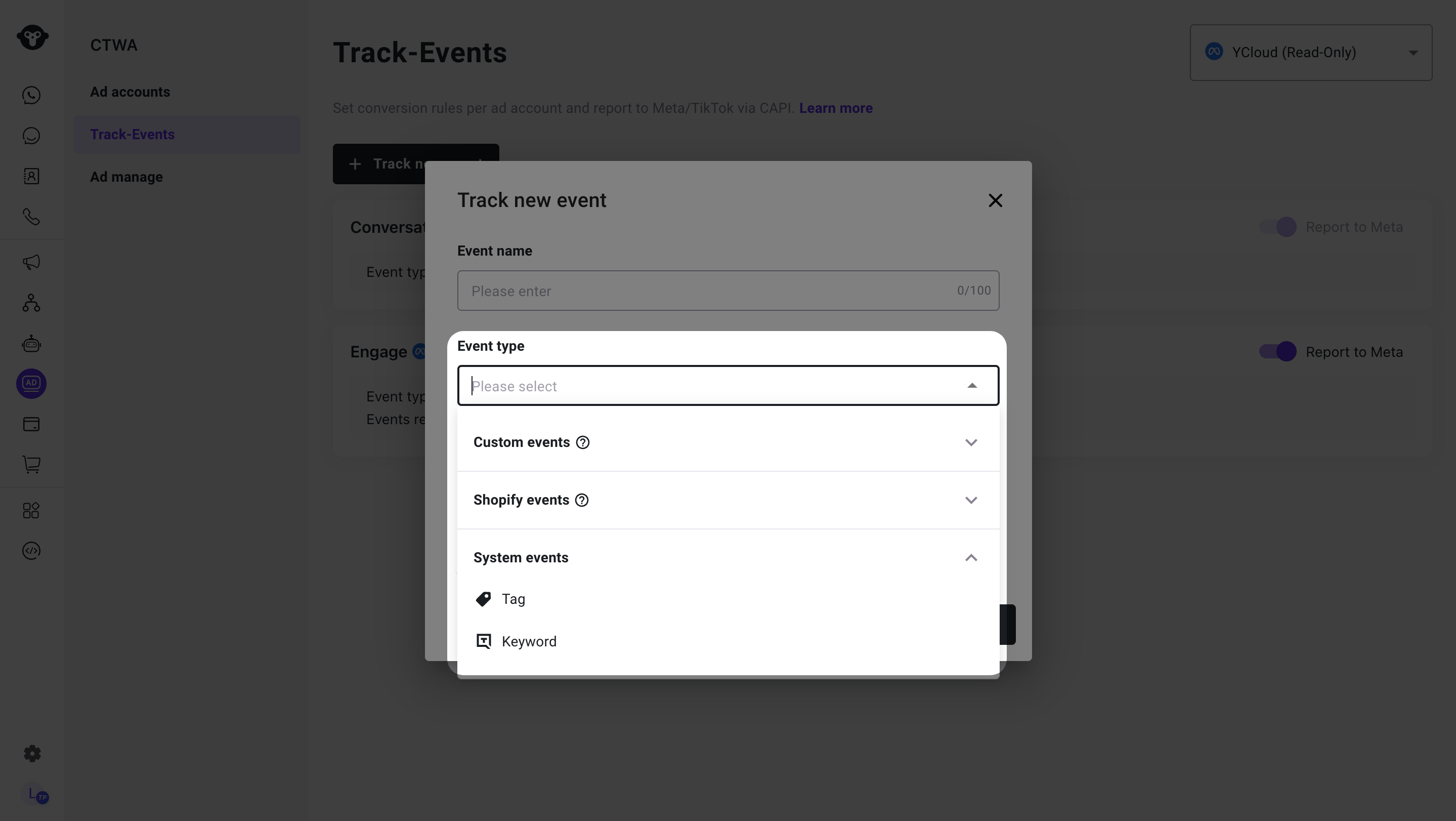
Choose a trigger type for the event
- Choose the Meta Event Name:
LeadorPurchase.
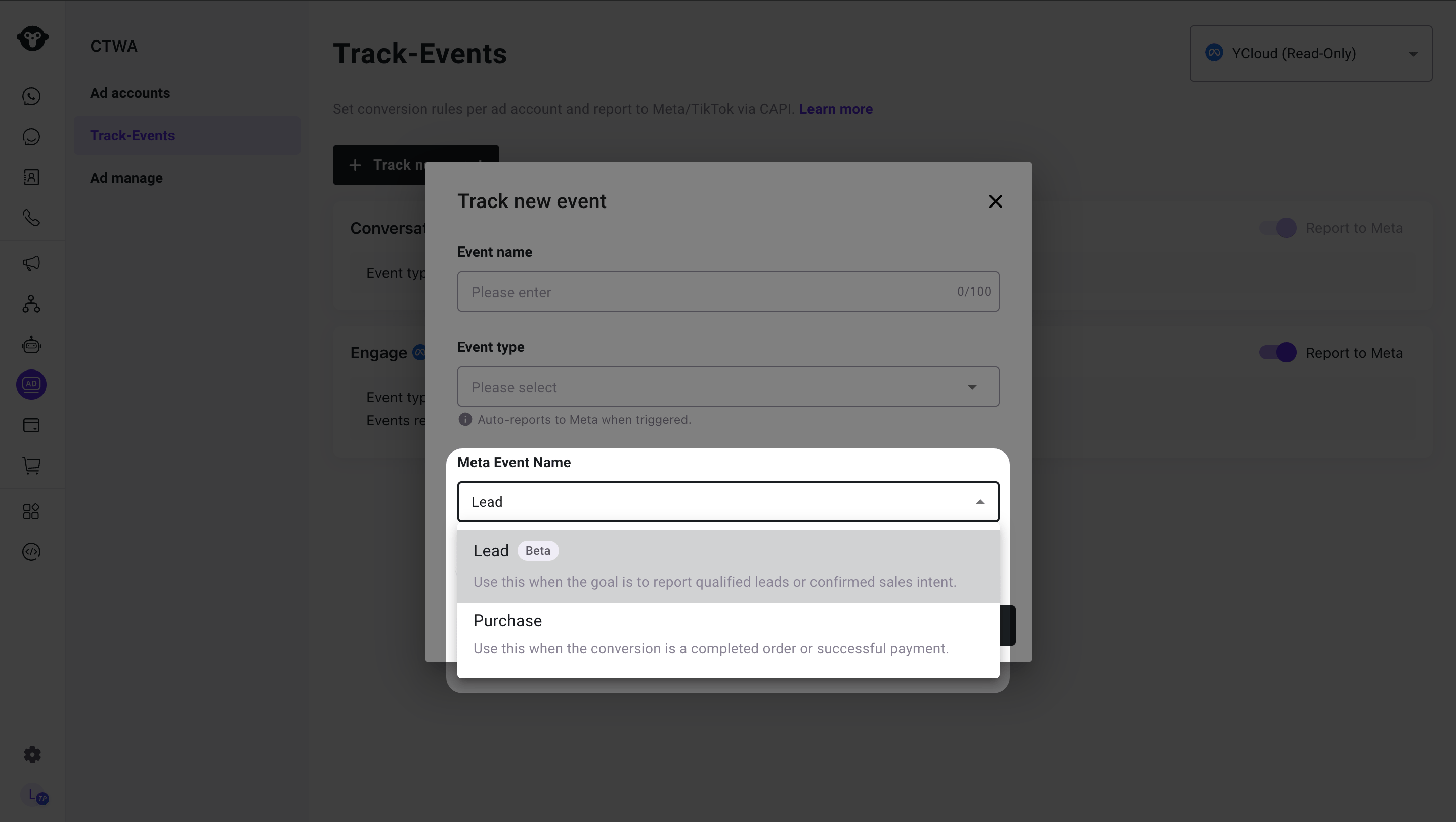
Choose Lead or Purchase as the Meta event name
- Turn on Report to Meta and save the rule.
- Custom Event API: Use this when your own system can confirm a result, such as an order being placed or a payment being completed.
- Contact Tag: Use this when your team or automation adds a tag after a customer becomes a qualified lead or completes a purchase.
- Keywords: Use this when a customer message contains a clear keyword that reliably identifies the result.
demo contact tag and your rule maps that tag to Meta Lead, YCloud can report a Lead signal to Meta for that WhatsApp user.
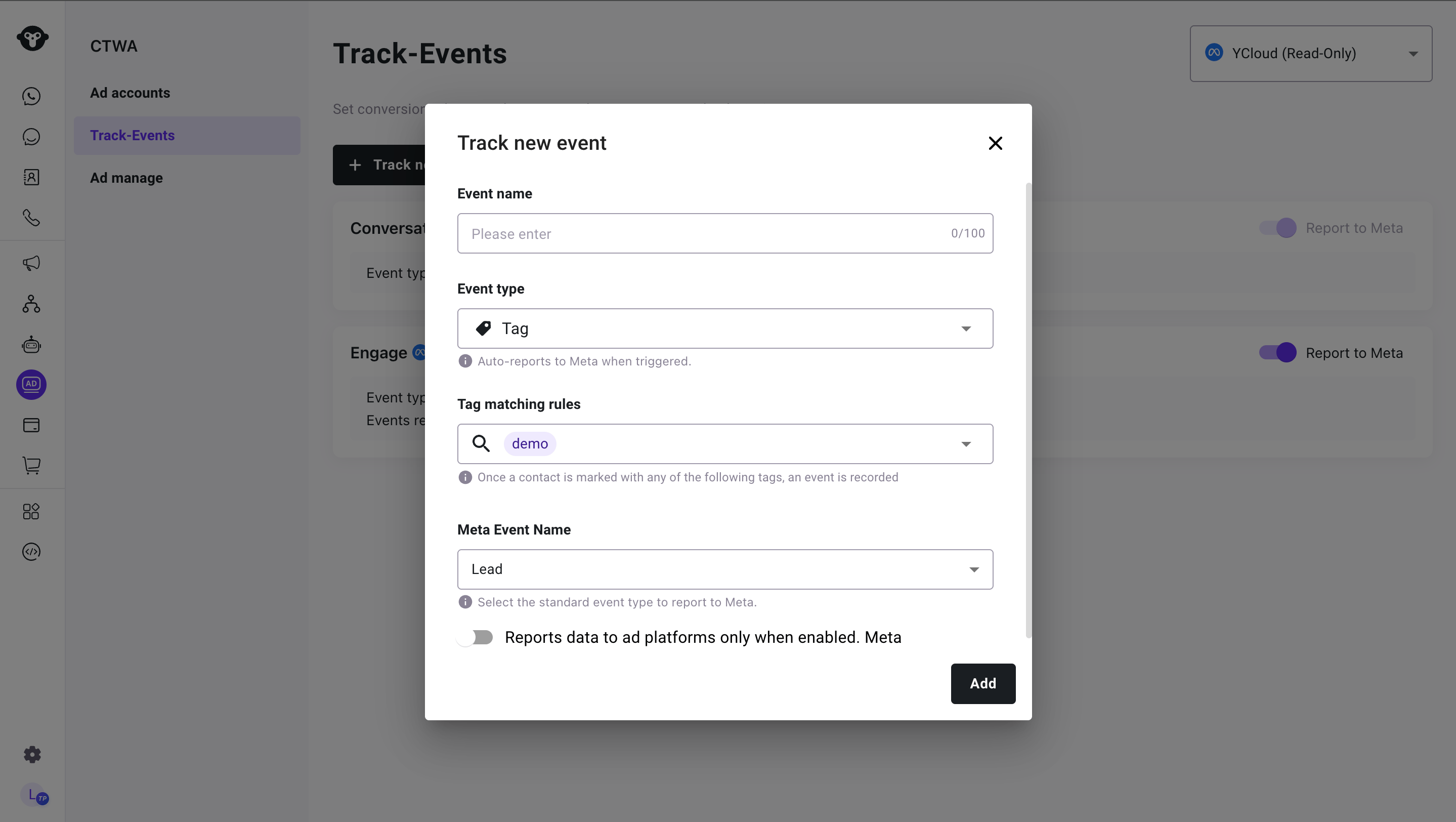
Map a contact tag to a Meta Lead event
Send a custom event without a phone number
If the customer already exists as a contact in YCloud, your system can identify them by their saved Meta username. Define the custom event withobjectType: CONTACT, then send contactUsername without the leading @. Choose one of the contact ID, phone number, or username for each request. See Track custom events for identifier rules and a username request example.
The contact must have the relevant ad attribution, and the event must match an enabled rule with Report to Meta turned on. An accepted custom event does not by itself confirm that Meta received a conversion.
Manage your event rules
You can add or delete custom rules, and turn supported rules on or off.- You can save more than one rule for the same Meta Event Name, but only one rule for that event name can be enabled at a time.
- You can configure
LeadandPurchaseseparately.
YCloud’s default
Engage signal maps to Meta Purchase to help newer ad accounts start accumulating Purchase signals. It is sent only when Report to Meta is turned on. It does not mean the customer placed an order, completed a payment, or generated revenue.Use reported signals for deeper optimization
For custom rules, report only Lead or Purchase results that you can identify reliably. Meta uses eligible CTWA results reported by YCloud to learn which conversations lead to meaningful business outcomes and support deeper optimization. To choose a performance goal and check Meta’s eligibility requirements, see Create a Click-to-WhatsApp Ad.Frequently Asked Questions
Which result should I report as Lead or Purchase?
Which result should I report as Lead or Purchase?
Report
Lead when a customer reaches the qualified-prospect stage that matters to your business, such as completing qualification or agreeing to a sales follow-up. Report Purchase when the customer completes the business outcome you define as a real purchase, such as placing an order or completing payment. Keep each definition consistent so Meta receives reliable signals.Why do I see Purchase in Meta when I have not reported a real purchase?
Why do I see Purchase in Meta when I have not reported a real purchase?
YCloud’s default
Engage signal maps to Meta Purchase to help newer ad accounts accumulate Purchase signals. It is sent only when Report to Meta is turned on. This signal does not mean the customer placed an order, completed a payment, or generated revenue. To report real business results, create a separate rule that maps your own confirmed condition to Purchase.Which dataset receives the events I report?
Which dataset receives the events I report?
A dataset is where Meta receives the signals reported by YCloud. Meta reads these signals from the dataset and attributes them to the relevant ad.Following Meta’s recommended setup, YCloud creates an event dataset for each WhatsApp Business Account (WABA) that you connect to YCloud. This dataset receives the events that YCloud reports.To view the dataset:
- Sign in to Meta Ads Manager.
- Select the Business Portfolio that owns the WABA.
- Open Events Manager, then select Datasets.
- Select the dataset created for that WABA.