

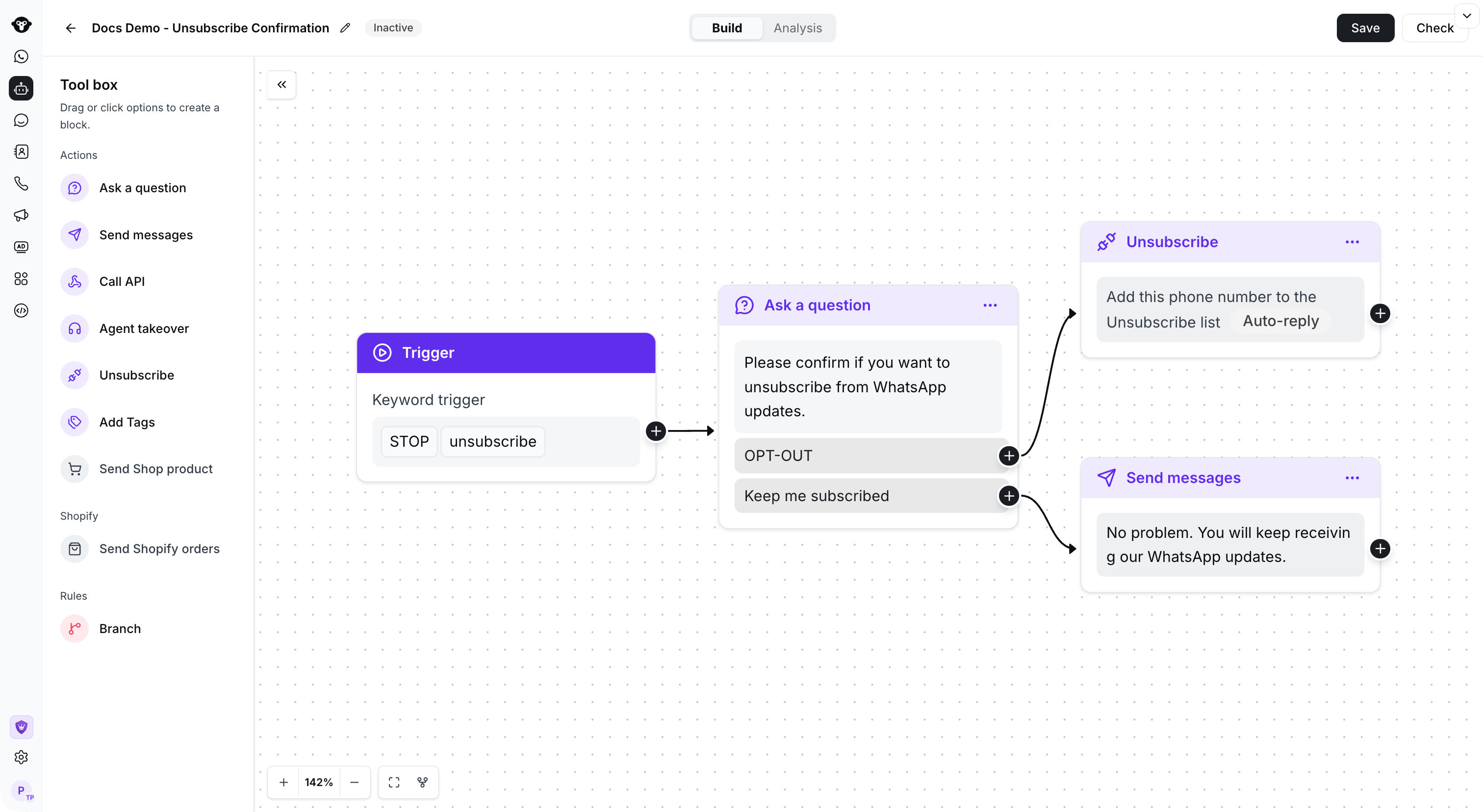
A confirmation flow routes OPT-OUT to Unsubscribe and keeps the other branch subscribed.
步骤 1:创建规则型 Agent 流程

Open Flows and select Create a flow.
步骤 2:添加退订触发关键词
建议:设置多个退订关键词,并选择“包含”(Containing)而非“完全匹配”(Exact matching)。这样,列表中的任意关键词都会触发该规则型 Agent。设置完成后,点击保存按钮。

Choose Containing and add the keywords customers use to opt out.
步骤 3:确认客户的退订意向(可选)
详细步骤:- 选择“提问”(Ask a question)组件
- 选择按钮(Buttons)消息格式

Choose Buttons for a confirmation question.
- 设置询问内容:“请确认您是否要退订 WhatsApp 消息?”
- 为按钮设置两个选项
- 退订(OPT-OUT)
- 保持订阅(Keep me subscribed)
- 设置完成后,点击保存

Enter the confirmation question and both reply choices, then save the node.
- 设置完成后,将关键词触发器连接到“提问”组件
步骤 4:添加到退订列表
- 添加“退订”(Unsubscribe)组件
- 您可以选择是否自动回复退订成功的消息。如果需要,请点击 自动回复 开关,并在下方输入自动回复内容,然后选择保存。

Enable Auto-reply if you want to confirm the successful unsubscribe action.
- 将“提问”组件中的“OPT-OUT”按钮连接到“退订”组件

Connect the trigger to the question, then connect OPT-OUT to Unsubscribe.
步骤 5:添加发送文本消息(可选)
添加发送文本消息组件,并将其连接到 Keep me subscribed 按钮
Send a short confirmation on the Keep me subscribed branch.
步骤 6:保存并激活规则型 Agent
编辑流程后,选择 保存,选择 激活,然后再次保存。当客户完成退订流程时,YCloud 会将该电话号码添加到 联系人 > 退订列表 中。
Choose the desired status before the final Save. This screenshot shows the activation option.