

第 1 步:创建规则智能体流程
打开规则智能体,然后选择 创建流程。
Open Flows, then select Create a flow. The flows shown in this demo are inactive.
- 添加触发器。当客户的消息与其匹配时,流程即会启动。

Start the flow by selecting Add a trigger.
- 添加关键词并选择 精准匹配 或 包含。

Choose a matching rule and enter a keyword. This form has not been saved.
- 提问:用户触发此规则智能体后,您可以在此部分设置要向用户提出的问题,并配置回复按钮。
- 发送消息:当用户点击按钮时,规则智能体将自动回复预设答案。
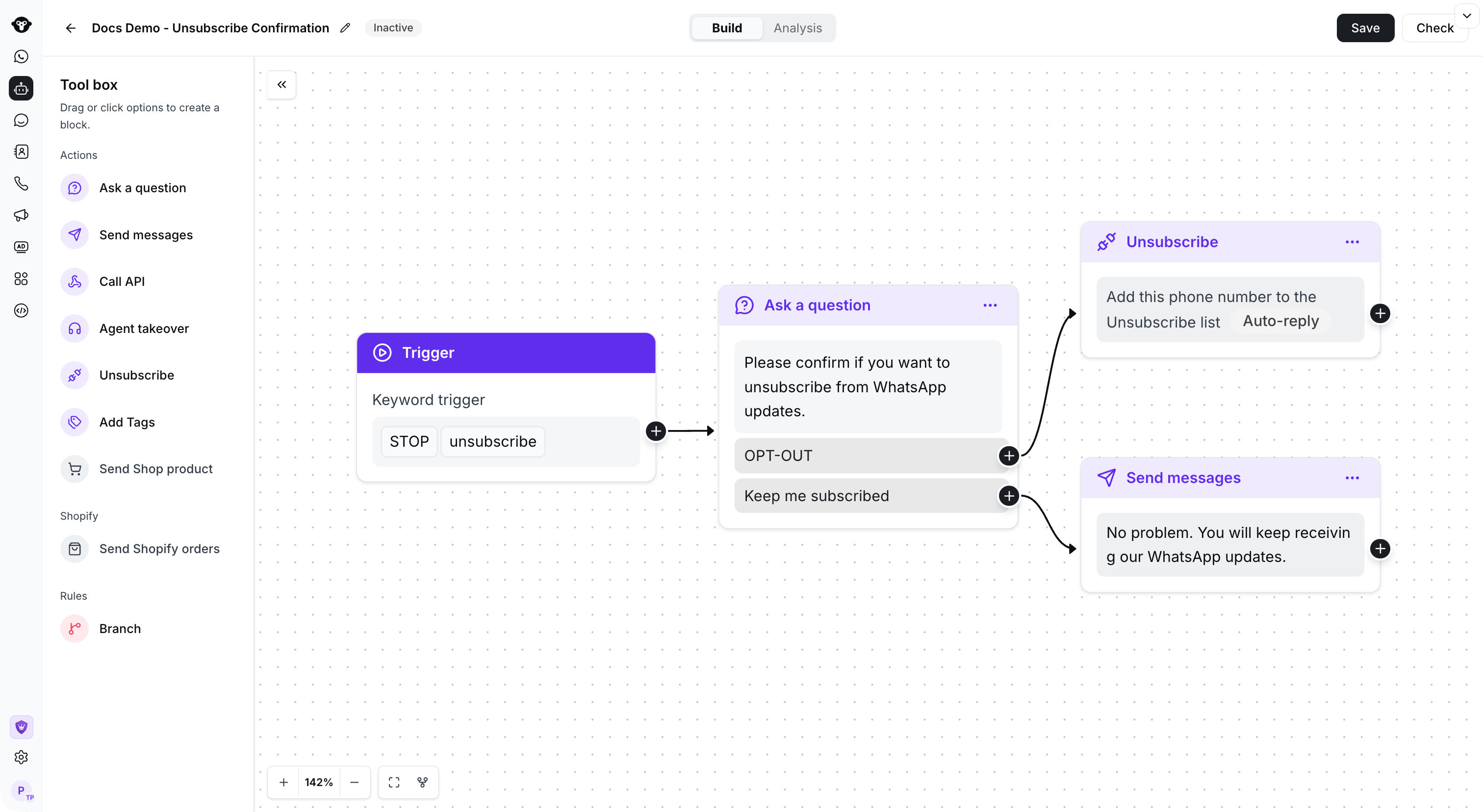
Example: connect a keyword trigger to a confirmation question and route each reply to an action.
复制流程
打开要复用的流程的操作菜单,然后选择 复制。
Open the flow action menu and select Copy.

Select the destination agent, then choose Copy.