

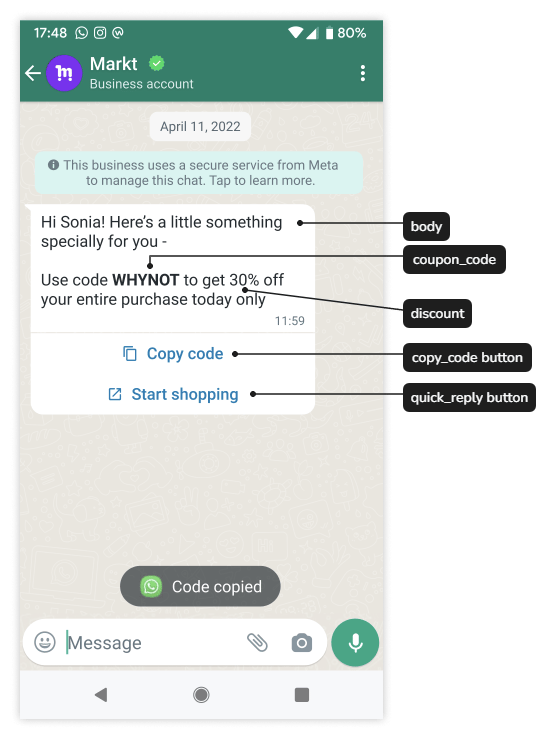
A coupon-code template is a marketing message with a button that copies a promotional code to the customer’s clipboard.
Meta coupon message labeling the promotional code, discount, copy-code button, and quick-reply button.

A promotional code is copied for redemption.

Source: Meta official example.

Make the offer understandable

Include the benefit, where the code can be used, and the important conditions. For example:
Save 15% on selected travel bags with code TRAVEL15. Valid through 30 September on orders over $50. See eligible items and full terms on our offer page.
This is illustrative copy, not a claim that every promotion or product is eligible. Decide whether the code is shared, single-use, or customer-specific. Your promotion system—not WhatsApp—enforces the minimum order, eligible products, redemption limit, and expiry.

Configure the template

  1. Select the intended WABA and a Marketing template.
  2. Write the body and provide realistic examples for variables.
  3. Add the supported copy-code button.
  4. Add a destination or instructions explaining where to redeem the offer.
  5. Submit and wait for approval.
The template defines the button and review example. The send request supplies the actual promotional code. If the body also displays the code, supply the same value in both places. For API sending, the button uses subtype copy_code with a parameter of type coupon_code. This differs from the special OTP-button sending behavior of authentication templates. Example of a send-time button component only:
Use the button’s actual zero-based position; 0 means the first button. This fragment does not include the required message envelope or any body parameters.

Limits and client behavior

Meta’s current coupon-template documentation specifies one copy-code button, a system-controlled button label, and a maximum of 20 characters for the example code. The YCloud OpenAPI field does not declare its own code-length maximum; if your editor applies a lower limit, use that supported limit and confirm any discrepancy before sending. Meta also documents that this format is not supported in the WhatsApp web client. Test the phone experience; do not approve the design solely from a desktop conversation. Use a short, unambiguous code. Avoid exposing account credentials, authentication codes, or personal information as promotional codes.

Test redemption, not only copying

Check that the copied value matches the body, the offer page accepts it, eligible and ineligible baskets behave correctly, and expired or already-used codes are rejected appropriately. Monitor message delivery and actual redemption separately. A copy-button interaction is not proof of a purchase. Continue with Marketing templates, Manage templates, and Send WhatsApp messages. Source: Meta coupon-code templates.