

What is WhatsApp Coexistence
This means your WhatsApp Business API and WhatsApp Business App can now co-exist together! Onboarding a number already in use with the WhatsApp Business App for API access allows both the API and the app to operate on the same phone number. You can use features such as large-scale messaging, AI Agent replies, rule-based flows, and Journeys while continuing to send messages from the WhatsApp Business App. This feature is perfect for teams looking to transition to API-based workflows while continuing to use their existing app.Why use WhatsApp Coexistence
Scenario 1: If your employees need to communicate with users using a work computer during the day and continue the conversation seamlessly via the app in the evening. ✅ Corresponding benefits: Messages will be mirrored between the mobile App and the API. That is:- Messages sent via the API will appear in the WhatsApp Business App.
- Messages sent via the App will appear in the Cloud API conversation history, which you can check on computers.
Noteworthy Info
Throughout
- In order to remain compatible with the WhatsApp Business app, business phone numbers that are in use with both the WhatsApp Business app and Cloud API have a fixed throughput of 5 mps(messages per second).
Requirement
To use this feature, you must be using WhatsApp Business app version 2.24.17 or higher.Pricing
Messages sent from the WhatsApp Business app remain free, messages sent from the API Partner Platform are charged based on the existing API pricing model.Function comparison after binding
The following table describes features available to business customers who have been onboarded to Cloud API, as well as any changes to WhatsApp Business app functionality post-onboarding.Note: Media messages (such as those containing images, videos, and audio) that are more than 14 days will not be able to be synchronized.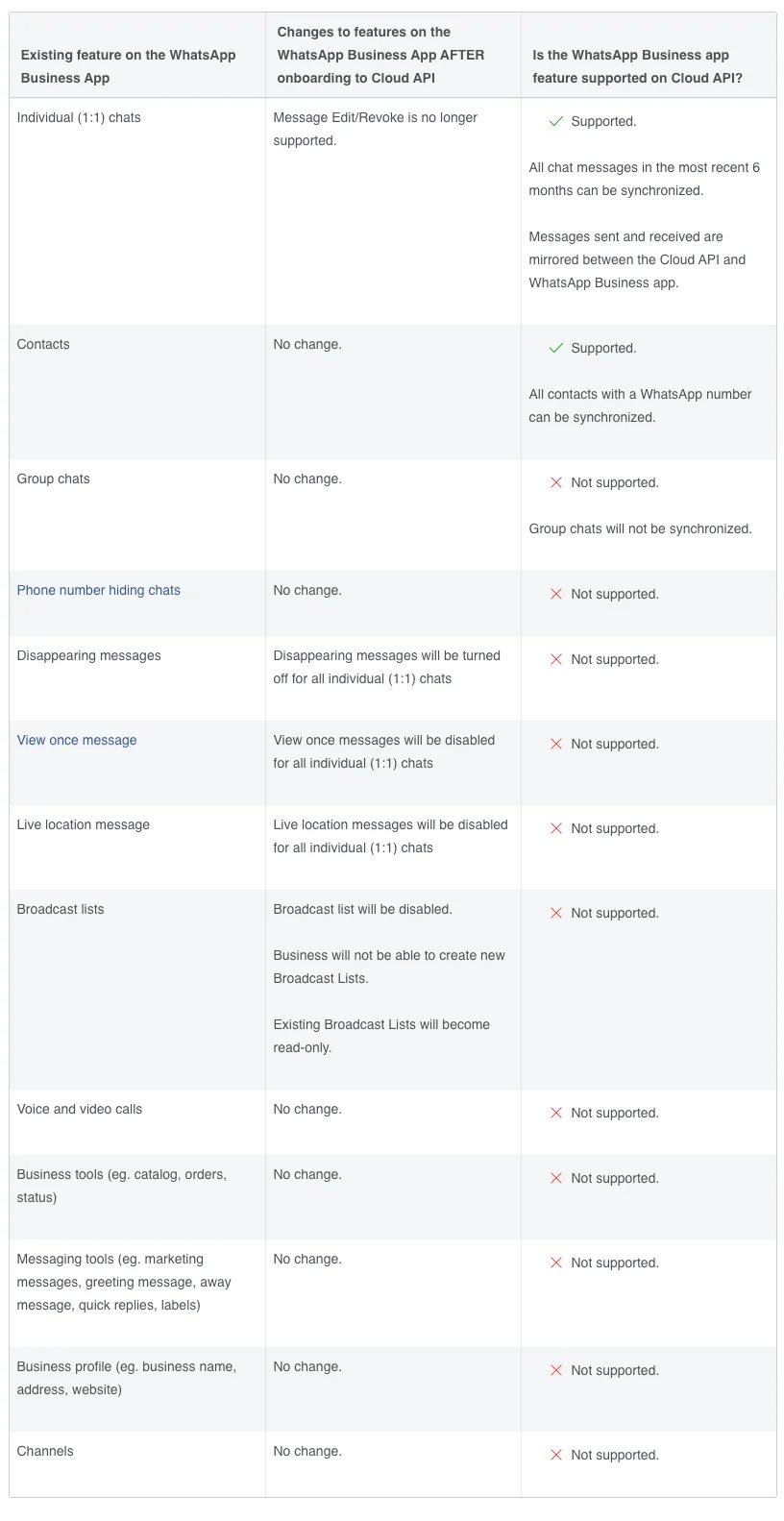
How it works
Open WhatsApp accounts, click Create Channel, and locate WhatsApp Business APP Coexistence.
Select Get started under WhatsApp Business APP Coexistence.

Read the tutorial, then select I'm ready to start to open embedded registration.
Both methods keep the phone number available in the WhatsApp Business App while connecting it to YCloud.
Option 1: Connect with Facebook
This method binds the WhatsApp Business App number to a Meta business portfolio. You can later maintain and manage the associated business assets in Meta Business Portfolio. Before starting, prepare a Facebook account, your company’s registration documents, and its website. These materials are required for Business Verification.- Sign in to your Facebook account.
- Create a business portfolio or select an existing one.
- In the WhatsApp Business Account step, select Connect a WhatsApp Business App.
- Enter the phone number used by your WhatsApp Business App.
- When the QR code appears, open the WhatsApp Business App on the phone and scan it to authorize the connection.
- On the phone, choose whether to synchronize your chat history. You can synchronize up to the most recent six months of history.
Option 2: Connect by QR code
This is the faster onboarding method. It does not require a Facebook login or the creation of a business portfolio during the connection process.- Select the QR-code connection method.
- Enter your business name and website information.
- Enter the WhatsApp Business App phone number that you want to connect.
- Open the WhatsApp Business App on the phone and scan the QR code to authorize the connection.
- On the phone, choose whether to synchronize your chat history. You can synchronize up to the most recent six months of history.
Synchronize chat history
After authorization is complete, YCloud starts synchronizing chats immediately if you chose to share your chat history. Keep the WhatsApp Business App open during synchronization. New messages appear in YCloud Inbox only after synchronization is complete.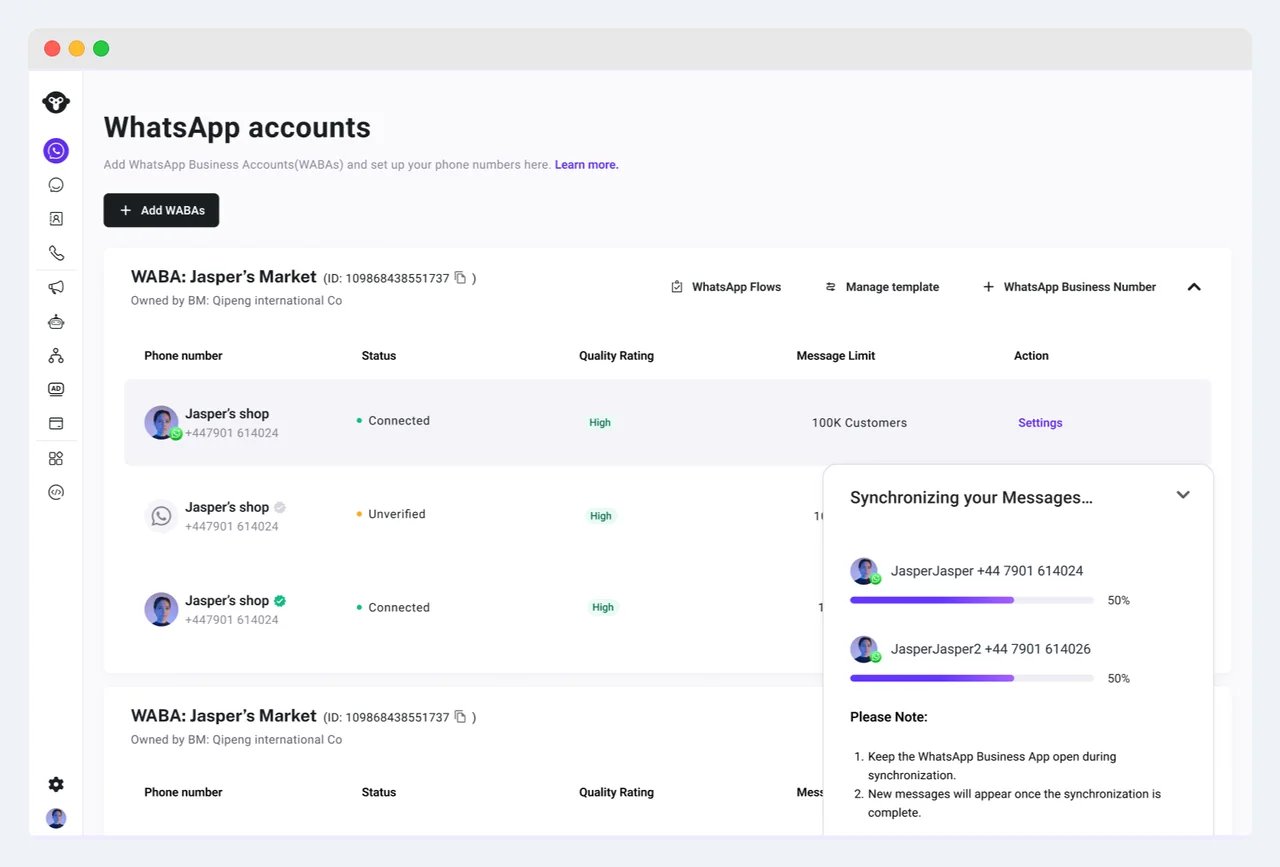
Watch the tutorial video
Watch the WhatsApp Business App coexistence tutorialFrequently asked questions
Will coexistence affect normal use of the WhatsApp Business App?
Will coexistence affect normal use of the WhatsApp Business App?
No. You can continue to send and receive messages and manage contacts in the WhatsApp Business App.
Can I set up coexistence through an API?
Can I set up coexistence through an API?
No. WhatsApp Business App coexistence must be connected through the YCloud platform. YCloud does not provide an API for this onboarding operation.
How do I resolve common coexistence binding errors?
How do I resolve common coexistence binding errors?
Why did a previously connected coexistence account disappear?
Why did a previously connected coexistence account disappear?
Meta may automatically unlink the account when the WhatsApp Business App has been inactive or when the app is signed in on a different device. Connect the account again in YCloud.