

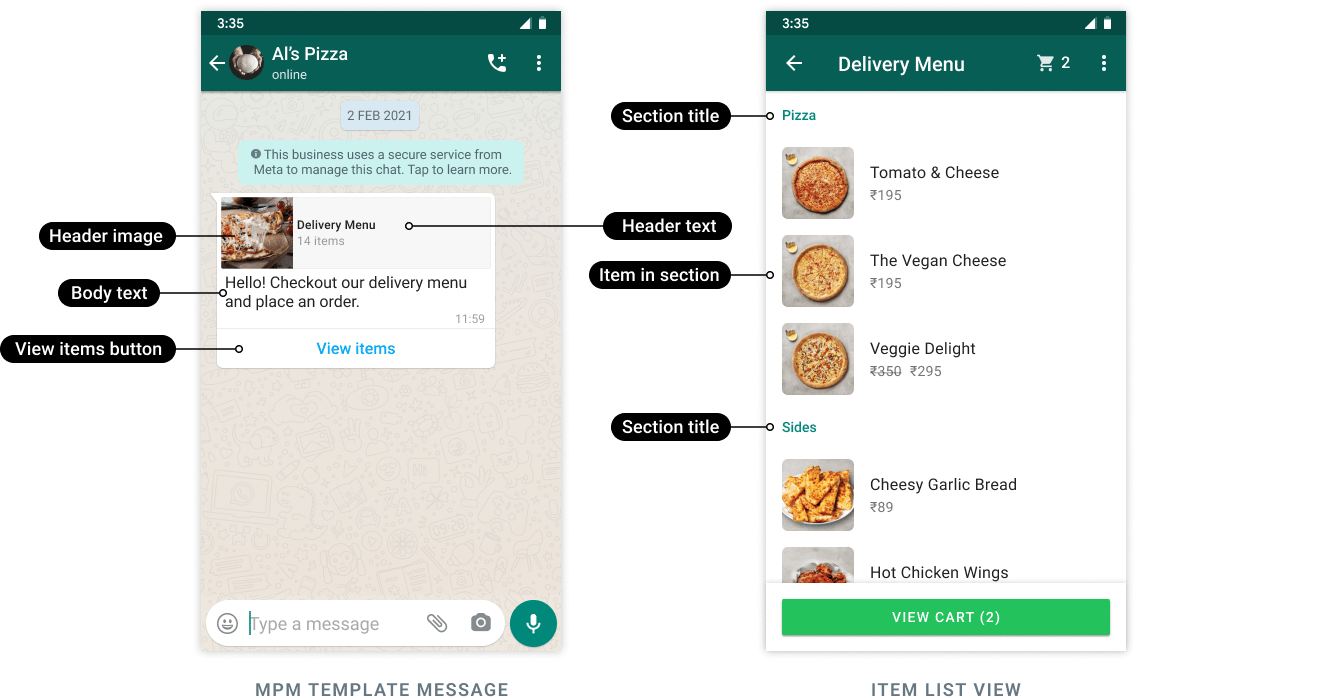
View items opens the selected product sections, rather than the full catalog.
Prepare the catalog
Connect the correct catalog to the intended WhatsApp assets. Verify product availability, commerce-policy eligibility, and every product retailer ID. In Commerce Manager, the retailer identifier is labeled Content ID. Use that value—not the product name, image URL, or an unrelated internal item ID. The existing YCloud workflow uses API creation and sending. Do not assume that this template appears in every console editor.Structure the selection
The current YCloud sending contract documents:
The 30-product limit applies to the entire message, not separately to each section.
For example, a travel shop could use Day trips with four items and Weekend kits with six. Ten products across two clear sections is easier to scan than filling the maximum solely because it is available.
Create once, supply products at send time
- Create a marketing template with the supported
MPMbutton and required body samples. - Wait for approval and confirm the sending language.
- Build the live product sections for that campaign.
- Supply the button subtype
mpmand the action containing those sections. - Send a controlled test before sending to the audience.
thumbnail_product_retailer_id. The selection itself uses the action’s sections and their product_items.
Example of the action object only, using fictional catalog identifiers: