

Before you start
Confirm these five items:- Correct business portfolio. Select the portfolio that owns the relevant WABA, not another portfolio with a similar display name.
- Full control. The person completing the standard verification flow needs full control of the portfolio. Access to a WABA or a YCloud account alone is not enough.
- Eligibility or a verification request. Meta must offer the flow for the feature you are using. Some products start verification outside Security Center.
- Consistent business information. Prepare the legal business name, address, phone number, and website.
- Access to a connection method. Someone authorized must be able to receive the offered code or verify the business domain.
| Materials | Requirement | Example |
|---|---|---|
| An official website |
| Display the company name on the websit: © 2024 YCloud International Pte. Ltd. All rights reserved |
An official document containing the legal name of the business.
| The file must include the full name of the company, its address, and its telephone number | 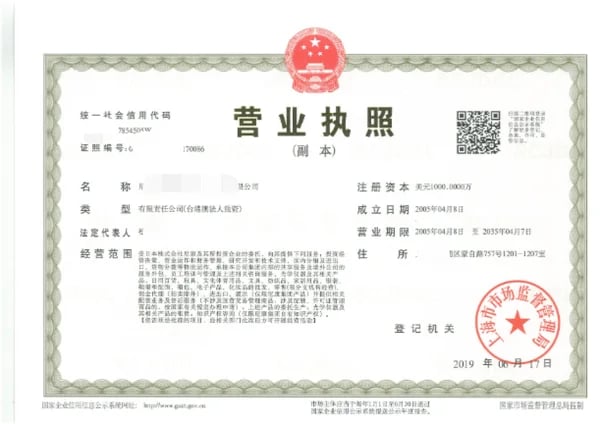 |
| Email address (required when you choose to use email address for business verification) | Email’s domain must be same as your website. Aim to collect the verification code in order to prove that the website belongs to you. | service@ycloud.com |
Prepare a matching set of business details
Meta compares the information you submit with business records and, when requested, supporting documents.
For example, if the legal entity is Example Retail Ltd. and the store trades as Example Store, do not randomly alternate the two names across the submission. Use the legal name where Meta asks for it and make the brand’s relationship to the company clear on legitimate business materials. Do not edit an official document to make it match.
Which documents can you use?
Meta may recognize a business record without asking for uploads. If uploads are requested, prepare official, current documents appropriate to the field being verified.
Make sure the business name and the address or phone number being verified are visible. Keep the issuer and relevant document details legible; do not upload expired documents. Cover unrelated sensitive personal information, such as a social security number, without hiding the business information needed for review.
Meta accepts documents in multiple languages, including English, Mandarin, Spanish, Portuguese, French, Arabic, and others. If your document’s language is not supported, Meta asks for an English translation bearing an official translation-agency stamp. Check the complete supported document and language list before ordering a translation.
Complete the standard desktop verification flow
1
Open the correct portfolio
Sign in to Meta Business Suite, select your business portfolio, and open Security Center. Confirm you have full control before continuing.
2
Start verification
Select Start verification when it is available. If Meta sent an in-product or email request for a specific feature, follow that request’s route instead.
3
Enter the business details
Enter the legal name, address, business phone number, and website. Check spelling, legal suffixes, and address details against your documents before submitting.
4
Select a matching business record
Select the record only if it represents your organization. If none matches, use My business isn’t listed or None of these match, then provide the requested information or documents. Do not choose a similarly named company to continue.
5
Confirm your connection to the business
Choose one of the methods Meta actually offers and complete it. Options may include email, phone call, SMS, WhatsApp message, or domain verification. You may be asked for proof of domain ownership when using email.
6
Submit and track the result
Complete the confirmation and select Done. Keep the submission confirmation and check the portfolio’s verification status and any requests for additional information.
Choose a method you can complete
Use the information and destination shown by Meta.
If the button is missing or the review fails
For case-specific errors, keep the exact rejection text and use Meta’s verification troubleshooting guidance. YCloud support can help identify the assets and explain context, but Meta decides the outcome.
What changes after approval?
Check that the intended portfolio shows the verified result. Then return to the capability you need:- For more proactive messaging capacity, check the separate messaging limit.
- For additional registered numbers, check the number cap.
- For a badge, assess the separate OBA requirements.
Prepare an effective support request
Include the portfolio ID, WABA ID, exact status or error, submission date, and a redacted screenshot of the relevant Meta screen. Explain what changed between attempts. Do not send passwords, verification codes, full identity documents, or access tokens in a general support message.Frequently asked questions
My brand name and registered company name are different. Which should I submit?
My brand name and registered company name are different. Which should I submit?
Use the legal entity’s details for business verification. Keep the brand relationship clear on your website and in the evidence Meta requests. Do not replace the legal name with a marketing name just to make it match the WhatsApp display name; the display name has a separate review.
Can I use a utility bill as my only business document?
Can I use a utility bill as my only business document?
Not for every field. A supported utility bill can help establish an address or phone number, but it is not accepted as proof of the legal business name. Select accepted documents that cover each requested detail; the same document does not necessarily prove all of them. See the document table above and Meta’s country-specific requirements.
Verification is complete in another portfolio. Does that verify this WABA?
Verification is complete in another portfolio. Does that verify this WABA?
Check which portfolio owns the WABA you are actually connecting. A verified status in another portfolio is not evidence that this owning portfolio is verified. Record the portfolio ID and WABA ID before contacting support; do not create another portfolio merely because you cannot find the verified one.