Use Alipay to verify a business registered in mainland China during WhatsApp embedded signup.
Businesses registered in mainland China can use Alipay as an alternative to document-based WhatsApp business verification when Meta offers Verify by Alipay at the end of embedded signup. Your legal representative uses their personal Alipay account to authorize the identity check and completes the required QR-code scan and face verification on their own phone.
Currently, this option is offered only at the end of a WhatsApp embedded signup session. It cannot be started as a standalone verification flow after you leave that session. Meta decides whether to offer it.This Alipay verification step is optional. If you are not ready, select Skip for now in the Meta window. Your completed WhatsApp signup is preserved, and you can use the standard document verification process later.
Your business is registered in mainland China and has a Unified Social Credit Code.
Your business has not already completed WhatsApp business verification.
The Facebook account used for signup has permission to manage your business’s settings in Meta.
Your legal representative holds a Chinese resident identity card and can sign in to their own personal Alipay account on their phone. They must be available to authorize the check, scan the QR code, and complete face verification themselves.
Have the following details ready, and make sure your legal representative can sign in to their own personal Alipay account. The business and identity details must match the official records.
What to prepare
Requirement
Unified Social Credit Code
Your business registration number: 18 alphanumeric characters.
Legal representative’s name
The name exactly as shown on the legal representative’s identity card.
Legal representative’s identity card number
The 18-character number on their Chinese resident identity card. The first 17 characters are digits; the last character is a digit or X.
Personal Alipay account
The legal representative’s own account. The identity information you submit must match the information held for that account.
The screenshots below show the Chinese-language flow. English descriptions explain the actions and required information. Account and business details are redacted.
1
Complete WhatsApp embedded signup
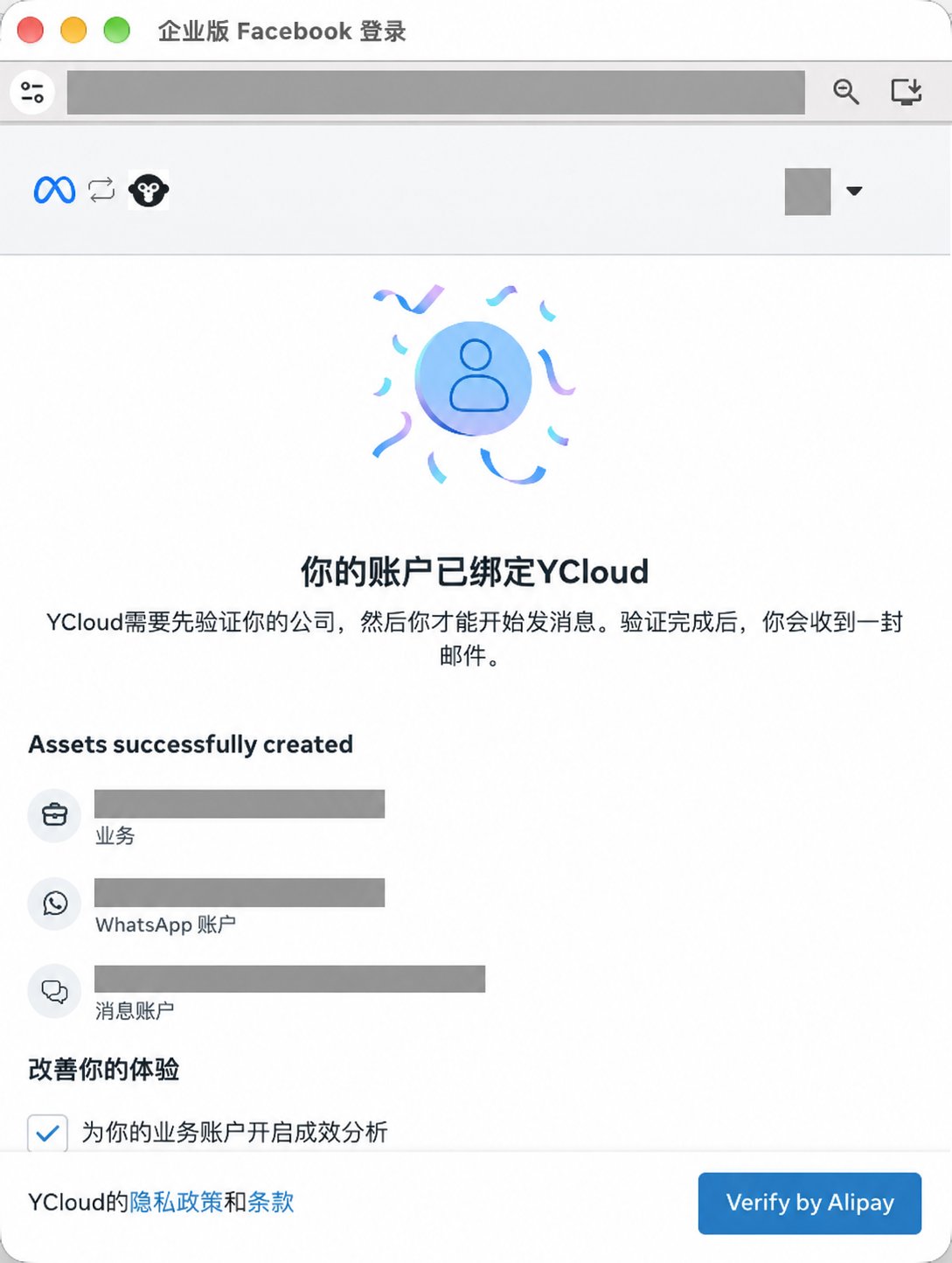
Follow Create WABA via Embedded Sign-up. When signup completes, Meta shows Verify by Alipay for eligible businesses registered in mainland China.Keep the embedded signup window open if you want to continue with Alipay verification.
After signup, eligible businesses see Verify by Alipay on the completion screen.
2
Enter your business and legal representative details
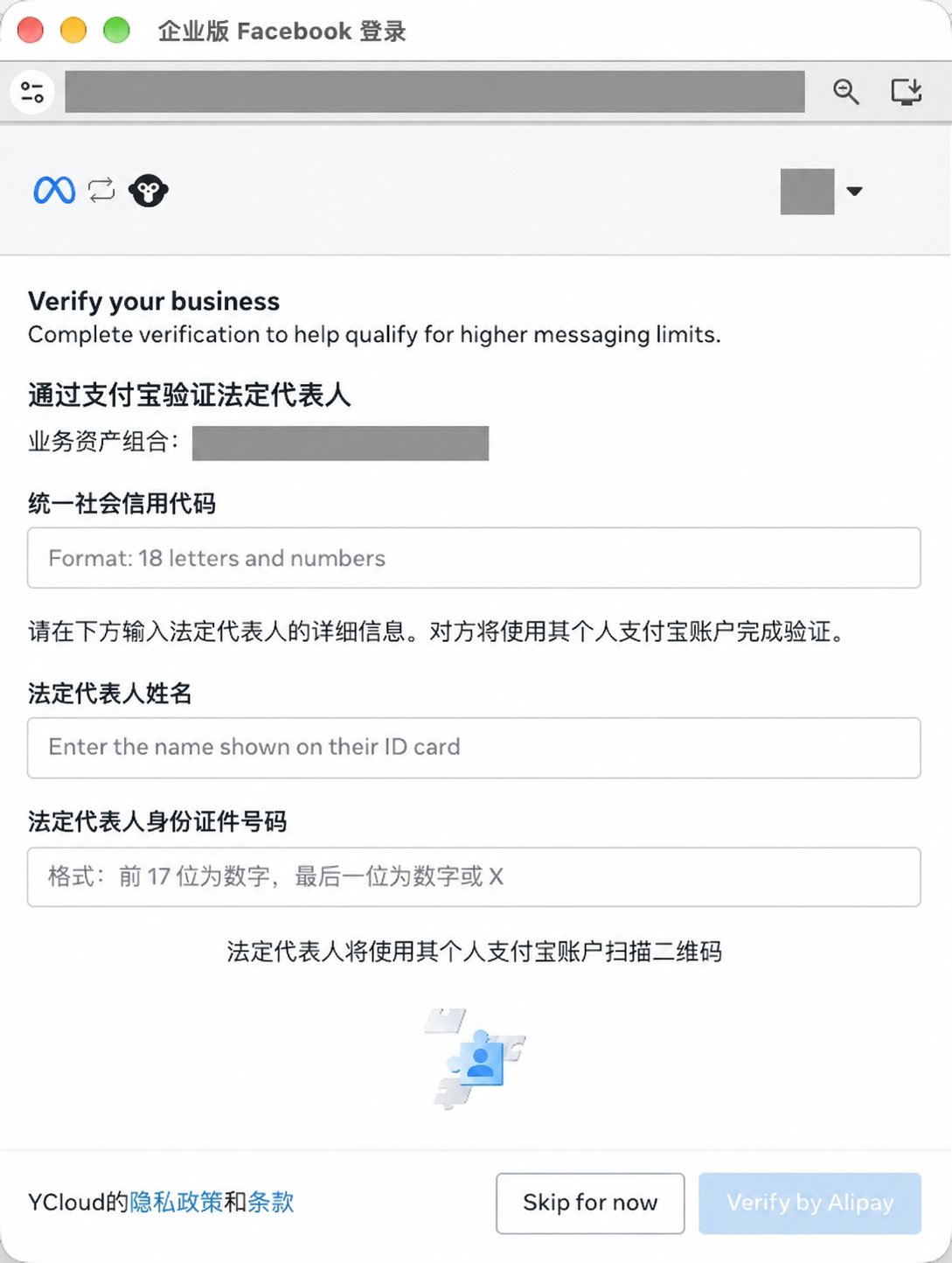
Select Verify by Alipay to open Meta’s form. Enter your Unified Social Credit Code, your legal representative’s name, and their identity card number using the requirements above.Review the details and follow the consent instructions in Meta’s verification step, then select Verify by Alipay again to submit the form. These details are shared with Alipay / WorldFirst for verification.
Prepare the business's Unified Social Credit Code, the legal representative's name, and their identity card number.
3
Open Alipay verification
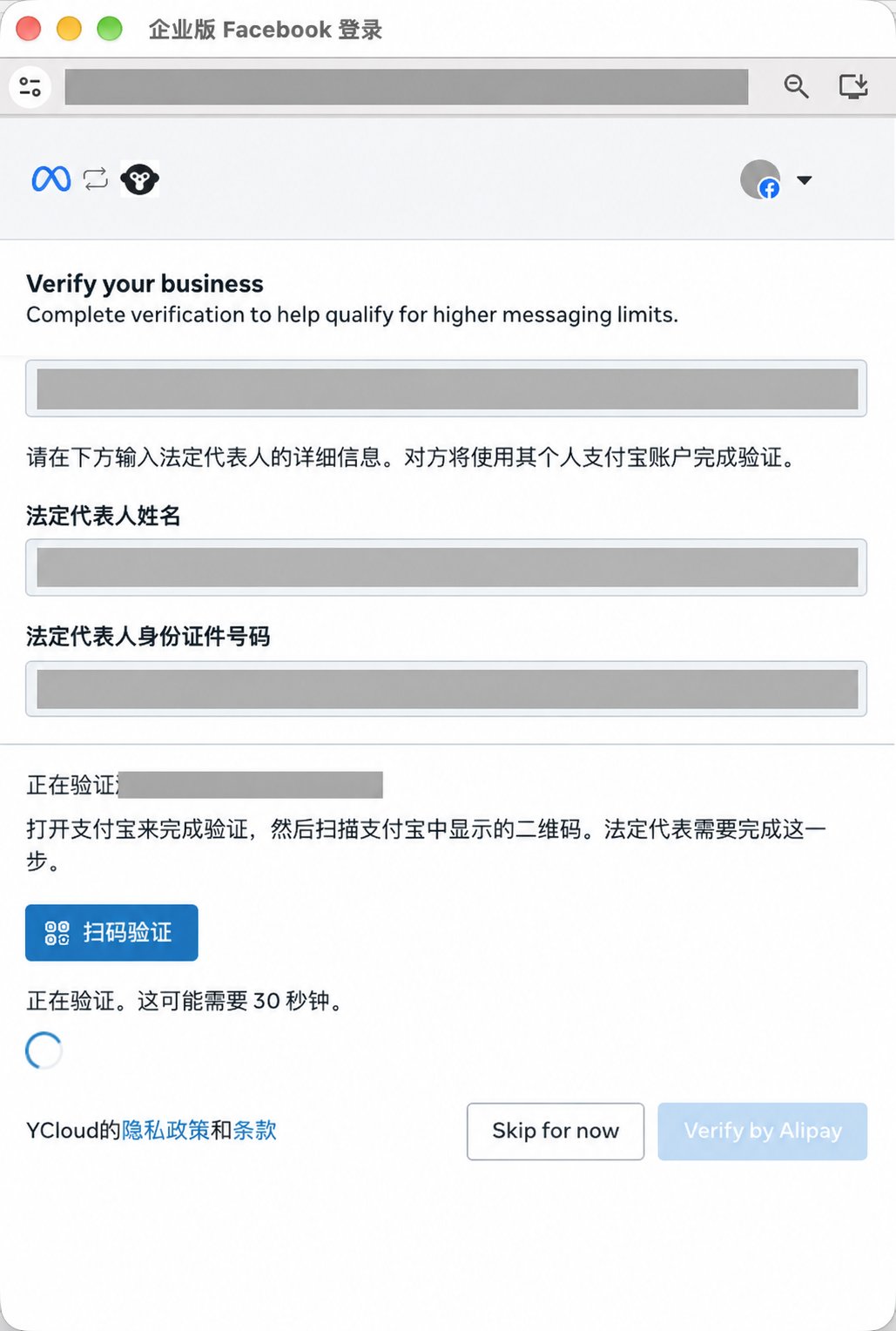
Meta displays a verification-in-progress screen. Select Scan to verify (扫码验证) to open the Alipay service authorization page in a new browser tab.Keep the original Meta window open. A waiting message or estimated processing time does not mean verification has succeeded.
On Meta's progress screen, select Scan to verify to continue to Alipay authorization.
4
Review and authorize in Alipay
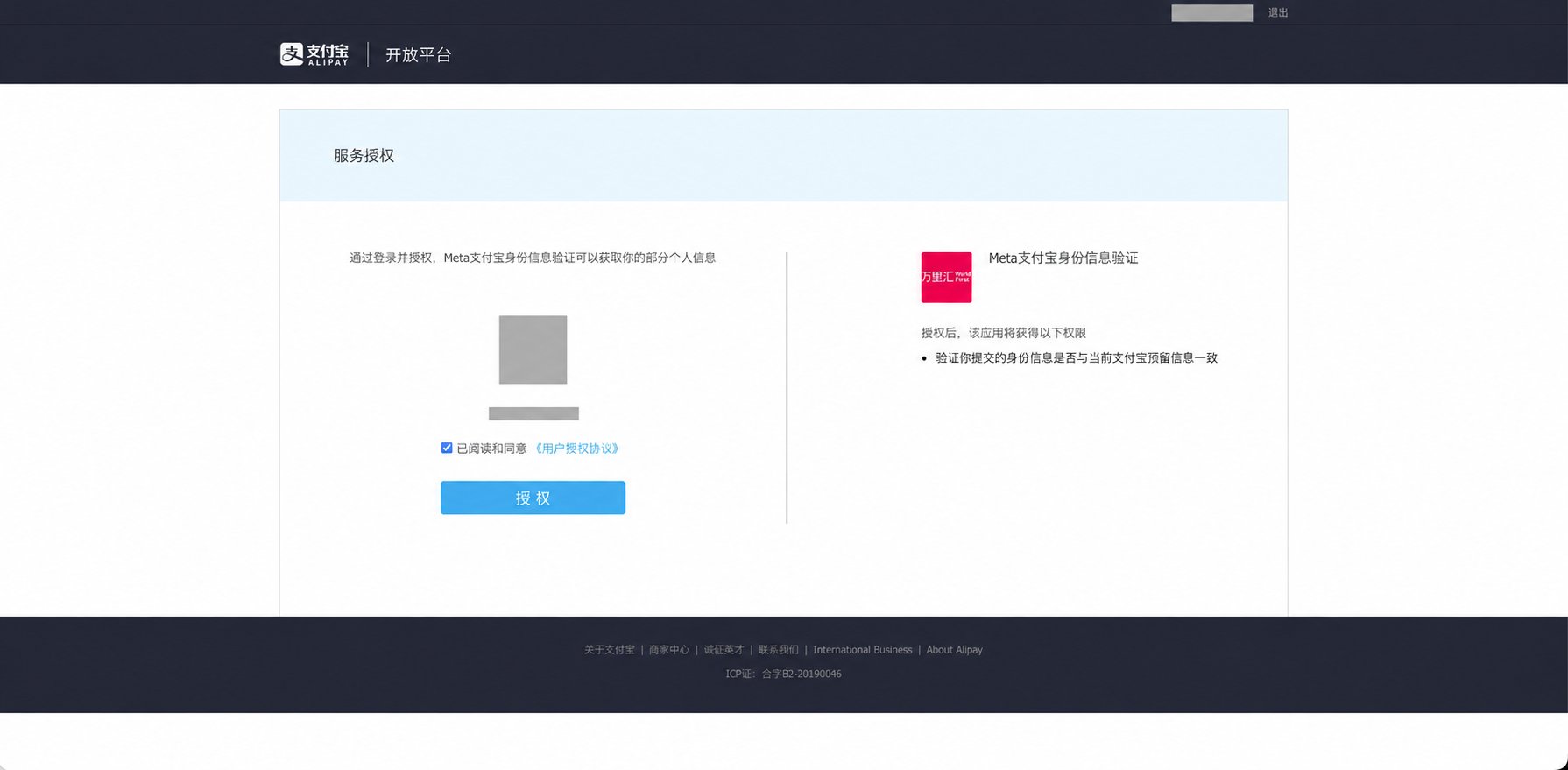
Make sure the Alipay account shown belongs to your legal representative. The authorization page identifies the Meta identity-verification service and WorldFirst. It requests permission to check whether the submitted identity information matches the information held for the signed-in Alipay account.Have your legal representative review the requested permission and User Authorization Agreement, select the agreement checkbox, and choose Authorize (授权).
Review the requested identity-check permission and agreement, then authorize using the legal representative's own Alipay account.
5
Complete the identity check and check the result
Follow the subsequent on-screen instructions. Your legal representative must use their personal Alipay account on their own phone to complete the required QR-code scan and face verification. The person setting up WhatsApp cannot complete this check on their behalf.If verification succeeds, Meta shows a confirmation and a Continue button. Select Continue to proceed. Authorizing the identity check is a separate step from completing business verification.The business verification status may update after the window closes. Submitting the form, authorizing access, or scanning the QR code alone does not mean verification has succeeded.
Continue signup normally. Meta determines eligibility. You can use the standard business verification process when available.
The identity check fails
You can retry in the same session. The form reopens with your entered values; check for mismatches and make sure the legal representative completes the face check. You can also leave this step and use the standard document verification process.
You skip verification or close the window
Your completed WhatsApp signup is preserved. You can still use Meta’s standard document verification process.
The status has not updated yet
Do not treat a delay as a failed verification. Check the result shown by Meta.
This option is currently offered only at the end of the embedded signup session. You cannot launch it separately after leaving that session. If you need to verify your business later, follow the standard business verification guide.
I already completed Alipay verification for Meta ads. Do I need this step?
Alipay verification completed for Meta ads does not grant WhatsApp business verification. If your business has not completed WhatsApp business verification, Meta may still offer this step.
{"docsConfig":{"theme":"mint","$schema":"https://mintlify.com/docs.json","name":"YCloud Docs","description":"YCloud product documentation, API reference, and webhook payload documentation.","colors":{"primary":"#602DED","light":"#FD4C7D","dark":"#1a1e22"},"logo":{"light":"https://mintcdn.com/lchnan/AXn0jsI-c5aPnOMW/logo/light.png?fit=max\u0026auto=format\u0026n=AXn0jsI-c5aPnOMW\u0026q=85\u0026s=0865e4207d765d07a769c29bc819adbe","dark":"https://mintcdn.com/lchnan/AXn0jsI-c5aPnOMW/logo/dark.png?fit=max\u0026auto=format\u0026n=AXn0jsI-c5aPnOMW\u0026q=85\u0026s=1bafffbe886c0ac13b0409dc90d446f8","href":"https://www.ycloud.com"},"favicon":"https://mintcdn.com/lchnan/AXn0jsI-c5aPnOMW/favicon.png?fit=max\u0026auto=format\u0026n=AXn0jsI-c5aPnOMW\u0026q=85\u0026s=1eed9e0b562f4b06368d2b8185b801b4","api":{"openapi":["openapi/endpoints/ycloud-api-v2.yaml","openapi/webhooks/testing-webhooks.yaml"],"params":{"expanded":"closed"},"playground":{"display":"interactive"},"examples":{"defaults":"required","prefill":true,"autogenerate":false},"url":"full"},"background":{"color":{"light":"#ffffff"}},"navbar":{"links":[{"href":"https://www.ycloud.com/customer-support","label":"Support"},{"href":"https://www.ycloud.com/pricing","label":"Pricing"}],"primary":{"type":"button","label":"Dashboard","href":"https://www.ycloud.com/console"}},"seo":{"indexing":"all"},"fonts":{"heading":{"family":"Inter","weight":650},"body":{"family":"Inter","weight":450}},"icons":{"library":"fontawesome"},"styling":{"codeblocks":{"theme":{"light":"github-light","dark":"github-dark"}},"latex":true},"errors":{"404":{"redirect":true}},"contextual":{"options":["copy","view","chatgpt","claude","perplexity","mcp","cursor","vscode"],"display":"header"},"markdown":{"schema":true},"navigation":{"languages":[{"language":"en","default":true,"href":"en/documentation/overview"},{"language":"zh","href":"zh/documentation/overview"},{"language":"es","href":"es/documentation/overview"},{"language":"pt","href":"pt/documentation/overview"},{"language":"ru","href":"ru/documentation/overview"}]}},"deployment":{"deploymentMetadataValue":{"subdomain":"lchnan","hasAudioNarration":false,"actualSubdomain":"lchnan","customDomains":["docs.ycloud.com"],"gitSource":{"type":"github","owner":"ycloud-developers","repo":"ycloud_docs","deployBranch":"main","contentDirectory":"","isPrivate":true,"mountPath":"","label":""},"chroma":{"collectionId":"125d1ee6-8449-4ab6-a3d9-6bac870b3098","liveDeploymentHistoryId":"6aeccc1890fdd8a86a9d22e4","schemaVersion":"v3","latestBuiltDeploymentHistoryId":"6aeccc1890fdd8a86a9d22e4"},"feedback":{"thumbs":true,"agentFeedback":true},"entitlements":{"AI_CHAT":{"status":"DISABLED"}},"buildId":"6aed780f634691b0b5fa9b8a","clientVersion":"0.0.4074","searchFilterCounts":[{"language":"en","tag":"Documentation","count":244},{"language":"es","tag":"Documentación","count":243},{"language":"pt","tag":"Documentação","count":243},{"language":"ru","tag":"Документация","count":243},{"language":"zh","tag":"产品文档","count":243},{"language":"default","tag":"API Reference","count":166},{"language":"default","tag":"Endpoints","count":166},{"language":"en","tag":"API Reference","count":90},{"language":"es","tag":"Referencia de la API","count":90},{"language":"pt","tag":"Referência da API","count":90},{"language":"ru","tag":"Справочник API","count":90},{"language":"zh","tag":"API 参考","count":90},{"language":"default","tag":"Meta Business Agent","count":63},{"language":"en","tag":"Channels","count":60},{"language":"es","tag":"Gestión de cuentas de WhatsApp","count":54},{"language":"pt","tag":"Gerenciamento de contas do WhatsApp","count":54},{"language":"ru","tag":"Управление аккаунтами WhatsApp","count":54},{"language":"zh","tag":"WhatsApp 账号管理","count":54},{"language":"en","tag":"Webhook reference","count":47},{"language":"es","tag":"Webhook reference","count":47},{"language":"pt","tag":"Webhook reference","count":47},{"language":"ru","tag":"Webhook reference","count":47},{"language":"zh","tag":"Webhook reference","count":47},{"language":"en","tag":"Integrations","count":43},{"language":"es","tag":"Integraciones","count":43},{"language":"pt","tag":"Integrações","count":43},{"language":"ru","tag":"Интеграции","count":43},{"language":"zh","tag":"集成","count":43},{"language":"default","tag":"Configure","count":43},{"language":"en","tag":"WhatsApp Business Platform","count":41},{"language":"es","tag":"WhatsApp Business Platform","count":41},{"language":"pt","tag":"WhatsApp Business Platform","count":41},{"language":"ru","tag":"Платформа WhatsApp Business","count":41},{"language":"zh","tag":"WhatsApp 商业平台","count":41},{"language":"en","tag":"Guides","count":39},{"language":"es","tag":"Guías","count":39},{"language":"pt","tag":"Guias","count":39},{"language":"ru","tag":"Руководства","count":39},{"language":"zh","tag":"指南","count":39},{"language":"es","tag":"Canales","count":32},{"language":"pt","tag":"Canais","count":32},{"language":"ru","tag":"Каналы","count":32},{"language":"zh","tag":"渠道","count":32},{"language":"en","tag":"WhatsApp Accounts Management","count":28},{"language":"en","tag":"Agents","count":26},{"language":"es","tag":"Agentes","count":26},{"language":"pt","tag":"Agentes","count":26},{"language":"ru","tag":"Агенты","count":26},{"language":"zh","tag":"智能体","count":26},{"language":"en","tag":"Inbox","count":19},{"language":"es","tag":"Bandeja de entrada","count":19},{"language":"pt","tag":"Caixa de entrada","count":19},{"language":"ru","tag":"Входящие","count":19},{"language":"zh","tag":"收件箱","count":19},{"language":"default","tag":"WhatsApp Phone Numbers","count":16},{"language":"default","tag":"WhatsApp Groups","count":12},{"language":"default","tag":"Contacts","count":10},{"language":"default","tag":"Operate","count":10},{"language":"default","tag":"Connectors","count":10},{"language":"default","tag":"Onboard","count":9}],"searchSettings":{"isFiltersEnabled":true}},"assistantConfig":{"enableAskAiButton":false,"enableStarterQuestions":false,"enableContextualStarterQuestions":false,"enableAskAiSearchBar":true},"basePath":"","hasChatPermissions":false,"hasWebMcpPermissions":false,"toggles":[{"name":"kill-isr","enabled":true,"variant":{"name":"disabled","enabled":false,"feature_enabled":true},"impressionData":false},{"name":"agent-mintlify-slack","enabled":true,"variant":{"name":"disabled","enabled":false,"feature_enabled":true},"impressionData":false},{"name":"agent-integrations-settings","enabled":true,"variant":{"name":"disabled","enabled":false,"feature_enabled":true},"impressionData":false},{"name":"rbac-expansion","enabled":true,"variant":{"name":"disabled","enabled":false,"feature_enabled":true},"impressionData":false},{"name":"automations-pr-grouping","enabled":true,"variant":{"name":"disabled","enabled":false,"feature_enabled":true},"impressionData":false},{"name":"custom-prefix","enabled":true,"variant":{"name":"disabled","enabled":false,"feature_enabled":true},"impressionData":false},{"name":"analytics-v7","enabled":true,"variant":{"name":"disabled","enabled":false,"feature_enabled":true},"impressionData":false},{"name":"user-flows-analytics","enabled":true,"variant":{"name":"disabled","enabled":false,"feature_enabled":true},"impressionData":false},{"name":"no-publish-flow","enabled":true,"variant":{"name":"disabled","enabled":false,"feature_enabled":true},"impressionData":false},{"name":"workos-onboarding","enabled":true,"variant":{"name":"disabled","enabled":false,"feature_enabled":true},"impressionData":false},{"name":"llms-txt-v2","enabled":true,"variant":{"name":"disabled","enabled":false,"feature_enabled":true},"impressionData":false},{"name":"snapshot-serving-live","enabled":true,"variant":{"name":"disabled","enabled":false,"feature_enabled":true},"impressionData":false},{"name":"stripTemperatureMiddleware","enabled":true,"variant":{"name":"disabled","enabled":false,"feature_enabled":true},"impressionData":false},{"name":"support-platform-pylon-zendesk","enabled":true,"variant":{"name":"disabled","enabled":false,"feature_enabled":true},"impressionData":false},{"name":"snapshot-serving","enabled":true,"variant":{"name":"disabled","enabled":false,"feature_enabled":true},"impressionData":false},{"name":"instant-rollback","enabled":true,"variant":{"name":"disabled","enabled":false,"feature_enabled":true},"impressionData":false},{"name":"granular-notifications-server","enabled":true,"variant":{"name":"disabled","enabled":false,"feature_enabled":true},"impressionData":false},{"name":"granular-notifications","enabled":true,"variant":{"name":"disabled","enabled":false,"feature_enabled":true},"impressionData":false},{"name":"automations-fable","enabled":true,"variant":{"name":"disabled","enabled":false,"feature_enabled":true},"impressionData":false},{"name":"fixed-ai-action-pricing","enabled":true,"variant":{"name":"disabled","enabled":false,"feature_enabled":true},"impressionData":false},{"name":"automation-resolve-merge-conflict","enabled":true,"variant":{"name":"disabled","enabled":false,"feature_enabled":true},"impressionData":false},{"name":"scoped-publishing","enabled":true,"variant":{"name":"disabled","enabled":false,"feature_enabled":true},"impressionData":false},{"name":"mintql","enabled":true,"variant":{"name":"disabled","enabled":false,"feature_enabled":true},"impressionData":false},{"name":"page-level-analytics","enabled":true,"variant":{"name":"disabled","enabled":false,"feature_enabled":true},"impressionData":false},{"name":"editor-version-history-v2","enabled":true,"variant":{"name":"disabled","enabled":false,"feature_enabled":true},"impressionData":false},{"name":"billing-page-v2","enabled":true,"variant":{"name":"disabled","enabled":false,"feature_enabled":true},"impressionData":false},{"name":"full-page-search","enabled":true,"variant":{"name":"disabled","enabled":false,"feature_enabled":true},"impressionData":false},{"name":"workspace-projects","enabled":true,"variant":{"name":"disabled","enabled":false,"feature_enabled":true},"impressionData":false},{"name":"assistant-v5","enabled":true,"variant":{"name":"disabled","enabled":false,"feature_enabled":true},"impressionData":false},{"name":"fork-pr-previews","enabled":true,"variant":{"name":"disabled","enabled":false,"feature_enabled":true},"impressionData":false},{"name":"revalidation-jwt","enabled":true,"variant":{"name":"disabled","enabled":false,"feature_enabled":true},"impressionData":false},{"name":"vite-origin","enabled":true,"variant":{"name":"disabled","enabled":false,"feature_enabled":true},"impressionData":false},{"name":"workos-sso-scim","enabled":true,"variant":{"name":"disabled","enabled":false,"feature_enabled":true},"impressionData":false},{"name":"hobby-abuse-scan","enabled":true,"variant":{"name":"disabled","enabled":false,"feature_enabled":true},"impressionData":false},{"name":"dashboard-inbox","enabled":true,"variant":{"name":"disabled","enabled":false,"feature_enabled":true},"impressionData":false},{"name":"workos-signup","enabled":true,"variant":{"name":"disabled","enabled":false,"feature_enabled":true},"impressionData":false},{"name":"turbopuffer-dual-write","enabled":true,"variant":{"name":"disabled","enabled":false,"feature_enabled":true},"impressionData":false},{"name":"workos-enabled","enabled":true,"variant":{"name":"disabled","enabled":false,"feature_enabled":true},"impressionData":false},{"name":"approve-review-flow","enabled":true,"variant":{"name":"disabled","enabled":false,"feature_enabled":true},"impressionData":false},{"name":"sso-setup-deadline-banner","enabled":true,"variant":{"name":"disabled","enabled":false,"feature_enabled":true},"impressionData":false},{"name":"turbopuffer-serve","enabled":true,"variant":{"name":"disabled","enabled":false,"feature_enabled":true},"impressionData":false},{"name":"live-agents","enabled":true,"variant":{"name":"disabled","enabled":false,"feature_enabled":true},"impressionData":false},{"name":"comment-mode","enabled":true,"variant":{"name":"disabled","enabled":false,"feature_enabled":true},"impressionData":false}],"privacy":{"consentBanner":{"enabled":true}},"googleFontsInlined":false},"customCss":[],"page":{"pagePath":"en/documentation/whatsapp-business-platform/accounts-and-business-identity/business-verification-by-alipay","slug":"/en/documentation/whatsapp-business-platform/accounts-and-business-identity/business-verification-by-alipay","pageMetadata":{"title":"Business verification by Alipay","description":"Use Alipay to verify a business registered in mainland China during WhatsApp embedded signup.","href":"/en/documentation/whatsapp-business-platform/accounts-and-business-identity/business-verification-by-alipay"},"description":{"compiledSource":"\"use strict\";\nconst {jsx: _jsx} = arguments[0];\nconst {useMDXComponents: _provideComponents} = arguments[0];\nfunction _createMdxContent(props) {\n const _components = {\n p: \"p\",\n ..._provideComponents(),\n ...props.components\n };\n return _jsx(_components.p, {\n children: \"Use Alipay to verify a business registered in mainland China during WhatsApp embedded signup.\"\n });\n}\nfunction MDXContent(props = {}) {\n const {wrapper: MDXLayout} = {\n ..._provideComponents(),\n ...props.components\n };\n return MDXLayout ? _jsx(MDXLayout, {\n ...props,\n children: _jsx(_createMdxContent, {\n ...props\n })\n }) : _createMdxContent(props);\n}\nreturn {\n default: MDXContent\n};\n","frontmatter":{},"scope":{}},"pageType":"default","mdx":{"mdxSource":{"compiledSource":"\"use strict\";const{Fragment:_Fragment,jsx:_jsx,jsxs:_jsxs}=arguments[0];const{useMDXComponents:_provideComponents}=arguments[0];function _createMdxContent(props){const _components={a:`a`,code:`code`,li:`li`,p:`p`,strong:`strong`,tbody:`tbody`,td:`td`,th:`th`,thead:`thead`,tr:`tr`,ul:`ul`,..._provideComponents(),...props.components},{Frame,Heading,Note,OptimizedImage,Step,Steps,Table}=_components;if(!Frame)_missingMdxReference(`Frame`,true);if(!Heading)_missingMdxReference(`Heading`,true);if(!Note)_missingMdxReference(`Note`,true);if(!OptimizedImage)_missingMdxReference(`OptimizedImage`,true);if(!Step)_missingMdxReference(`Step`,true);if(!Steps)_missingMdxReference(`Steps`,true);if(!Table)_missingMdxReference(`Table`,true);return _jsxs(_Fragment,{children:[_jsxs(_components.p,{children:[`Businesses registered in mainland China can use Alipay as an alternative to document-based WhatsApp business verification when Meta offers `,_jsx(_components.strong,{children:`Verify by Alipay`}),` at the end of embedded signup. Your legal representative uses their personal Alipay account to authorize the identity check and completes the required QR-code scan and face verification on their own phone.`]}),`\n`,_jsxs(Note,{children:[_jsxs(_components.p,{children:[_jsx(_components.strong,{children:`Currently, this option is offered only at the end of a WhatsApp embedded signup session.`}),` It cannot be started as a standalone verification flow after you leave that session. Meta decides whether to offer it.`]}),_jsxs(_components.p,{children:[`This Alipay verification step is optional. If you are not ready, select `,_jsx(_components.strong,{children:`Skip for now`}),` in the Meta window. Your completed WhatsApp signup is preserved, and you can use the standard `,_jsx(_components.a,{href:`/en/documentation/whatsapp-business-platform/accounts-and-business-identity/business-verification`,children:`document verification process`}),` later.`]})]}),`\n`,_jsx(Heading,{level:`2`,id:`before-you-start`,children:`Before you start`}),`\n`,_jsx(_components.p,{children:`Make sure that:`}),`\n`,_jsxs(_components.ul,{children:[`\n`,_jsx(_components.li,{children:`Your business is registered in mainland China and has a Unified Social Credit Code.`}),`\n`,_jsx(_components.li,{children:`Your business has not already completed WhatsApp business verification.`}),`\n`,_jsx(_components.li,{children:`The Facebook account used for signup has permission to manage your business’s settings in Meta.`}),`\n`,_jsx(_components.li,{children:`Your legal representative holds a Chinese resident identity card and can sign in to their own personal Alipay account on their phone. They must be available to authorize the check, scan the QR code, and complete face verification themselves.`}),`\n`]}),`\n`,_jsx(_components.p,{children:`Have the following details ready, and make sure your legal representative can sign in to their own personal Alipay account. The business and identity details must match the official records.`}),`\n`,_jsxs(Table,{children:[_jsx(_components.thead,{children:_jsxs(_components.tr,{children:[_jsx(_components.th,{children:`What to prepare`}),_jsx(_components.th,{children:`Requirement`})]})}),_jsxs(_components.tbody,{children:[_jsxs(_components.tr,{children:[_jsx(_components.td,{children:`Unified Social Credit Code`}),_jsx(_components.td,{children:`Your business registration number: 18 alphanumeric characters.`})]}),_jsxs(_components.tr,{children:[_jsx(_components.td,{children:`Legal representative’s name`}),_jsx(_components.td,{children:`The name exactly as shown on the legal representative’s identity card.`})]}),_jsxs(_components.tr,{children:[_jsx(_components.td,{children:`Legal representative’s identity card number`}),_jsxs(_components.td,{children:[`The 18-character number on their Chinese resident identity card. The first 17 characters are digits; the last character is a digit or `,_jsx(_components.code,{children:`X`}),`.`]})]}),_jsxs(_components.tr,{children:[_jsx(_components.td,{children:`Personal Alipay account`}),_jsx(_components.td,{children:`The legal representative’s own account. The identity information you submit must match the information held for that account.`})]})]})]}),`\n`,_jsx(Heading,{level:`2`,id:`complete-verification`,children:`Complete verification`}),`\n`,_jsx(_components.p,{children:`The screenshots below show the Chinese-language flow. English descriptions explain the actions and required information. Account and business details are redacted.`}),`\n`,_jsxs(Steps,{children:[_jsxs(Step,{title:`Complete WhatsApp embedded signup`,children:[_jsxs(_components.p,{children:[`Follow `,_jsx(_components.a,{href:`/en/documentation/channels/whatsapp-accounts-management/business-accounts/create-waba-via-embedded-sign-up`,children:`Create WABA via Embedded Sign-up`}),`. When signup completes, Meta shows `,_jsx(_components.strong,{children:`Verify by Alipay`}),` for eligible businesses registered in mainland China.`]}),_jsx(_components.p,{children:`Keep the embedded signup window open if you want to continue with Alipay verification.`}),_jsx(Frame,{caption:`After signup, eligible businesses see Verify by Alipay on the completion screen.`,children:_jsx(OptimizedImage,{src:`https://mintcdn.com/lchnan/6OWI0XHbjxNmmAA3/product-assets/alipay-business-verification/signup-complete.png?fit=max\u0026auto=format\u0026n=6OWI0XHbjxNmmAA3\u0026q=85\u0026s=0dc8a6abff427b418d6cad5e8eda4b30`,alt:`Meta signup completion screen with the Verify by Alipay button. Business names and identifiers are redacted.`,width:`420`,\"data-og-width\":`1089`,\"data-og-height\":`1444`,\"data-path\":`product-assets/alipay-business-verification/signup-complete.png`,\"data-optimize\":`true`,\"data-opv\":`3`,srcset:`https://mintcdn.com/lchnan/6OWI0XHbjxNmmAA3/product-assets/alipay-business-verification/signup-complete.png?w=280\u0026fit=max\u0026auto=format\u0026n=6OWI0XHbjxNmmAA3\u0026q=85\u0026s=774f16fdec2f78fa25657867d045a57e 280w, https://mintcdn.com/lchnan/6OWI0XHbjxNmmAA3/product-assets/alipay-business-verification/signup-complete.png?w=560\u0026fit=max\u0026auto=format\u0026n=6OWI0XHbjxNmmAA3\u0026q=85\u0026s=38e7a761cc7e8403ba26cfd49854bb50 560w, https://mintcdn.com/lchnan/6OWI0XHbjxNmmAA3/product-assets/alipay-business-verification/signup-complete.png?w=840\u0026fit=max\u0026auto=format\u0026n=6OWI0XHbjxNmmAA3\u0026q=85\u0026s=101d3d17dceff24144f7a95a96a58897 840w, https://mintcdn.com/lchnan/6OWI0XHbjxNmmAA3/product-assets/alipay-business-verification/signup-complete.png?w=1100\u0026fit=max\u0026auto=format\u0026n=6OWI0XHbjxNmmAA3\u0026q=85\u0026s=8cff34cfb8b8a72a5f8cd478bcccb686 1100w, https://mintcdn.com/lchnan/6OWI0XHbjxNmmAA3/product-assets/alipay-business-verification/signup-complete.png?w=1650\u0026fit=max\u0026auto=format\u0026n=6OWI0XHbjxNmmAA3\u0026q=85\u0026s=94083c0795d7a110da54ef6e780fed88 1650w, https://mintcdn.com/lchnan/6OWI0XHbjxNmmAA3/product-assets/alipay-business-verification/signup-complete.png?w=2500\u0026fit=max\u0026auto=format\u0026n=6OWI0XHbjxNmmAA3\u0026q=85\u0026s=70e270d652cbfe0cb9fb10bcd40f7eae 2500w`})})]}),_jsxs(Step,{title:`Enter your business and legal representative details`,children:[_jsxs(_components.p,{children:[`Select `,_jsx(_components.strong,{children:`Verify by Alipay`}),` to open Meta’s form. Enter your Unified Social Credit Code, your legal representative’s name, and their identity card number using the requirements above.`]}),_jsxs(_components.p,{children:[`Review the details and follow the consent instructions in Meta’s verification step, then select `,_jsx(_components.strong,{children:`Verify by Alipay`}),` again to submit the form. These details are shared with Alipay / WorldFirst for verification.`]}),_jsx(Frame,{caption:`Prepare the business's Unified Social Credit Code, the legal representative's name, and their identity card number.`,children:_jsx(OptimizedImage,{src:`https://mintcdn.com/lchnan/6OWI0XHbjxNmmAA3/product-assets/alipay-business-verification/business-details-form.png?fit=max\u0026auto=format\u0026n=6OWI0XHbjxNmmAA3\u0026q=85\u0026s=020283e80c8fc139cf0b81032b5577d6`,alt:`Meta verification form showing the three required fields and their input formats, with Verify by Alipay and Skip for now buttons.`,width:`420`,\"data-og-width\":`1089`,\"data-og-height\":`1444`,\"data-path\":`product-assets/alipay-business-verification/business-details-form.png`,\"data-optimize\":`true`,\"data-opv\":`3`,srcset:`https://mintcdn.com/lchnan/6OWI0XHbjxNmmAA3/product-assets/alipay-business-verification/business-details-form.png?w=280\u0026fit=max\u0026auto=format\u0026n=6OWI0XHbjxNmmAA3\u0026q=85\u0026s=c787b8fbf2372810ada1deb3c4d3834b 280w, https://mintcdn.com/lchnan/6OWI0XHbjxNmmAA3/product-assets/alipay-business-verification/business-details-form.png?w=560\u0026fit=max\u0026auto=format\u0026n=6OWI0XHbjxNmmAA3\u0026q=85\u0026s=cbdaabd6d230cd4ccc40ec9745952e2b 560w, https://mintcdn.com/lchnan/6OWI0XHbjxNmmAA3/product-assets/alipay-business-verification/business-details-form.png?w=840\u0026fit=max\u0026auto=format\u0026n=6OWI0XHbjxNmmAA3\u0026q=85\u0026s=6a49ba6c0c30782f45fad5097add6456 840w, https://mintcdn.com/lchnan/6OWI0XHbjxNmmAA3/product-assets/alipay-business-verification/business-details-form.png?w=1100\u0026fit=max\u0026auto=format\u0026n=6OWI0XHbjxNmmAA3\u0026q=85\u0026s=0379141a4875e8969fcfae30bc09dd2d 1100w, https://mintcdn.com/lchnan/6OWI0XHbjxNmmAA3/product-assets/alipay-business-verification/business-details-form.png?w=1650\u0026fit=max\u0026auto=format\u0026n=6OWI0XHbjxNmmAA3\u0026q=85\u0026s=5e2ef817ea0ab7986e10f317bfbcbb33 1650w, https://mintcdn.com/lchnan/6OWI0XHbjxNmmAA3/product-assets/alipay-business-verification/business-details-form.png?w=2500\u0026fit=max\u0026auto=format\u0026n=6OWI0XHbjxNmmAA3\u0026q=85\u0026s=304e465aacd068f3905f584ea0508007 2500w`})})]}),_jsxs(Step,{title:`Open Alipay verification`,children:[_jsxs(_components.p,{children:[`Meta displays a verification-in-progress screen. Select `,_jsx(_components.strong,{children:`Scan to verify`}),` (`,_jsx(_components.strong,{children:`扫码验证`}),`) to open the Alipay service authorization page in a new browser tab.`]}),_jsx(_components.p,{children:`Keep the original Meta window open. A waiting message or estimated processing time does not mean verification has succeeded.`}),_jsx(Frame,{caption:`On Meta's progress screen, select Scan to verify to continue to Alipay authorization.`,children:_jsx(OptimizedImage,{src:`https://mintcdn.com/lchnan/6OWI0XHbjxNmmAA3/product-assets/alipay-business-verification/verification-in-progress.png?fit=max\u0026auto=format\u0026n=6OWI0XHbjxNmmAA3\u0026q=85\u0026s=d8a76685155b4535fe17fedd9e12792d`,alt:`Meta verification-in-progress screen with the Scan to verify button and a loading indicator. Submitted details and the business name are redacted.`,width:`420`,\"data-og-width\":`1029`,\"data-og-height\":`1528`,\"data-path\":`product-assets/alipay-business-verification/verification-in-progress.png`,\"data-optimize\":`true`,\"data-opv\":`3`,srcset:`https://mintcdn.com/lchnan/6OWI0XHbjxNmmAA3/product-assets/alipay-business-verification/verification-in-progress.png?w=280\u0026fit=max\u0026auto=format\u0026n=6OWI0XHbjxNmmAA3\u0026q=85\u0026s=357dd5021e8f49318559be7ae9068a5d 280w, https://mintcdn.com/lchnan/6OWI0XHbjxNmmAA3/product-assets/alipay-business-verification/verification-in-progress.png?w=560\u0026fit=max\u0026auto=format\u0026n=6OWI0XHbjxNmmAA3\u0026q=85\u0026s=83a8646f0c1f540416f79b3fb42ab278 560w, https://mintcdn.com/lchnan/6OWI0XHbjxNmmAA3/product-assets/alipay-business-verification/verification-in-progress.png?w=840\u0026fit=max\u0026auto=format\u0026n=6OWI0XHbjxNmmAA3\u0026q=85\u0026s=a6a833cb06ae8c21bf4a49535cd242e8 840w, https://mintcdn.com/lchnan/6OWI0XHbjxNmmAA3/product-assets/alipay-business-verification/verification-in-progress.png?w=1100\u0026fit=max\u0026auto=format\u0026n=6OWI0XHbjxNmmAA3\u0026q=85\u0026s=2282a9c425487f5aed66a2ae18f23cca 1100w, https://mintcdn.com/lchnan/6OWI0XHbjxNmmAA3/product-assets/alipay-business-verification/verification-in-progress.png?w=1650\u0026fit=max\u0026auto=format\u0026n=6OWI0XHbjxNmmAA3\u0026q=85\u0026s=484befffa3de136986e8c05c22c98477 1650w, https://mintcdn.com/lchnan/6OWI0XHbjxNmmAA3/product-assets/alipay-business-verification/verification-in-progress.png?w=2500\u0026fit=max\u0026auto=format\u0026n=6OWI0XHbjxNmmAA3\u0026q=85\u0026s=b4dbf60c7b0a9a32433df83aa88aa753 2500w`})})]}),_jsxs(Step,{title:`Review and authorize in Alipay`,children:[_jsx(_components.p,{children:`Make sure the Alipay account shown belongs to your legal representative. The authorization page identifies the Meta identity-verification service and WorldFirst. It requests permission to check whether the submitted identity information matches the information held for the signed-in Alipay account.`}),_jsxs(_components.p,{children:[`Have your legal representative review the requested permission and `,_jsx(_components.strong,{children:`User Authorization Agreement`}),`, select the agreement checkbox, and choose `,_jsx(_components.strong,{children:`Authorize`}),` (`,_jsx(_components.strong,{children:`授权`}),`).`]}),_jsx(Frame,{caption:`Review the requested identity-check permission and agreement, then authorize using the legal representative's own Alipay account.`,children:_jsx(OptimizedImage,{src:`https://mintcdn.com/lchnan/6OWI0XHbjxNmmAA3/product-assets/alipay-business-verification/alipay-service-authorization.png?fit=max\u0026auto=format\u0026n=6OWI0XHbjxNmmAA3\u0026q=85\u0026s=771e6fc11acb06497817345c74d9d768`,alt:`Alipay service authorization page showing the identity-check permission, User Authorization Agreement checkbox, and Authorize button. Account identifiers and the avatar are redacted.`,\"data-og-width\":`1790`,width:`1790`,\"data-og-height\":`879`,height:`879`,\"data-path\":`product-assets/alipay-business-verification/alipay-service-authorization.png`,\"data-optimize\":`true`,\"data-opv\":`3`,srcset:`https://mintcdn.com/lchnan/6OWI0XHbjxNmmAA3/product-assets/alipay-business-verification/alipay-service-authorization.png?w=280\u0026fit=max\u0026auto=format\u0026n=6OWI0XHbjxNmmAA3\u0026q=85\u0026s=d13eaf9f66eb7ffe95d29d3601fb96ea 280w, https://mintcdn.com/lchnan/6OWI0XHbjxNmmAA3/product-assets/alipay-business-verification/alipay-service-authorization.png?w=560\u0026fit=max\u0026auto=format\u0026n=6OWI0XHbjxNmmAA3\u0026q=85\u0026s=bcd78b40125c73b961f26256d6b72be9 560w, https://mintcdn.com/lchnan/6OWI0XHbjxNmmAA3/product-assets/alipay-business-verification/alipay-service-authorization.png?w=840\u0026fit=max\u0026auto=format\u0026n=6OWI0XHbjxNmmAA3\u0026q=85\u0026s=ee0a154ae0d13004de383a098be60d62 840w, https://mintcdn.com/lchnan/6OWI0XHbjxNmmAA3/product-assets/alipay-business-verification/alipay-service-authorization.png?w=1100\u0026fit=max\u0026auto=format\u0026n=6OWI0XHbjxNmmAA3\u0026q=85\u0026s=b1b73a6daa4bbadb3d9ae13d92bff2d1 1100w, https://mintcdn.com/lchnan/6OWI0XHbjxNmmAA3/product-assets/alipay-business-verification/alipay-service-authorization.png?w=1650\u0026fit=max\u0026auto=format\u0026n=6OWI0XHbjxNmmAA3\u0026q=85\u0026s=aa3007d3f5b4043891578a69176ba633 1650w, https://mintcdn.com/lchnan/6OWI0XHbjxNmmAA3/product-assets/alipay-business-verification/alipay-service-authorization.png?w=2500\u0026fit=max\u0026auto=format\u0026n=6OWI0XHbjxNmmAA3\u0026q=85\u0026s=0cc5cea7a5aa02f612effa79b7a620e4 2500w`})})]}),_jsxs(Step,{title:`Complete the identity check and check the result`,children:[_jsx(_components.p,{children:`Follow the subsequent on-screen instructions. Your legal representative must use their personal Alipay account on their own phone to complete the required QR-code scan and face verification. The person setting up WhatsApp cannot complete this check on their behalf.`}),_jsxs(_components.p,{children:[`If verification succeeds, Meta shows a confirmation and a `,_jsx(_components.strong,{children:`Continue`}),` button. Select `,_jsx(_components.strong,{children:`Continue`}),` to proceed. Authorizing the identity check is a separate step from completing business verification.`]}),_jsx(_components.p,{children:`The business verification status may update after the window closes. Submitting the form, authorizing access, or scanning the QR code alone does not mean verification has succeeded.`})]})]}),`\n`,_jsx(Heading,{level:`2`,id:`if-you-cannot-complete-verification`,children:`If you cannot complete verification`}),`\n`,_jsxs(Table,{children:[_jsx(_components.thead,{children:_jsxs(_components.tr,{children:[_jsx(_components.th,{children:`Situation`}),_jsx(_components.th,{children:`What to do`})]})}),_jsxs(_components.tbody,{children:[_jsxs(_components.tr,{children:[_jsxs(_components.td,{children:[`Meta does not offer `,_jsx(_components.strong,{children:`Verify by Alipay`})]}),_jsxs(_components.td,{children:[`Continue signup normally. Meta determines eligibility. You can use the standard `,_jsx(_components.a,{href:`/en/documentation/whatsapp-business-platform/accounts-and-business-identity/business-verification`,children:`business verification process`}),` when available.`]})]}),_jsxs(_components.tr,{children:[_jsx(_components.td,{children:`The identity check fails`}),_jsxs(_components.td,{children:[`You can retry in the same session. The form reopens with your entered values; check for mismatches and make sure the legal representative completes the face check. You can also leave this step and use the standard `,_jsx(_components.a,{href:`/en/documentation/whatsapp-business-platform/accounts-and-business-identity/business-verification`,children:`document verification process`}),`.`]})]}),_jsxs(_components.tr,{children:[_jsx(_components.td,{children:`You skip verification or close the window`}),_jsx(_components.td,{children:`Your completed WhatsApp signup is preserved. You can still use Meta’s standard document verification process.`})]}),_jsxs(_components.tr,{children:[_jsx(_components.td,{children:`The status has not updated yet`}),_jsx(_components.td,{children:`Do not treat a delay as a failed verification. Check the result shown by Meta.`})]})]})]}),`\n`,_jsx(Heading,{level:`2`,id:`frequently-asked-questions`,children:`Frequently asked questions`}),`\n`,_jsx(Heading,{level:`3`,id:`can-i-start-alipay-verification-later`,children:`Can I start Alipay verification later?`}),`\n`,_jsxs(_components.p,{children:[`This option is currently offered only at the end of the embedded signup session. You cannot launch it separately after leaving that session. If you need to verify your business later, follow the standard `,_jsx(_components.a,{href:`/en/documentation/whatsapp-business-platform/accounts-and-business-identity/business-verification`,children:`business verification guide`}),`.`]}),`\n`,_jsx(Heading,{level:`3`,id:`i-already-completed-alipay-verification-for-meta-ads-do-i-need-this-step`,children:`I already completed Alipay verification for Meta ads. Do I need this step?`}),`\n`,_jsx(_components.p,{children:`Alipay verification completed for Meta ads does not grant WhatsApp business verification. If your business has not completed WhatsApp business verification, Meta may still offer this step.`})]})}function MDXContent(props={}){const{wrapper:MDXLayout}={..._provideComponents(),...props.components};return MDXLayout?_jsx(MDXLayout,{...props,children:_jsx(_createMdxContent,{...props})}):_createMdxContent(props)}return{default:MDXContent};function _missingMdxReference(id,component){throw new Error(`Expected `+(component?`component`:`object`)+\" `\"+id+\"` to be defined: you likely forgot to import, pass, or provide it.\")}","frontmatter":{},"scope":{"codeStyling":{"theme":{"light":"github-light","dark":"github-dark"}},"config":{},"pageMetadata":{"title":"Business verification by Alipay","description":"Use Alipay to verify a business registered in mainland China during WhatsApp embedded signup.","href":"/en/documentation/whatsapp-business-platform/accounts-and-business-identity/business-verification-by-alipay"}}},"mdxSourceWithNoJs":null},"mdxExtracts":{"tableOfContents":[{"title":"Before you start","slug":"before-you-start","depth":2,"children":[]},{"title":"Complete verification","slug":"complete-verification","depth":2,"children":[]},{"title":"If you cannot complete verification","slug":"if-you-cannot-complete-verification","depth":2,"children":[]},{"title":"Frequently asked questions","slug":"frequently-asked-questions","depth":2,"children":[{"title":"Can I start Alipay verification later?","slug":"can-i-start-alipay-verification-later","depth":3,"children":[]},{"title":"I already completed Alipay verification for Meta ads. Do I need this step?","slug":"i-already-completed-alipay-verification-for-meta-ads-do-i-need-this-step","depth":3,"children":[]}]}],"codeExamples":{}},"jsLinks":[],"subdomain":"lchnan","siteName":"YCloud Docs","title":"Business verification by Alipay - YCloud Docs","navMaps":{"firstHrefInVersion":{},"firstHrefInLanguage":{"en":{"href":"/en/documentation/whatsapp-business-platform/accounts-and-business-identity/business-verification-by-alipay","matchLevel":0},"zh":{"href":"/zh/documentation/whatsapp-business-platform/accounts-and-business-identity/business-verification-by-alipay","matchLevel":1},"es":{"href":"/es/documentation/whatsapp-business-platform/accounts-and-business-identity/business-verification-by-alipay","matchLevel":1},"pt":{"href":"/pt/documentation/whatsapp-business-platform/accounts-and-business-identity/business-verification-by-alipay","matchLevel":1},"ru":{"href":"/ru/documentation/whatsapp-business-platform/accounts-and-business-identity/business-verification-by-alipay","matchLevel":1}}},"lastModified":"2026-11-06T02:34:11.199Z","originalFileLocation":"en/documentation/whatsapp-business-platform/accounts-and-business-identity/business-verification-by-alipay.mdx","locale":"en"},"headHtml":"\u003cscript data-mint-head>(function(){var d=document.documentElement,p=null;if(!p){try{p=localStorage.getItem(\"isDarkMode\")}catch(e){}if(p==='true')p='dark';else if(p==='false')p='light';if(p!=='light'\u0026\u0026p!=='dark'\u0026\u0026p!=='system')p=\"system\"}var r=p==='system'?(matchMedia(\"(prefers-color-scheme: dark)\").matches?'dark':'light'):p;d.classList.remove(r==='dark'?'light':'dark');d.classList.add(r);d.setAttribute(\"data-theme-preference\",p)})();\u003c/script>\u003cmeta data-mint-head name=\"description\" content=\"Use Alipay to verify a business registered in mainland China during WhatsApp embedded signup.\">\u003cmeta data-mint-head name=\"application-name\" content=\"YCloud Docs\">\u003cmeta data-mint-head name=\"generator\" content=\"Mintlify\">\u003clink data-mint-head rel=\"icon\" type=\"image/png\" sizes=\"192x192\" href=\"/mintlify-assets/_mintlify/favicons/lchnan/g_kuIVCsIE9hrH5P/_generated/favicon/android-chrome-192x192.png\" media=\"(prefers-color-scheme: light)\">\u003clink data-mint-head rel=\"apple-touch-icon\" type=\"image/png\" sizes=\"180x180\" href=\"/mintlify-assets/_mintlify/favicons/lchnan/g_kuIVCsIE9hrH5P/_generated/favicon/apple-touch-icon.png\">\u003clink data-mint-head rel=\"icon\" type=\"image/png\" sizes=\"16x16\" href=\"/mintlify-assets/_mintlify/favicons/lchnan/g_kuIVCsIE9hrH5P/_generated/favicon/favicon-16x16.png\" media=\"(prefers-color-scheme: light)\">\u003clink data-mint-head rel=\"icon\" type=\"image/png\" sizes=\"32x32\" href=\"/mintlify-assets/_mintlify/favicons/lchnan/g_kuIVCsIE9hrH5P/_generated/favicon/favicon-32x32.png\" media=\"(prefers-color-scheme: light)\">\u003clink data-mint-head rel=\"shortcut icon\" type=\"image/x-icon\" href=\"/mintlify-assets/_mintlify/favicons/lchnan/g_kuIVCsIE9hrH5P/_generated/favicon/favicon.ico\" media=\"(prefers-color-scheme: light)\">\u003clink data-mint-head rel=\"icon\" type=\"image/png\" sizes=\"192x192\" href=\"/mintlify-assets/_mintlify/favicons/lchnan/g_kuIVCsIE9hrH5P/_generated/favicon-dark/android-chrome-192x192.png\" media=\"(prefers-color-scheme: dark)\">\u003clink data-mint-head rel=\"icon\" type=\"image/png\" sizes=\"16x16\" href=\"/mintlify-assets/_mintlify/favicons/lchnan/g_kuIVCsIE9hrH5P/_generated/favicon-dark/favicon-16x16.png\" media=\"(prefers-color-scheme: dark)\">\u003clink data-mint-head rel=\"icon\" type=\"image/png\" sizes=\"32x32\" href=\"/mintlify-assets/_mintlify/favicons/lchnan/g_kuIVCsIE9hrH5P/_generated/favicon-dark/favicon-32x32.png\" media=\"(prefers-color-scheme: dark)\">\u003clink data-mint-head rel=\"shortcut icon\" type=\"image/x-icon\" href=\"/mintlify-assets/_mintlify/favicons/lchnan/g_kuIVCsIE9hrH5P/_generated/favicon-dark/favicon.ico\" media=\"(prefers-color-scheme: dark)\">\u003cmeta data-mint-head property=\"og:title\" content=\"Business verification by Alipay - YCloud Docs\">\u003cmeta data-mint-head property=\"og:description\" content=\"Use Alipay to verify a business registered in mainland China during WhatsApp embedded signup.\">\u003cmeta data-mint-head property=\"og:site_name\" content=\"YCloud Docs\">\u003cmeta data-mint-head property=\"og:url\" content=\"https://docs.ycloud.com/en/documentation/whatsapp-business-platform/accounts-and-business-identity/business-verification-by-alipay\">\u003cmeta data-mint-head property=\"og:type\" content=\"website\">\u003cmeta data-mint-head property=\"og:image\" content=\"https://lchnan.mintlify.site/_mintlify/api/og/v2?division=Accounts+and+business+identity\u0026amp;title=Business+verification+by+Alipay\u0026amp;description=Use+Alipay+to+verify+a+business+registered+in+mainland+China+during+WhatsApp+embedded+signup.\u0026amp;theme=7e639de6347778391fbe3ad7\u0026amp;signature=d4a2507cfdcdf35f53aebd6ea537a3334eedc978e15af1047a27dbd58f190c04\">\u003cmeta data-mint-head property=\"og:image:width\" content=\"1200\">\u003cmeta data-mint-head property=\"og:image:height\" content=\"630\">\u003cmeta data-mint-head name=\"twitter:card\" content=\"summary_large_image\">\u003cmeta data-mint-head name=\"twitter:title\" content=\"Business verification by Alipay - YCloud Docs\">\u003cmeta data-mint-head name=\"twitter:description\" content=\"Use Alipay to verify a business registered in mainland China during WhatsApp embedded signup.\">\u003cmeta data-mint-head name=\"twitter:image\" content=\"https://lchnan.mintlify.site/_mintlify/api/og/v2?division=Accounts+and+business+identity\u0026amp;title=Business+verification+by+Alipay\u0026amp;description=Use+Alipay+to+verify+a+business+registered+in+mainland+China+during+WhatsApp+embedded+signup.\u0026amp;theme=7e639de6347778391fbe3ad7\u0026amp;signature=d4a2507cfdcdf35f53aebd6ea537a3334eedc978e15af1047a27dbd58f190c04\">\u003cmeta data-mint-head name=\"twitter:image:width\" content=\"1200\">\u003cmeta data-mint-head name=\"twitter:image:height\" content=\"630\">\u003cmeta data-mint-head name=\"msapplication-config\" content=\"/mintlify-assets/_mintlify/favicons/lchnan/g_kuIVCsIE9hrH5P/_generated/favicon/browserconfig.xml\">\u003cmeta data-mint-head name=\"apple-mobile-web-app-title\" content=\"YCloud Docs\">\u003cmeta data-mint-head name=\"msapplication-TileColor\" content=\"#602DED\">\u003clink data-mint-head rel=\"canonical\" href=\"https://docs.ycloud.com/en/documentation/whatsapp-business-platform/accounts-and-business-identity/business-verification-by-alipay\">\u003clink data-mint-head rel=\"alternate\" type=\"application/xml\" href=\"/sitemap.xml\">\u003clink data-mint-head rel=\"alternate\" type=\"text/markdown\" href=\"/en/documentation/whatsapp-business-platform/accounts-and-business-identity/business-verification-by-alipay.md\">\u003clink data-mint-head rel=\"alternate\" hreflang=\"en\" href=\"https://docs.ycloud.com/en/documentation/whatsapp-business-platform/accounts-and-business-identity/business-verification-by-alipay\">\u003clink data-mint-head rel=\"alternate\" hreflang=\"zh\" href=\"https://docs.ycloud.com/zh/documentation/whatsapp-business-platform/accounts-and-business-identity/business-verification-by-alipay\">\u003clink data-mint-head rel=\"alternate\" hreflang=\"es\" href=\"https://docs.ycloud.com/es/documentation/whatsapp-business-platform/accounts-and-business-identity/business-verification-by-alipay\">\u003clink data-mint-head rel=\"alternate\" hreflang=\"pt\" href=\"https://docs.ycloud.com/pt/documentation/whatsapp-business-platform/accounts-and-business-identity/business-verification-by-alipay\">\u003clink data-mint-head rel=\"alternate\" hreflang=\"ru\" href=\"https://docs.ycloud.com/ru/documentation/whatsapp-business-platform/accounts-and-business-identity/business-verification-by-alipay\">\u003clink data-mint-head rel=\"alternate\" hreflang=\"x-default\" href=\"https://docs.ycloud.com/en/documentation/whatsapp-business-platform/accounts-and-business-identity/business-verification-by-alipay\">\u003cscript data-mint-head type=\"application/ld+json\">{\"@context\":\"https://schema.org\",\"@graph\":[{\"@type\":\"Organization\",\"@id\":\"https://docs.ycloud.com/#organization\",\"name\":\"YCloud Docs\",\"url\":\"https://docs.ycloud.com\",\"logo\":{\"@type\":\"ImageObject\",\"url\":\"https://mintcdn.com/lchnan/AXn0jsI-c5aPnOMW/logo/light.png?fit=max\u0026auto=format\u0026n=AXn0jsI-c5aPnOMW\u0026q=85\u0026s=0865e4207d765d07a769c29bc819adbe\"}},{\"@type\":\"WebSite\",\"@id\":\"https://docs.ycloud.com#website\",\"name\":\"YCloud Docs\",\"url\":\"https://docs.ycloud.com\",\"publisher\":{\"@id\":\"https://docs.ycloud.com/#organization\"}},{\"@type\":\"WebPage\",\"@id\":\"https://docs.ycloud.com/en/documentation/whatsapp-business-platform/accounts-and-business-identity/business-verification-by-alipay#webpage\",\"url\":\"https://docs.ycloud.com/en/documentation/whatsapp-business-platform/accounts-and-business-identity/business-verification-by-alipay\",\"name\":\"Business verification by Alipay\",\"description\":\"Use Alipay to verify a business registered in mainland China during WhatsApp embedded signup.\",\"dateModified\":\"2026-11-06T02:34:11.199Z\",\"isPartOf\":{\"@id\":\"https://docs.ycloud.com#website\"},\"breadcrumb\":{\"@id\":\"https://docs.ycloud.com/en/documentation/whatsapp-business-platform/accounts-and-business-identity/business-verification-by-alipay#breadcrumb\"}},{\"@type\":\"BreadcrumbList\",\"@id\":\"https://docs.ycloud.com/en/documentation/whatsapp-business-platform/accounts-and-business-identity/business-verification-by-alipay#breadcrumb\",\"itemListElement\":[{\"@type\":\"ListItem\",\"position\":1,\"name\":\"WhatsApp Business Platform\",\"item\":\"https://docs.ycloud.com/en/documentation/whatsapp-business-platform/overview\"},{\"@type\":\"ListItem\",\"position\":2,\"name\":\"Accounts and business identity\",\"item\":\"https://docs.ycloud.com/en/documentation/whatsapp-business-platform/accounts-and-business-identity/account-structure-and-wabas\"},{\"@type\":\"ListItem\",\"position\":3,\"name\":\"Business verification by Alipay\",\"item\":\"https://docs.ycloud.com/en/documentation/whatsapp-business-platform/accounts-and-business-identity/business-verification-by-alipay\"}]},{\"@type\":[\"Article\",\"TechArticle\"],\"@id\":\"https://docs.ycloud.com/en/documentation/whatsapp-business-platform/accounts-and-business-identity/business-verification-by-alipay#article\",\"headline\":\"Business verification by Alipay\",\"name\":\"Business verification by Alipay\",\"description\":\"Use Alipay to verify a business registered in mainland China during WhatsApp embedded signup.\",\"url\":\"https://docs.ycloud.com/en/documentation/whatsapp-business-platform/accounts-and-business-identity/business-verification-by-alipay\",\"mainEntityOfPage\":{\"@id\":\"https://docs.ycloud.com/en/documentation/whatsapp-business-platform/accounts-and-business-identity/business-verification-by-alipay#webpage\"},\"dateModified\":\"2026-11-06T02:34:11.199Z\",\"publisher\":{\"@id\":\"https://docs.ycloud.com/#organization\"},\"isPartOf\":{\"@id\":\"https://docs.ycloud.com#website\"}}]}\u003c/script>\u003cscript data-mint-head type=\"application/ld+json\">{\"@context\":\"https://schema.org\",\"@type\":\"WebSite\",\"name\":\"YCloud Docs\",\"creator\":{\"@type\":\"Organization\",\"name\":\"Mintlify\",\"url\":\"https://mintlify.com\"}}\u003c/script>","siteName":"YCloud Docs","nav":{"global":null,"languages":[{"language":"en","default":true,"tabs":[{"tab":"Documentation","icon":"book-open","groups":[{"group":"Overview","pages":[{"title":"Welcome to YCloud Docs","href":"/en/documentation/overview"},{"group":"Update Log","pages":[{"title":"Update Log","href":"/en/documentation/overview/update-log/index"},{"title":"WhatsApp pricing update and Message limit changes on Oct.","href":"/en/documentation/overview/update-log/whatsapp-pricing-update-and-message-limit-changes-on-oct"}]}]},{"group":"Quick Start","pages":[{"title":"Connect WhatsApp to YCloud","href":"/en/documentation/quick-start/connect-whatsapp-to-ycloud"},{"title":"Send verification codes via WhatsApp","href":"/en/documentation/quick-start/send-verification-codes-via-whatsapp"},{"title":"Send utility messages via WhatsApp","href":"/en/documentation/quick-start/send-utility-messages-via-whatsapp"},{"title":"Acquire customers with Click-to-WhatsApp ads","href":"/en/documentation/quick-start/acquire-customers-with-click-to-whatsapp-ads"},{"title":"Run marketing campaigns via WhatsApp","href":"/en/documentation/quick-start/run-marketing-campaigns-via-whatsapp"},{"title":"Set up customer support via WhatsApp","href":"/en/documentation/quick-start/set-up-customer-support-via-whatsapp"}]},{"group":"WhatsApp Business Platform","pages":[{"title":"Overview","href":"/en/documentation/whatsapp-business-platform/overview"},{"group":"Accounts and business identity","pages":[{"title":"Account structure and WABAs","href":"/en/documentation/whatsapp-business-platform/accounts-and-business-identity/account-structure-and-wabas"},{"title":"Business phone numbers","href":"/en/documentation/whatsapp-business-platform/accounts-and-business-identity/business-phone-numbers"},{"title":"Business verification","description":"Prepare your business details and complete Meta business verification.","href":"/en/documentation/whatsapp-business-platform/accounts-and-business-identity/business-verification"},{"title":"Business verification by Alipay","href":"/en/documentation/whatsapp-business-platform/accounts-and-business-identity/business-verification-by-alipay"},{"title":"Official Business Accounts","description":"Check eligibility and apply for Official Business Account status in WhatsApp Manager.","href":"/en/documentation/whatsapp-business-platform/accounts-and-business-identity/official-business-accounts"},{"title":"WhatsApp Business App coexistence","href":"/en/documentation/whatsapp-business-platform/accounts-and-business-identity/whatsapp-business-app-coexistence"}]},{"group":"Messaging","pages":[{"title":"How messaging works","href":"/en/documentation/whatsapp-business-platform/messaging/how-messaging-works"},{"group":"Message templates","pages":[{"title":"Template overview","href":"/en/documentation/whatsapp-business-platform/messaging/message-templates/index"},{"title":"Marketing templates","href":"/en/documentation/whatsapp-business-platform/messaging/message-templates/marketing-templates"},{"title":"Utility templates","href":"/en/documentation/whatsapp-business-platform/messaging/message-templates/utility-templates"},{"title":"Authentication templates","href":"/en/documentation/whatsapp-business-platform/messaging/message-templates/authentication-message-templates/index"},{"title":"Template components and formats","href":"/en/documentation/whatsapp-business-platform/messaging/message-templates/template-components-and-formats"},{"title":"Template review and lifecycle","href":"/en/documentation/whatsapp-business-platform/messaging/message-templates/template-review-and-lifecycle"},{"group":"Authentication Message Templates","hidden":true,"pages":[{"title":"Copy-code authentication","href":"/en/documentation/whatsapp-business-platform/messaging/message-templates/authentication-message-templates/copy-code-authentication"},{"title":"One-tap authentication","href":"/en/documentation/whatsapp-business-platform/messaging/message-templates/authentication-message-templates/one-tap-authentication"},{"title":"Zero-tap authentication","href":"/en/documentation/whatsapp-business-platform/messaging/message-templates/authentication-message-templates/zero-tap-authentication"}]},{"title":"Catalog templates","hidden":true,"href":"/en/documentation/whatsapp-business-platform/messaging/message-templates/catalog-templates"},{"title":"Carousel templates","hidden":true,"href":"/en/documentation/whatsapp-business-platform/messaging/message-templates/carousel-templates"},{"title":"Coupon-code templates","hidden":true,"href":"/en/documentation/whatsapp-business-platform/messaging/message-templates/coupon-code-templates"},{"title":"Limited-time offer templates","hidden":true,"href":"/en/documentation/whatsapp-business-platform/messaging/message-templates/limited-time-offer-templates"},{"title":"Multi-product templates","hidden":true,"href":"/en/documentation/whatsapp-business-platform/messaging/message-templates/multi-product-templates"}]},{"title":"Service messages","href":"/en/documentation/whatsapp-business-platform/messaging/service-messages"},{"title":"Message delivery statuses","href":"/en/documentation/whatsapp-business-platform/messaging/message-delivery-statuses"}]},{"group":"Pricing, limits, and quality","pages":[{"title":"WhatsApp pricing","href":"/en/documentation/whatsapp-business-platform/pricing-limits-and-quality/whatsapp-pricing"},{"title":"Authentication-international rates","href":"/en/documentation/whatsapp-business-platform/pricing-limits-and-quality/authentication-international-rates"},{"title":"Max Price for WhatsApp marketing messages","href":"/en/documentation/whatsapp-business-platform/pricing-limits-and-quality/max-price-for-marketing-messages"},{"title":"Messaging limits and throughput","href":"/en/documentation/whatsapp-business-platform/pricing-limits-and-quality/messaging-limits-and-throughput"},{"title":"Quality and delivery controls","href":"/en/documentation/whatsapp-business-platform/pricing-limits-and-quality/quality-and-delivery-controls"}]},{"group":"Consent, policies, and account health","pages":[{"title":"Customer opt-in","href":"/en/documentation/whatsapp-business-platform/consent-policies-and-account-health/customer-opt-in"},{"title":"Customer opt-out","href":"/en/documentation/whatsapp-business-platform/consent-policies-and-account-health/customer-opt-out"},{"title":"Business and commerce policies","href":"/en/documentation/whatsapp-business-platform/consent-policies-and-account-health/business-and-commerce-policies"},{"title":"Account restrictions and appeals","href":"/en/documentation/whatsapp-business-platform/consent-policies-and-account-health/account-restrictions-and-appeals"}]},{"group":"More WhatsApp Features","pages":[{"title":"WhatsApp Flows","href":"/en/documentation/whatsapp-business-platform/more-whatsapp-features/whatsapp-flows/index"},{"title":"WhatsApp Calling","href":"/en/documentation/whatsapp-business-platform/more-whatsapp-features/whatsapp-calling"},{"title":"WhatsApp Groups","href":"/en/documentation/whatsapp-business-platform/more-whatsapp-features/whatsapp-groups"},{"title":"Catalogs and commerce","href":"/en/documentation/whatsapp-business-platform/more-whatsapp-features/catalogs-and-commerce"},{"title":"Click-to-WhatsApp ads","href":"/en/documentation/whatsapp-business-platform/more-whatsapp-features/click-to-whatsapp-ads"}]},{"group":"WhatsApp Flows","hidden":true,"pages":[{"title":"Create a WhatsApp Flow","href":"/en/documentation/whatsapp-business-platform/more-whatsapp-features/whatsapp-flows/create-a-whatsapp-flow"},{"title":"Send a WhatsApp Flow","href":"/en/documentation/whatsapp-business-platform/more-whatsapp-features/whatsapp-flows/send-a-whatsapp-flow"},{"title":"Review WhatsApp Flow submissions","href":"/en/documentation/whatsapp-business-platform/more-whatsapp-features/whatsapp-flows/review-whatsapp-flow-submissions"}]}]},{"group":"Channels","pages":[{"group":"WhatsApp Accounts Management","pages":[{"group":"WhatsApp business platform","pages":[{"title":"Create WABA via Embedded Sign-up","href":"/en/documentation/channels/whatsapp-accounts-management/business-accounts/create-waba-via-embedded-sign-up"},{"title":"Add Numbers","href":"/en/documentation/channels/whatsapp-accounts-management/business-accounts/add-numbers"},{"title":"Number migration","href":"/en/documentation/channels/whatsapp-accounts-management/business-accounts/number-migration"},{"title":"Remove WhatsApp business accounts","href":"/en/documentation/channels/whatsapp-accounts-management/business-accounts/remove-whatsapp-business-accounts"}]},{"group":"WhatsApp Business App Coexistence","pages":[{"title":"Onboard WhatsApp business app","href":"/en/documentation/channels/whatsapp-accounts-management/coexistence/onboard-whatsapp-business-app"},{"title":"Off-board WhatsApp Business App","href":"/en/documentation/channels/whatsapp-accounts-management/coexistence/off-board-whatsapp-business-app"},{"title":"Coexistence accounts migration","href":"/en/documentation/channels/whatsapp-accounts-management/coexistence/coexistence-accounts-migration"}]},{"group":"Template Management","pages":[{"group":"Create Template","pages":[{"title":"Create Template","href":"/en/documentation/channels/whatsapp-accounts-management/template-management/create-template/index"},{"title":"Create WhatsApp Flows Template","href":"/en/documentation/channels/whatsapp-accounts-management/template-management/create-template/create-whatsapp-flows-template"},{"title":"Create WhatsApp Pay Template","href":"/en/documentation/channels/whatsapp-accounts-management/template-management/create-template/create-whatsapp-pay-template"},{"title":"AI generates marketing templates","href":"/en/documentation/channels/whatsapp-accounts-management/template-management/create-template/ai-generates-marketing-templates"}]},{"title":"Template Library","sidebarTitle":"Template Library","href":"/en/documentation/channels/whatsapp-accounts-management/template-management/template-library"},{"title":"Test a message","sidebarTitle":"Test a message","href":"/en/documentation/channels/whatsapp-accounts-management/template-management/test-a-message"},{"title":"Copy Template","href":"/en/documentation/channels/whatsapp-accounts-management/template-management/copy-template"},{"title":"Template Analytics","href":"/en/documentation/channels/whatsapp-accounts-management/template-management/template-analytics"}]},{"group":"Phone Number Management","pages":[{"title":"Phone Number Management","href":"/en/documentation/channels/whatsapp-accounts-management/phone-number-management/index"},{"title":"Edit Phone Number Display Name ","href":"/en/documentation/channels/whatsapp-accounts-management/phone-number-management/edit-phone-number-display-name"},{"title":"Edit Phone Number Remark Name","href":"/untitled-page"},{"title":"Claim a Business Username","href":"/en/documentation/channels/whatsapp-accounts-management/phone-number-management/claim-a-business-username"},{"title":"Phone Number Profile Settings","href":"/en/documentation/channels/whatsapp-accounts-management/phone-number-management/phone-number-profile-settings"},{"title":"Authority","href":"/en/documentation/channels/whatsapp-accounts-management/phone-number-management/authority"},{"title":"Conversation Assignment Rules","href":"/en/documentation/channels/whatsapp-accounts-management/phone-number-management/conversation-assignment-rules"},{"title":"Automation","href":"/en/documentation/channels/whatsapp-accounts-management/phone-number-management/automation"},{"title":"Chat Links","href":"/en/documentation/channels/whatsapp-accounts-management/phone-number-management/chat-links"}]},{"title":"Account Disabling and Handling","href":"/en/documentation/channels/whatsapp-accounts-management/account-disabling-and-handling"},{"group":"Data Analysis","pages":[{"title":"Message Overview","href":"/en/documentation/channels/whatsapp-accounts-management/data-analysis/message-overview"},{"title":"Message Logs","href":"/en/documentation/channels/whatsapp-accounts-management/data-analysis/message-logs"},{"title":"Calling Logs","href":"/en/documentation/channels/whatsapp-accounts-management/data-analysis/calling-logs"}]}]}]},{"group":"Inbox","pages":[{"group":"Getting Started","pages":[{"title":"Inbox Introduction","href":"/en/documentation/inbox/inbox-introduction"},{"title":"Quick start with Inbox","href":"/en/documentation/inbox/quick-start-with-inbox"},{"title":"Admin Guide","href":"/en/documentation/inbox/admin-guide"},{"title":"Customer Support Guide","href":"/en/documentation/inbox/customer-support-guide"},{"title":"Inbox Mobile App","href":"/en/documentation/inbox/inbox-mobile-app"}]},{"group":"Conversations","pages":[{"title":"Initiate New Chat","href":"/en/documentation/inbox/initiate-new-chat"},{"title":"Search contacts \u0026 chat history","href":"/en/documentation/inbox/search-contacts-and-chat-history"},{"title":"Unsupported messages in Inbox","href":"/en/documentation/inbox/unsupported-messages-in-inbox"},{"title":"Message Translation","href":"/en/documentation/inbox/message-translation"},{"title":"WhatsApp Calling in Inbox","href":"/en/documentation/inbox/whatsapp-calling-in-inbox"},{"title":"AI Copilot","href":"/en/documentation/inbox/ai-copilot"}]},{"group":"Configuration","pages":[{"title":"Canned Response","href":"/en/documentation/inbox/canned-response"},{"title":"Welcome Messages","href":"/en/documentation/inbox/welcome-messages"},{"title":"Conversation Tags","href":"/en/documentation/inbox/conversation-tags"}]},{"group":"Analytics","pages":[{"title":"Conversation Logs","href":"/en/documentation/inbox/conversation-logs"},{"title":"Inbox Analytics","href":"/en/documentation/inbox/inbox-analytics"}]},{"group":"Best Practices","pages":[{"title":"Best Practices","href":"/en/documentation/inbox/best-practices/index"},{"title":"How Sales Teams Use Inbox","href":"/en/documentation/inbox/best-practices/how-sales-teams-use-inbox"},{"title":"How Service Teams Use Inbox","href":"/en/documentation/inbox/best-practices/how-service-teams-use-inbox"}]}]},{"group":"Contact","pages":[{"title":"Contact Management","href":"/en/documentation/contact/contact-management"},{"title":"Create/Import Contacts","href":"/en/documentation/contact/create-import-contacts"},{"title":"Contact Segments","href":"/en/documentation/contact/contact-segments"},{"title":"Contact Merge Rules","href":"/en/documentation/contact/contact-merge-rules"},{"title":"Bulk Operations","href":"/en/documentation/contact/bulk-operations"},{"title":"Unsubscribe List","href":"/en/documentation/contact/unsubscribe-list"},{"group":"Contact Settings","pages":[{"title":"Contact Settings","href":"/en/documentation/contact/contact-settings/index"},{"title":"Contact Attribute Settings","href":"/en/documentation/contact/contact-settings/contact-attribute-settings"},{"title":"Contact Tag Settings","href":"/en/documentation/contact/contact-settings/contact-tag-settings"},{"title":"Contact Event","href":"/en/documentation/contact/contact-settings/contact-event"}]},{"title":"Owner Assignment Settings (Agent/Sales Assignment)","href":"/en/documentation/contact/owner-assignment-settings-agent-sales-assignment"}]},{"group":"Calling","pages":[{"group":"Getting Started","pages":[{"title":"Overview","href":"/en/documentation/calling/overview"},{"title":"Quick start with Calling","href":"/en/documentation/calling/quick-start-with-calling"},{"title":"Admin Guide","href":"/en/documentation/calling/admin-guide"},{"title":"Agent Guide","href":"/en/documentation/calling/agent-guide"},{"title":"Outbound Calling Guide","href":"/en/documentation/calling/outbound-calling-guide"}]},{"title":"Recording and Transcription","href":"/en/documentation/calling/recording-and-transcription"},{"title":"Calling Logs","href":"/en/documentation/calling/calling-logs"}]},{"group":"Campaign","pages":[{"title":"Create a WhatsApp Marketing Campaign","href":"/en/documentation/campaign/create-a-whatsapp-marketing-campaign"},{"title":"Track button clicks","href":"/en/documentation/campaign/track-button-clicks"},{"title":"Analyze Campaign data","href":"/en/documentation/campaign/analyze-campaign-data"}]},{"group":"Journey","pages":[{"title":"Journey introduction","href":"/en/documentation/journey/journey-introduction"},{"title":"Create a journey","href":"/en/documentation/journey/create-a-journey"},{"group":"Components and Features Introduction","pages":[{"title":"Journey components","href":"/en/documentation/journey/components-and-features-introduction/index"},{"title":"Trigger","href":"/en/documentation/journey/components-and-features-introduction/trigger"},{"title":"Send template","href":"/en/documentation/journey/components-and-features-introduction/send-template"},{"title":"Message status rule","href":"/en/documentation/journey/components-and-features-introduction/message-status-rule"},{"title":"Add tag","href":"/en/documentation/journey/components-and-features-introduction/add-tag"},{"title":"Wait","href":"/en/documentation/journey/components-and-features-introduction/wait"},{"title":"Goal and Exit Rule","href":"/en/documentation/journey/components-and-features-introduction/goal-and-exit-rule"}]},{"title":"Journey best practices","href":"/en/documentation/journey/journey-best-practices"}]},{"group":"Agents","pages":[{"title":"Create an agent","href":"/en/documentation/agents/create-an-agent"},{"group":"AI Agent","pages":[{"title":"What is AI Agent","sidebarTitle":"What is AI Agent","href":"/en/documentation/agents/ai-agent/what-is-ai-agent"},{"title":"How to Create and Configure an AI Agent","sidebarTitle":"Create and Configure an AI Agent","href":"/en/documentation/agents/ai-agent/how-to-create-and-configure-an-ai-agent"},{"title":"AI Profile","sidebarTitle":"AI Profile","href":"/en/documentation/agents/ai-agent/ai-profile"},{"group":"AI Knowledge Base","pages":[{"title":"AI Knowledge Base","href":"/en/documentation/agents/ai-agent/ai-knowledge-base"},{"title":"Connect external app content","href":"/en/documentation/agents/ai-agent/connect-external-app-content"}]},{"title":"AI Skills","sidebarTitle":"AI Skills","href":"/en/documentation/agents/ai-agent/ai-skills"},{"title":"AI Recommendations","sidebarTitle":"AI Recommendations","href":"/en/documentation/agents/ai-agent/ai-recommendations"},{"title":"AI Performance","sidebarTitle":"AI Performance","href":"/en/documentation/agents/ai-agent/ai-performance"},{"title":"Best Practices for YCloud AI Agent","sidebarTitle":"YCloud AI Agent Best Practices","href":"/en/documentation/agents/ai-agent/best-practices/best-practices-for-ycloud-ai-agent"},{"title":"AI Guidance Best Practice","href":"/en/documentation/agents/ai-agent/best-practices/ai-guidance-best-practice"}]},{"group":"Rule-based Agent","pages":[{"title":"Rule-based Agent","href":"/en/documentation/agents/rule-based-agent/rule-based-agent"},{"title":"Create a Flow","href":"/en/documentation/agents/rule-based-agent/create-a-flow"},{"group":"Flow Components","pages":[{"title":"Rule-based Agent Flow Components","href":"/en/documentation/agents/rule-based-agent/flow-components/index"},{"title":"Trigger","href":"/en/documentation/agents/rule-based-agent/flow-components/trigger"},{"title":"Ask a Question","href":"/en/documentation/agents/rule-based-agent/flow-components/ask-a-question"},{"title":"Send Messages","href":"/en/documentation/agents/rule-based-agent/flow-components/send-messages"},{"title":"Agent Takeover","href":"/en/documentation/agents/rule-based-agent/flow-components/agent-takeover"},{"title":"Unsubscribe","href":"/en/documentation/agents/rule-based-agent/flow-components/unsubscribe"},{"title":"Branch","href":"/en/documentation/agents/rule-based-agent/flow-components/branch"},{"title":"Send Shopify orders","href":"/en/documentation/agents/rule-based-agent/flow-components/send-shopify-orders"}]},{"title":"Rule-based Agent Analytics","sidebarTitle":"Rule-based Agent Analytics","href":"/en/documentation/agents/rule-based-agent/rule-based-agent-analytics"},{"title":"Automatically Add Customers to Unsubscribe List","href":"/en/documentation/agents/rule-based-agent/best-practices/automatically-add-customers-to-unsubscribe-list"}]},{"title":"External Agent","href":"/en/documentation/agents/external-agent"},{"title":"Data connectors","href":"/en/documentation/agents/data-connectors"},{"title":"Best Practices","href":"/en/documentation/agents/best-practices/index"}]},{"group":"CTWA (Click to WhatsApp Ad)","pages":[{"title":"CTWA Introduction","href":"/en/documentation/ctwa-click-to-whatsapp-ad/ctwa-introduction"},{"group":"Meta CTWA Ads","pages":[{"title":"Meta CTWA Ads","sidebarTitle":"Overview","icon":"meta","href":"/en/documentation/ctwa-click-to-whatsapp-ad/meta-ctwa-ads/index"},{"title":"Connect a Meta Ad Account","sidebarTitle":"Connect a Meta Ad Account","icon":"meta","href":"/en/documentation/ctwa-click-to-whatsapp-ad/meta-ctwa-ads/connect-a-meta-ad-account"},{"title":"Create a Click-to-WhatsApp Ad","sidebarTitle":"Create a Click-to-WhatsApp Ad","icon":"meta","href":"/en/documentation/ctwa-click-to-whatsapp-ad/meta-ctwa-ads/create-a-click-to-whatsapp-ad"},{"title":"Report CTWA Ad Results to Meta","icon":"meta","sidebarTitle":"Report Ad Results to Meta","href":"/en/documentation/ctwa-click-to-whatsapp-ad/meta-ctwa-ads/report-ctwa-ad-results-to-meta"}]},{"group":"TikTok Messaging Ad","pages":[{"title":"TikTok Messaging Ad","icon":"tiktok","href":"/en/documentation/ctwa-click-to-whatsapp-ad/tiktok-messaging-ad/index"},{"title":"Connect TikTok Ad Account","icon":"tiktok","href":"/en/documentation/ctwa-click-to-whatsapp-ad/tiktok-messaging-ad/connect-tiktok-ad-account"},{"title":"Create TikTok Instant Messaging Ad","icon":"tiktok","href":"/en/documentation/ctwa-click-to-whatsapp-ad/tiktok-messaging-ad/create-tiktok-instant-messaging-ad"},{"title":"Report Ad Results to TikTok","icon":"tiktok","sidebarTitle":"Report Ad Results to TikTok","href":"/en/documentation/ctwa-click-to-whatsapp-ad/tiktok-messaging-ad/report-ad-results-to-tiktok"}]},{"title":"Receive CTWA Visitors","href":"/en/documentation/ctwa-click-to-whatsapp-ad/receive-ctwa-visitors"},{"title":"CTWA Analysis","href":"/en/documentation/ctwa-click-to-whatsapp-ad/ctwa-analysis"}]},{"group":"Shop","pages":[{"title":"Shop Overview","href":"/en/documentation/shop/overview"},{"title":"Install Shop","href":"/en/documentation/shop/install-shop"},{"title":"Shipping Settings","href":"/en/documentation/shop/shipping-settings"},{"title":"Payment Settings","href":"/en/documentation/shop/payment-settings"},{"title":"Product","href":"/en/documentation/shop/product"},{"group":"Order","pages":[{"title":"Order","href":"/en/documentation/shop/orders/index"},{"title":"Shipping Import","href":"/en/documentation/shop/orders/shipping-import"}]}]},{"group":"WhatsApp pay","pages":[{"title":"Overview","href":"/en/documentation/whatsapp-pay/overview"},{"title":"Link Your Payment Account","href":"/en/documentation/whatsapp-pay/link-your-payment-account"},{"title":"Send order detail \u0026 checkout button message","href":"/en/documentation/whatsapp-pay/send-order-detail-and-checkout-button-message"},{"title":"Update order status","href":"/en/documentation/whatsapp-pay/update-order-status"}]},{"group":"Integrations","pages":[{"group":"Channels","pages":[{"title":"Channels","href":"/en/documentation/integrations/channels/index"},{"group":"Global SMS","pages":[{"title":"Global SMS","href":"/en/documentation/integrations/channels/global-sms/index"},{"title":"Getting Started","href":"/en/documentation/integrations/channels/global-sms/getting-started"},{"title":"SMS Basic Principles","href":"/en/documentation/integrations/channels/global-sms/sms-basic-principles"},{"group":"SMS Features","pages":[{"title":"SMS Features","href":"/en/documentation/integrations/channels/global-sms/sms-features/index"},{"title":"API Interface","href":"/en/documentation/integrations/channels/global-sms/sms-features/api-interface"},{"title":"SMPP","href":"/en/documentation/integrations/channels/global-sms/sms-features/smpp"},{"title":"Mass Messaging","href":"/en/documentation/integrations/channels/global-sms/sms-features/mass-messaging"},{"title":"Sender ID","href":"/en/documentation/integrations/channels/global-sms/sms-features/sender-id"}]}]},{"group":"Verify","pages":[{"title":"Verify","href":"/en/documentation/integrations/channels/verify/index"},{"title":"Getting Started","href":"/en/documentation/integrations/channels/verify/getting-started"},{"group":"Verification Features","pages":[{"title":"Verification Features","href":"/en/documentation/integrations/channels/verify/verification-features/index"},{"title":"Verification Message Templates","href":"/en/documentation/integrations/channels/verify/verification-features/verification-message-templates"},{"title":"Security Settings","href":"/en/documentation/integrations/channels/verify/verification-features/security-settings"},{"title":"Verification Analysis","href":"/en/documentation/integrations/channels/verify/verification-features/verification-analysis"},{"title":"Custom OTP","href":"/en/documentation/integrations/channels/verify/verification-features/custom-otp"}]},{"group":"Best Practices for Verification","pages":[{"title":"Best Practices for Verification","href":"/en/documentation/integrations/channels/verify/best-practices-for-verification/index"},{"title":"Best Practices","href":"/en/documentation/integrations/channels/verify/best-practices-for-verification/best-practices"},{"title":"Verification Channel Selection","href":"/en/documentation/integrations/channels/verify/best-practices-for-verification/verification-channel-selection"},{"title":"Verification via WhatsApp","href":"/en/documentation/integrations/channels/verify/best-practices-for-verification/verification-via-whatsapp"},{"title":"Preventing Fraud and Invalid Registrations","href":"/en/documentation/integrations/channels/verify/best-practices-for-verification/preventing-fraud-and-invalid-registrations"}]}]},{"group":"Email","pages":[{"title":"Email","href":"/en/documentation/integrations/channels/email/index"},{"title":"Getting Started","href":"/en/documentation/integrations/channels/email/getting-started"},{"title":"Basic Principles","href":"/en/documentation/integrations/channels/email/basic-principles"},{"group":"Email Features","pages":[{"title":"Email Features","href":"/en/documentation/integrations/channels/email/email-features/index"},{"title":"Domain Configuration","href":"/en/documentation/integrations/channels/email/email-features/domain-configuration"},{"title":"Send emails via API","href":"/en/documentation/integrations/channels/email/email-features/send-emails-via-api"},{"title":"Monitoring and Optimization","href":"/en/documentation/integrations/channels/email/email-features/monitoring-and-optimization"}]},{"group":"Best Practices for Email","pages":[{"title":"Best Practices for Email","href":"/en/documentation/integrations/channels/email/best-practices-for-email/index"},{"title":"Separate Marketing Subdomain","href":"/en/documentation/integrations/channels/email/best-practices-for-email/separate-marketing-subdomain"},{"title":"Warm-up Sending","href":"/en/documentation/integrations/channels/email/best-practices-for-email/warm-up-sending"}]},{"title":"Email Template Samples","href":"/en/documentation/integrations/channels/email/email-template-samples"}]}]},{"group":"Coupons","pages":[{"title":"Coupon Tool Usage","href":"/en/documentation/integrations/coupons/coupon-tool-usage"}]},{"group":"Shopify","pages":[{"title":"Connect your Shopify store","sidebarTitle":"Connect your Shopify store","icon":"shopify","href":"/en/documentation/integrations/e-commerce/shopify/index"},{"title":"Send Shopify products and manage orders in Inbox","sidebarTitle":"Shopify in Inbox","icon":"shopify","href":"/en/documentation/integrations/e-commerce/shopify/use-shopify-in-inbox"},{"group":"Automate Shopify notifications","pages":[{"title":"Recover abandoned checkouts","sidebarTitle":"Recover abandoned checkouts","href":"/en/documentation/integrations/e-commerce/shopify/recover-abandoned-checkouts"},{"title":"Confirm COD orders","sidebarTitle":"Confirm COD orders","href":"/en/documentation/integrations/e-commerce/shopify/confirm-cod-orders"},{"title":"Notify customers about canceled or fulfilled orders","sidebarTitle":"Notify customers about canceled or fulfilled orders","href":"/en/documentation/integrations/e-commerce/shopify/notify-customers-about-canceled-or-fulfilled-orders"}]},{"title":"Add a chat widget to your Shopify store","sidebarTitle":"Add a chat widget to your Shopify store","icon":"shopify","href":"/en/documentation/integrations/e-commerce/shopify/add-a-chat-widget-to-your-shopify-store"}]},{"title":"HubSpot","icon":"hubspot","href":"/en/documentation/integrations/hubspot"},{"title":"MM Lite API","href":"/en/documentation/integrations/mm-lite-api"},{"title":"Messenger marketing","href":"/en/documentation/integrations/messenger-marketing"},{"title":"Freshdesk","href":"/en/documentation/integrations/freshdesk"}]},{"group":"Developer","pages":[{"title":"Manage API keys","sidebarTitle":"API key management","href":"/en/documentation/developer/manage-api-keys"},{"title":"Configure an IP whitelist","sidebarTitle":"IP whitelist","href":"/en/documentation/developer/configure-an-ip-whitelist"},{"title":"Create and configure a custom app","href":"/en/documentation/developer/create-and-configure-a-custom-app"},{"title":"Webhooks","href":"/en/documentation/developer/webhooks"},{"group":"Integrate With n8n","pages":[{"title":"Integrate With n8n","href":"/en/documentation/developer/integrate-with-n8n/index"},{"title":"Best Practice: AI Auto-Reply","hidden":true,"href":"/en/documentation/developer/integrate-with-n8n/best-practice-ai-auto-reply"},{"title":"Example 1: AI auto-reply","hidden":true,"href":"/en/documentation/developer/integrate-with-n8n/example-1-ai-auto-reply"}]}]},{"group":"Account Management","pages":[{"title":"Company Info","sidebarTitle":"Company Info","href":"/en/documentation/account-management/company-info"},{"title":"Users and Teams","href":"/en/documentation/account-management/users-and-teams"},{"title":"Visual Agent","href":"/en/documentation/account-management/visual-agent"},{"title":"Personal Preferences Settings","href":"/en/documentation/account-management/personal-preferences-settings"},{"title":"My exports","href":"/en/documentation/account-management/export-center"},{"title":"Security and Privacy","href":"/en/documentation/account-management/security-and-privacy"},{"title":"Notification \u0026 Alert","href":"/en/documentation/account-management/notification-and-alert"}]},{"group":"Pricing and Billing","pages":[{"title":"Billing overview","href":"/en/documentation/pricing-and-billing/billing-overview"},{"title":"WhatsApp pricing and billing","href":"/en/documentation/pricing-and-billing/whatsapp-pricing-and-billing"},{"title":"Manage subscriptions and add-ons","href":"/en/documentation/pricing-and-billing/manage-subscriptions-and-add-ons"},{"title":"Billing and Recharge","href":"/en/documentation/pricing-and-billing/billing-and-recharge"},{"title":"Set up billing notifications","href":"/en/documentation/pricing-and-billing/set-up-billing-notifications"},{"title":"Invoices","href":"/en/documentation/pricing-and-billing/invoices"},{"title":"Payment methods and cards","href":"/en/documentation/pricing-and-billing/payment-methods-and-cards"}]},{"group":"Partnership","pages":[{"title":"Partner Documentation","href":"/en/documentation/partnership/partner-documentation"}]},{"group":"Support","pages":[{"title":"YCloud Support Team","href":"/en/documentation/support/ycloud-support-team"},{"title":"Meta Support","href":"/en/documentation/support/meta-support"},{"title":"Frequently Asked Questions","icon":"circle-question","href":"/en/documentation/support/frequently-asked-questions"}]}]},{"tab":"API Reference","icon":"code","pages":[{"title":"API Reference","href":"/en/api-reference/getting-started/ycloud-api"}]},{"tab":"Partner Center","icon":"handshake","pages":[{"title":"Partner Center","href":"/en/partner-center/overview"}]}]},{"language":"zh","pages":[{"title":"zh","href":"/zh/documentation/whatsapp-business-platform/accounts-and-business-identity/business-verification-by-alipay"}]},{"language":"es","pages":[{"title":"es","href":"/es/documentation/whatsapp-business-platform/accounts-and-business-identity/business-verification-by-alipay"}]},{"language":"pt","pages":[{"title":"pt","href":"/pt/documentation/whatsapp-business-platform/accounts-and-business-identity/business-verification-by-alipay"}]},{"language":"ru","pages":[{"title":"ru","href":"/ru/documentation/whatsapp-business-platform/accounts-and-business-identity/business-verification-by-alipay"}]}]},"basePath":"","title":"Business verification by Alipay - YCloud Docs","buildId":"dpl_BLQvU86QFwq3AhPofSTw6q8dGWKm","deploymentId":"dpl_BLQvU86QFwq3AhPofSTw6q8dGWKm","dynamics":["07c022d89b","a74be98ba7"],"chunks":["Frame-CK6QbnxT.js","DynamicMarkdown-BKiHAm_d.js","zoom-image-lightbox-CLQdF-Ar.js","lightbox-handle-r17bVUz3.js"]}