

Start with the event that triggered the message
Identify the customer action or operational event before writing the template.
Meta’s utility categorization criteria also cover qualifying essential or critical information. Do not assume every announcement fits that exception.
Make the context visible
Include enough information for the customer and reviewer to understand why the message was sent. An illustrative template:Compare concrete drafts
These examples illustrate category reasoning, not an approval guarantee. Meta assesses the complete template and the actual use case.
Define the trigger and stop condition
A utility notification should have both:- Trigger: a specific state change, such as order
PACKED → SHIPPED. - Stop condition: the update is no longer useful or has been superseded, such as an already delivered parcel.
Keep utility and marketing separate
If you add a promotion, upsell, cross-sell, or purchase incentive, the message can be classified as marketing even when it also contains a genuine transaction update. Do not split a promotional sentence across variables or use a utility template’s button to deliver an unrelated offer. Choose Marketing templates when that is the actual purpose. One-time passcodes used for identity verification belong in Authentication templates.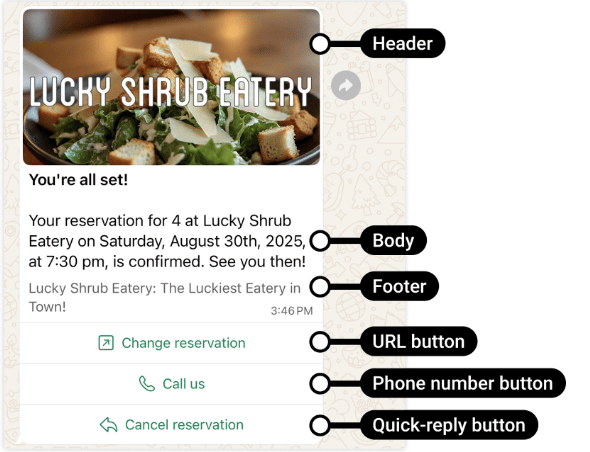
A reservation confirmation illustrates a transaction-specific update without an added promotion.
Choose a template or a service reply
For an event-driven notification outside the customer service window, use an approved template. Within an open window, you may answer with a suitable free-form service message or use a utility template. The distinction matters for both sending eligibility and pricing. Utility templates delivered inside an open service window have a Meta pricing exemption; outside it, the relevant utility rate normally applies. See WhatsApp pricing for the complete rules.Check the message at send time
An approved template does not validate the transaction data you insert. Before sending:- Verify that the event belongs to the intended customer.
- Use current dates, amounts, and statuses.
- Avoid duplicate notifications when the same event is processed again.
- Check consent and communication preferences.
- Do not expose unnecessary sensitive information.
- Handle delivery failures without repeating an obsolete update.