

Check number eligibility
The current YCloud Groups guide requires an Official Business Account and a supported Cloud API number. It excludes Business app numbers and Multi-solution Conversations. Your YCloud account must have access to the number. Group availability remains subject to platform and YCloud eligibility checks; having an API key alone does not make a number eligible. The guide documents small groups of up to eight participants. Check the current guide before designing around group counts, participant limits, or other capacity assumptions.What YCloud supports
The current API supports:- Creating, listing, retrieving, and deleting groups.
- Retrieving and resetting invite links.
- Sending an approved invite-link template to an individual.
- Listing, approving, and rejecting join requests.
- Removing participants.
- Updating the subject and description.
- Receiving group lifecycle, participant, settings, and status events.
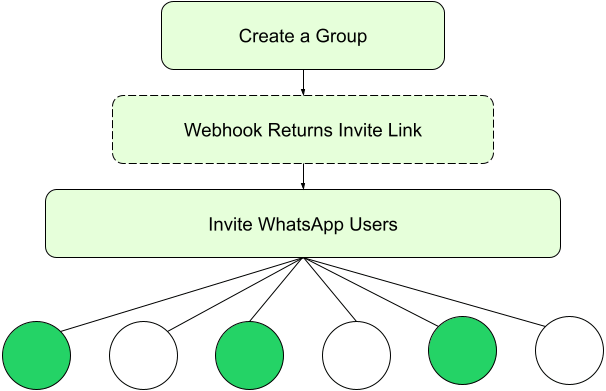
Meta's invitation model: create the group, receive the invite link through the lifecycle webhook, then invite WhatsApp users. This diagram does not imply YCloud outbound group-message support.
Membership is an invitation process
A customer chooses whether to join through the invitation. If approval is required, your business reviews the join request. Do not assume that knowing a person’s phone number authorizes adding them to a group. Explain the group’s purpose and who will participate before sharing the link. Treat invite links as access-sensitive information. Consider whether an unrestricted link can be forwarded beyond the intended audience, and define when to reset it.Wait for the final result
Some management operations complete asynchronously. The immediate response confirms receipt of the request; webhooks report the outcome. Before sending an invitation, confirm that group creation succeeded. After a membership change, confirm the affected participants rather than assuming the whole request succeeded. An inbound group-message event may be received by an integration even though Inbox does not show the conversation. That event does not grant outbound group-message support.A safe first-group workflow
- Confirm the sending number’s OBA status and Groups eligibility.
- Create a group with a clear subject and choose automatic joining or approval-required joining.
- Store the creation request ID. A response with
status: "pending"is not the final group. - Wait for the successful group-creation lifecycle event and store its group ID and invite link.
- Send the approved invite-link template to eligible individual recipients.
- If approval is required, review each join request and approve or reject it.
- Confirm membership from the participant outcome before treating the person as a member.
Identifiers and documented limits
Treat a group ID as an opaque, case-sensitive identifier. Do not normalize or decode it. A creation request ID, group ID, invitation message ID, and join-request ID are different identifiers and are not interchangeable.
Protect membership changes
Resetting an invite link invalidates the previous link. Update any invitations or controlled distribution points that still use it; recipients with the old link may no longer be able to join. Configure a YCloud webhook endpoint for group lifecycle, participant, settings, and status updates. YCloud manages the relevant platform subscription; your application still needs to verify webhook signatures and safely handle duplicate events. Keep an audit record of who requested an action, the affected group, the request ID, and the final outcome. Do not log private invite links in public dashboards.Decide whether to proceed
Use the Groups integration guide if the supported management operations meet your needs. If your core requirement is two-way group messaging in YCloud Inbox or through the Messages API, confirm availability with YCloud before implementation. Do not build a customer commitment around an unsupported capability.Frequently asked questions
The create response says pending. Can I invite people using that ID?
The create response says pending. Can I invite people using that ID?
Wait for the final creation outcome. The request ID is not the group ID or an invite link. Store the successful lifecycle event’s group information, then send the approved invitation to eligible individual recipients.
The invite was delivered. Why is the customer not a member?
The invite was delivered. Why is the customer not a member?
Delivery only confirms the invitation reached the recipient. The customer still needs to open the link and choose to join; approval-required groups also need a successful approval outcome. Check the join request and participant event rather than treating the invitation’s delivery status as membership.
The old invitation link stopped working. Should I create another group?
The old invitation link stopped working. Should I create another group?
First check whether the link was reset. A reset invalidates the previous link, so use the current link and update controlled distribution points. If the link is current, check whether the group is full or the participant was previously removed. Confirm the group and participant outcome before creating a duplicate group. See Meta’s Groups FAQ.
Can agents reply to this group from YCloud Inbox?
Can agents reply to this group from YCloud Inbox?
Not under the current documented YCloud scope. Group conversations do not appear in Inbox, and outbound group messages are not supported by the Messages API. Group-management endpoints and inbound group events do not establish a complete two-way group-chat product.
Why do webhooks still arrive after I delete a group?
Why do webhooks still arrive after I delete a group?
Meta can still deliver messages or status events it received before deletion. Those delayed events do not mean the group was recreated. Keep the group ID and deletion outcome, process historical events safely, and do not restart invitations based only on a late webhook. See Meta’s Groups FAQ.