

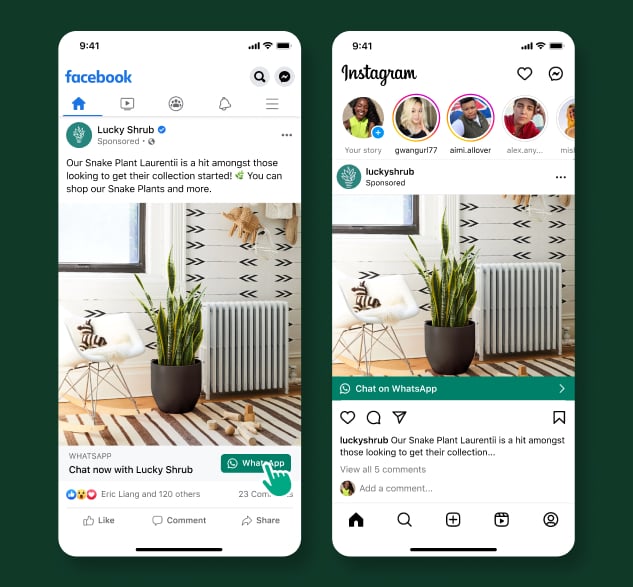
Meta examples of Facebook and Instagram ads with WhatsApp destinations. The customer must still send a message after opening the chat.
Follow the customer journey
- A person sees and clicks the ad.
- WhatsApp opens with the selected business conversation.
- The person sends a message.
- Your team or automation responds.
- You qualify the inquiry and complete the next business action.
Understand the assets
Check asset relationships and operator permissions before launch. Creating an ad account does not create a WhatsApp number or give the operator access to it.
Use the Meta CTWA setup guide for the exact YCloud and Meta connection steps.
Plan the first response
Match the greeting and routing to the ad’s promise. If the ad offers a quotation, ask only for information needed to prepare one. Decide:- Which team receives the inquiry.
- What happens outside business hours.
- When automation hands over to a person.
- How you preserve the customer’s context.
- How you handle an inquiry when no agent is available.
Understand the messaging windows
Once the customer messages you, apply the normal customer service window. A qualifying ad entry point can also create a free-entry-point pricing window when you respond in time. That is a separate pricing rule, not a longer permission to send free-form messages. See WhatsApp pricing for the 72-hour rule, response requirement, and distinction from the service window. Advertising spend remains separate. A website link, QR code, or campaign on another advertising platform should not be assumed to receive the same Meta pricing treatment.Measure beyond clicks
Compare ad clicks, received conversations, qualified leads, and completed outcomes. They answer different questions. Where supported, preserve ad referral context and configure conversion reporting for actual business events. A delivered message is not automatically a conversion. Use CTWA analysis and Meta conversion reporting for YCloud’s reporting workflows.Launch checklist in the order you need it
- Connect the identities. Make sure the Facebook Page is linked to the intended WhatsApp number. For an Instagram identity, check the professional-account and Facebook Page relationship as well.
- Connect reporting access. Use Connect a Facebook ad account to authorize the intended ad account in YCloud.
- Build the ad in Meta Ads Manager. Select WhatsApp as the destination and verify the receiving number. Follow Create a CTWA ad.
- Test the conversation. Send the first customer message and confirm that the right Inbox team or AI Agent receives it.
- Configure outcome reporting. Map actual lead or purchase events using the conversion reporting guide.
Example: find the point of drop-off
Suppose a campaign has 100 ad clicks, 40 received conversations, 10 qualified leads, and 3 purchases. These are illustrative numbers, not performance benchmarks.
Use consistent reporting periods and attribution definitions. Ad-platform figures and conversation logs can differ because of attribution windows, time zones, duplicate contacts, and event timing. Do not “correct” the difference by counting every delivered WhatsApp message as a lead.
Follow up with permission
A response to an ad does not automatically subscribe the customer to unrelated future promotions. Use Customer opt-in to establish the scope of later messaging. For platform behavior, see Meta’s ads that click to WhatsApp documentation.Frequently asked questions
Ads Manager shows clicks, but Inbox has no new conversation. Is the connection broken?
Ads Manager shows clicks, but Inbox has no new conversation. Is the connection broken?
A click opens WhatsApp; the person must still send the message. Test the ad destination, confirm the receiving number, and send an actual test inquiry. If that inquiry is received, investigate click-to-message drop-off rather than expecting one Inbox conversation per click.
Does a WhatsApp QR code on our website receive the same 72-hour benefit?
Does a WhatsApp QR code on our website receive the same 72-hour benefit?
Do not assume it does. The free-entry-point rule applies to qualifying Meta entry points and a timely business response; an ordinary website link or QR code is not automatically equivalent. Both still require the customer to send a message to establish the usual messaging interaction.
Can I count every person who chats from the ad as a qualified lead?
Can I count every person who chats from the ad as a qualified lead?
Only if that matches a deliberate qualification definition—not just because a message arrived. Track received inquiries separately from qualified leads and purchases. Keep reporting periods, attribution windows, and event definitions consistent when comparing YCloud with Ads Manager.