

Etapa 1: Criar um fluxo de Rule-based Agent
Abra o Rule-based Agent e selecione Criar um fluxo.
Open Flows, then select Create a flow. The flows shown in this demo are inactive.
- Adicione um gatilho. Quando a mensagem de um cliente corresponder a ele, o fluxo será iniciado.

Start the flow by selecting Add a trigger.
- Adicione palavras-chave e escolha Correspondência exata ou Contém.

Choose a matching rule and enter a keyword. This form has not been saved.
- Fazer uma pergunta: depois que o usuário acionar este Rule-based Agent, você pode definir nesta seção as perguntas que deseja fazer a ele, além de configurar botões de resposta.
- Enviar mensagem: quando o usuário clica no botão, o Rule-based Agent responde automaticamente com a resposta predefinida.
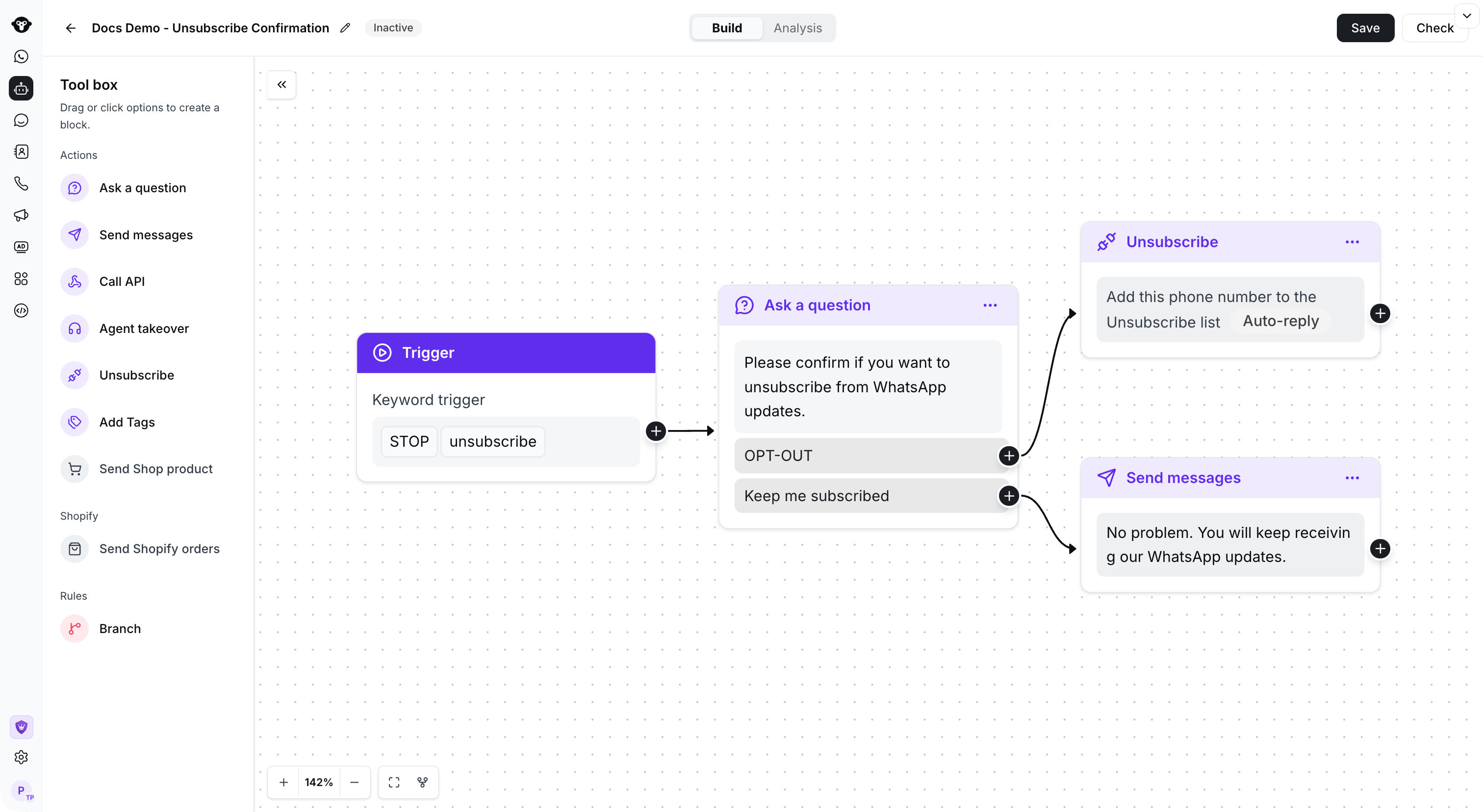
Example: connect a keyword trigger to a confirmation question and route each reply to an action.
Copiar um fluxo
Abra o menu de ações do fluxo que deseja reutilizar e selecione Copiar.
Open the flow action menu and select Copy.

Select the destination agent, then choose Copy.